
SiteGround is one of those hosting names that keeps coming up whenever someone asks for a recommendation in a WordPress forum or a small-business Facebook group. It has built a reputation as a premium managed host that runs on Google Cloud, wraps everything in its own custom control panel, and answers support tickets with actual humans who know what they are talking about. It has also built a reputation for renewal prices that make people wince. Both reputations are earned.
In this review we dig into what SiteGround actually delivers: the infrastructure, the Site Tools panel, the in-house caching and security stack, the full plan lineup from StartUp to Cloud, and the honest trade-offs around storage caps and steep renewals. The goal is to help you decide whether SiteGround is worth its premium for your project, or whether a cheaper host would serve you just as well.
AnalyzeBench Score: 8.6 / 10
Best for: WordPress and WooCommerce site owners, small businesses, agencies, and freelancers who want managed, high-performance hosting with excellent support and are willing to pay a premium for it, provided they plan around the renewal jump.
What we loved:
- Google Cloud infrastructure with genuinely fast, consistent performance and strong uptime.
- In-house Site Tools panel that is cleaner and faster than legacy cPanel.
- Proprietary multi-level caching (SuperCacher) plus the Speed Optimizer plugin for WordPress.
- 24/7 in-house support that is fast, knowledgeable, and not outsourced.
- Free CDN across 170+ locations, free SSL, daily backups with 30-day history, and free WordPress migration on every plan.
- Proactive AI-driven security, DDoS protection, and account isolation baked in.
Watch out for:
- Renewal prices are steep. The low intro rate roughly triples (or more) when your first term ends.
- Storage caps are conservative: 10 GB on StartUp, 50 GB on GrowBig, 100 GB on GoGeek.
- Monthly visit guidance is modest on the entry plan (around 10,000 visits for StartUp).
- No cPanel, which is a learning curve if you are attached to it.
- Cloud plans start at a serious price point and are aimed at larger sites, not hobby projects.
What makes SiteGround different
Plenty of hosts advertise speed and support. What sets SiteGround apart is how much of its stack is built in-house rather than bolted together from off-the-shelf parts. Around 2019 the company replaced cPanel with its own control panel, Site Tools, and moved its infrastructure onto Google Cloud Platform. Those two decisions define the modern SiteGround experience.
Google Cloud gives SiteGround a fast, resilient backbone with data centers across North America, Europe, Asia, and Australia. On top of that foundation, SiteGround layers its own performance and security technology: a custom multi-level caching system, an AI-driven anti-bot and firewall setup, and a Speed Optimizer plugin that squeezes extra performance out of WordPress at the application level. The result is a platform where the caching, staging, security, and CDN are all tightly integrated instead of being third-party add-ons you have to wire together yourself.
The other genuine differentiator is support. SiteGround runs its own in-house support team rather than outsourcing, and that shows up in the quality of answers. Ask about a caching conflict or a broken migration and you tend to get someone who understands WordPress and hosting rather than a script-reader. For non-technical owners, that difference is worth a lot.
The core service
At its heart, SiteGround is a managed shared and cloud host optimized for WordPress and WooCommerce, though it happily runs any PHP, HTML, or JavaScript site and CMS platforms like PrestaShop. “Managed” is the operative word: SiteGround handles server maintenance, security patching, automatic WordPress core updates, and performance tuning so you can focus on your website.
Every plan, even the cheapest, includes a meaningful baseline: auto-renewing free SSL, free daily backups with up to 30 days of restore points, a free CDN across 170+ edge locations, free professional email at your domain, a free domain for the first year, and one free website migration. You also get the Site Tools panel, staging on higher tiers, WP-CLI and SSH access, and SiteGround’s caching stack.
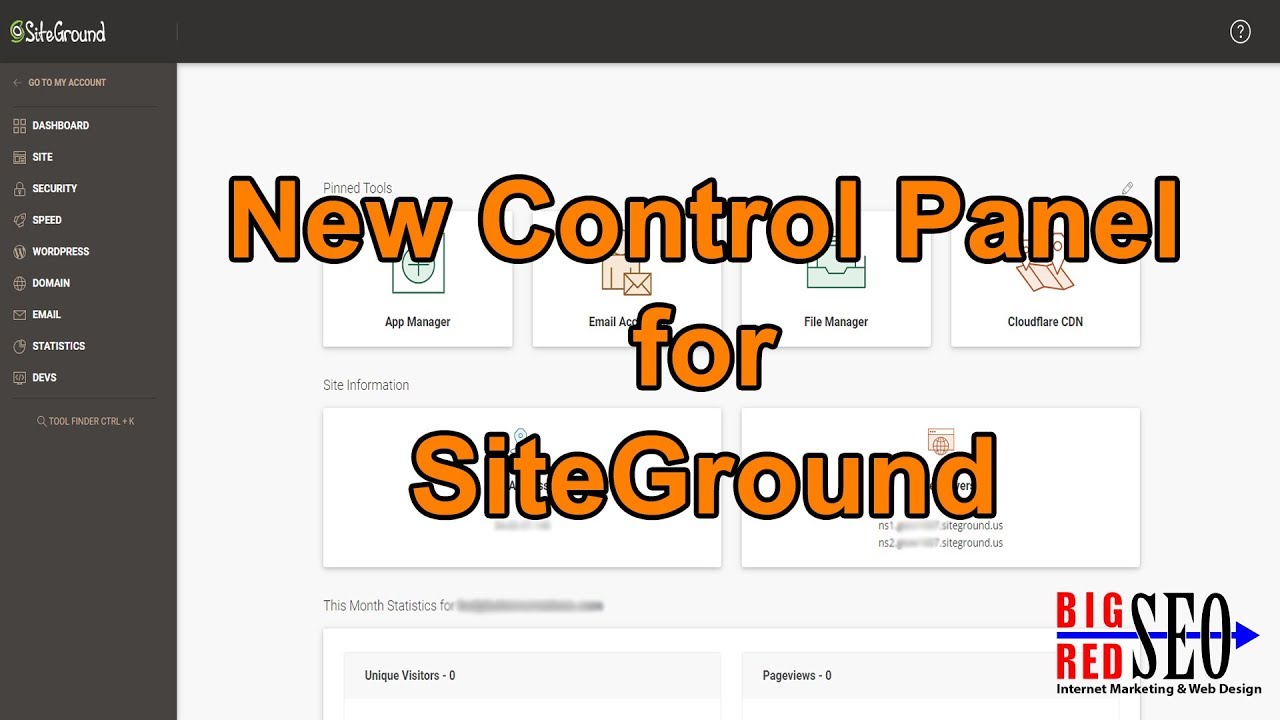
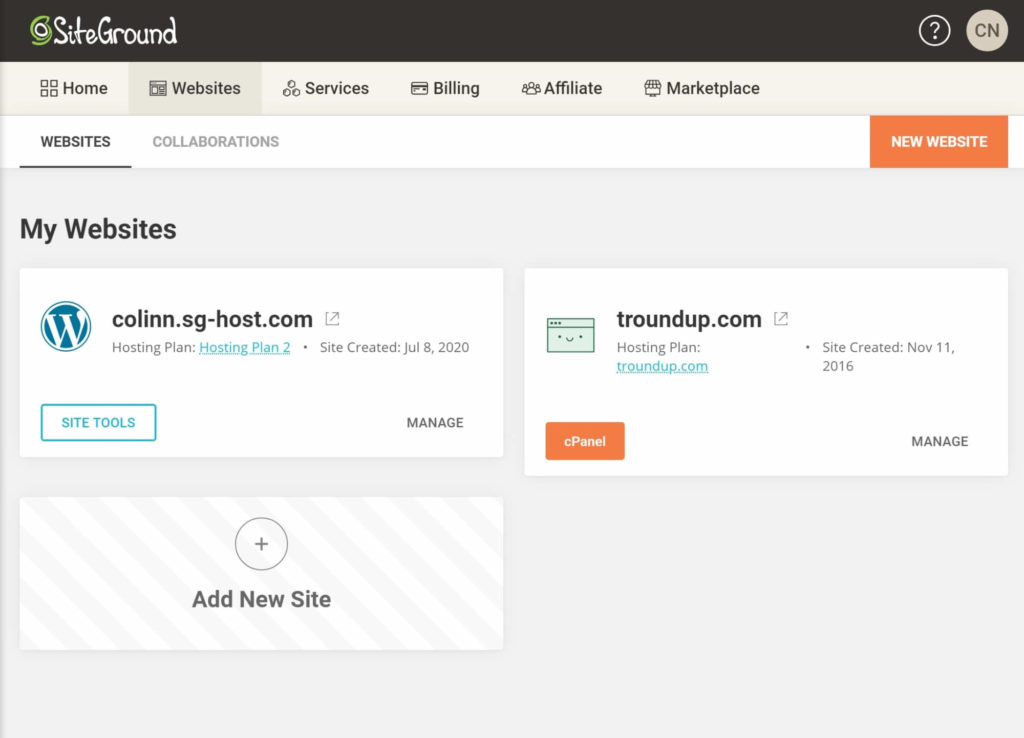
Site Tools itself deserves a mention. It is clean, modern, and noticeably faster than the cPanel interfaces on budget hosts. Common tasks such as installing WordPress, spinning up a staging site, restoring yesterday’s backup, creating email accounts, or enabling the CDN are point-and-click affairs. There is a learning curve if you are a long-time cPanel user, but most people adapt within a session or two and end up preferring it.
Security is proactive rather than reactive. SiteGround isolates each account so a compromise on one site cannot spread to yours, runs an AI-powered anti-bot system that blocks a huge volume of malicious traffic automatically, updates custom firewall rules multiple times a day, and provides DDoS protection and daily malware scanning across the board. For most small and medium sites, this is more security than you would configure yourself.
Hosting plans & pricing
SiteGround’s shared hosting comes in three tiers, plus a separate managed Cloud range for bigger workloads. WordPress and WooCommerce hosting follow the same three-tier structure and pricing as the general shared plans, so a WooCommerce store pays the same as a managed WordPress site at each level. All prices below are the promotional intro rates for the first term, which renew substantially higher, a point we return to in the next section.
StartUp
The entry plan starts around $2.99/month on the intro deal and renews at roughly $17.99/month. It hosts one website with unlimited traffic, includes 10 GB of premium storage, and comfortably handles a small site with modest traffic (SiteGround guides it at around 10,000 monthly visits). You still get the full core feature set: free SSL, CDN, daily backups, free email, managed WordPress updates, and the caching stack. StartUp is a solid choice for a personal site, a portfolio, a small blog, or a brand-new business site, as long as you accept the single-site limit and the conservative storage.
GrowBig
GrowBig is the plan most people should look at, and SiteGround markets it as the best value. It starts around $4.99/month intro and renews near $29.99/month. The jump to unlimited websites is the headline: you can host as many sites as your 50 GB of storage allows. GrowBig also unlocks on-demand backups, a staging environment, and a roughly 30% faster PHP setup, and it is guided at around 100,000 monthly visits. For a growing business, an agency managing a handful of client sites, or anyone who expects to launch more than one project, GrowBig is the sweet spot.
GoGeek
GoGeek is the top shared tier, starting around $7.99/month intro and renewing near $44.99/month. It brings 100 GB of storage, unlimited websites, and the developer- and agency-focused extras: staging with Git integration, private DNS, white-label access for reselling to clients, and priority support that pushes you to the front of the queue. SiteGround guides GoGeek at 400,000+ monthly visits. If you run a busy WooCommerce store, manage many client sites, or want the fastest support response, GoGeek earns its price.
Cloud
When shared hosting is no longer enough, SiteGround’s managed Cloud range takes over. The entry Jump Start plan starts around $100/month with 4 CPU cores, 8 GB of memory, 40 GB of SSD storage, and 5 TB of transfer, scaling up to the Super Power tier at roughly $400/month with 16 CPU cores. Cloud plans add smart autoscaling for traffic spikes, a 99.99% uptime SLA, priority support, white-label access, and full developer tooling (staging, Git, WP-CLI, SSH). It is fully managed, so you get dedicated resources without administering a server, and it is aimed at high-traffic sites, large stores, and agencies, not hobby projects.
How to get the best deal (watch renewals)
Here is the single most important thing to understand before you buy: SiteGround uses a two-stage pricing model. The attractive intro price applies only to your first billing term. When you renew, the rate climbs to the standard price, which is roughly three times the intro figure across the shared plans. StartUp goes from about $2.99 to about $17.99, GrowBig from about $4.99 to about $29.99, and GoGeek from about $7.99 to about $44.99 per month.
This is not a scam, and SiteGround is upfront about it right on the pricing page, but it does mean the “83% off” headline only tells half the story. To get the best real value, use these tactics:
- Lock in the longest intro term you can afford. The promotional rate applies for the entire first term, so paying for a longer initial period stretches the discount over more months before the renewal rate kicks in.
- Budget for the renewal now, not later. Decide whether the standard price is worth it to you before you sign up, so the second-year bill is not a shock.
- Right-size your plan. Do not overpay for GoGeek if GrowBig covers your traffic and storage. You can upgrade instantly as you grow.
- Use the 30-day money-back guarantee. It lets you test real performance with your own site risk-free before committing to a longer relationship.
- Ask support about renewal options. Depending on your account and term length, there may be additional renewal discounts worth a conversation before your first term ends.
Play it right and SiteGround’s first term is genuinely cheap while the renewal stays predictable and planned-for. Play it wrong and you get surprised by a bill that tripled overnight.
Watch: SiteGround in action
If you would rather see the Site Tools panel, the plan differences, and the real-world pros and cons walked through on screen before you decide, this independent review video covers the platform in detail.
SiteGround vs alternatives
SiteGround does not compete on price, so the fair question is what you get for the premium compared with two of the most common alternatives. Hostinger is the budget-performance favorite, and Bluehost is the mainstream, WordPress-recommended incumbent. Here is how they line up on the factors that matter most.
| Factor | SiteGround | Hostinger | Bluehost |
|---|---|---|---|
| Positioning | Premium managed host on Google Cloud | Budget-friendly performance host | Mainstream, WordPress-recommended host |
| Intro pricing | Higher intro, premium tier | Lowest intro prices in the group | Low intro, mid-range |
| Renewal jump | Steep (roughly 3x) | Noticeable but generally milder | Noticeable, similar pattern |
| Control panel | Custom Site Tools (no cPanel) | Custom hPanel (no cPanel) | cPanel-based custom dashboard |
| Performance stack | Google Cloud, SuperCacher, Speed Optimizer | Fast NVMe stack, LiteSpeed caching | Solid, less specialized tuning |
| Support reputation | Excellent, in-house, fast | Good, improving | Mixed, can be inconsistent |
| Best fit | Businesses wanting premium managed WordPress | Budget-conscious builders and startups | Beginners wanting a familiar, official option |
The short version: if raw monthly cost is your top priority, Hostinger usually wins. If you want the official, hand-holding WordPress experience at a moderate price, Bluehost is a safe pick. If you want the best managed performance and support and are willing to pay for it, SiteGround is the strongest of the three.
Uptime, speed & value
Performance is where SiteGround justifies its price. Sitting on Google Cloud, the platform delivers strong, consistent uptime, with SiteGround advertising a 99.9% guarantee on shared plans and a 99.99% SLA on Cloud. In practice, users report reliable uptime with only rare, brief interruptions.
Speed is helped along by the layered caching system. SiteGround’s SuperCacher combines static HTML caching with in-memory object caching, and for WordPress the Speed Optimizer plugin adds application-level improvements such as minification and automatic WebP image conversion. Pair that with the free CDN across 170+ edge locations and a well-built WordPress site tends to load quickly for a global audience without much manual tuning. Many migrating sites report a real speed jump after moving over.
On value, the honest answer depends on how you weigh the intro price against the renewal. During the first term, SiteGround is excellent value for premium infrastructure, integrated caching, strong security, and top-tier support. At renewal the value tightens, and you have to genuinely want the managed experience to justify paying meaningfully more than a budget host would charge. For business-critical sites where downtime and slow support cost real money, that premium is easy to justify. For a hobby blog, it is a harder sell.
Who should use it — and who should not
SiteGround is a strong fit if you are a small business, freelancer, or agency running WordPress or WooCommerce and you value performance, security, and support over rock-bottom price. It is ideal for anyone who does not want to manage server details, wants proactive security handled for them, and appreciates being able to reach a knowledgeable human 24/7. Agencies in particular benefit from staging, Git, white-label access, and the ability to manage multiple isolated sites cleanly from Site Tools.
It is a weaker fit if your primary concern is the lowest possible cost, especially past the first term. If you are hosting a simple hobby project, running many large-media sites that will bump against the storage caps, or you specifically need cPanel and refuse to switch, you will likely be happier and cheaper elsewhere. High-storage or very high-traffic projects may also find the shared caps limiting and need to jump to Cloud sooner than expected, which changes the cost equation considerably.
Honest limits
No host is perfect, and SiteGround’s weak spots are well known. The renewal pricing is the big one: the intro-to-renewal gap is one of the steepest in the mainstream market, and anyone who does not plan for it feels stung. Storage caps are the second: 10 GB, 50 GB, and 100 GB are reasonable for typical text-and-image sites but tight for media-heavy projects, and SiteGround does not compete on the “unlimited storage” marketing that some budget hosts lean on.
Traffic guidance on the entry plan is modest, so a StartUp site that unexpectedly goes viral can hit resource limits and need an upgrade. The absence of cPanel, while arguably an improvement, is a friction point for anyone with cPanel muscle memory. And the Cloud range, while excellent, is not a casual step up in price. None of these are dealbreakers for the right user, but they are the trade-offs you accept for the quality of the rest of the platform.
SiteGround discount codes & deals
SiteGround runs its promotional intro pricing more or less continuously, so you rarely need to hunt for a separate coupon code. The real discount is the advertised intro rate itself, which knocks the first term down dramatically before the standard renewal price applies. The best move is to start on the current promotional deal, choose the longest first term you are comfortable with to maximize the discount window, and use the 30-day money-back guarantee to test the platform with your own site risk-free.
Because the intro pricing and any seasonal promotions change over time, the most reliable way to see the current live offer, the exact plan prices, and whatever the best available deal is right now is to check directly through the link below.
Check the latest SiteGround deals
Frequently asked questions
Is SiteGround worth the price?
For business-critical WordPress and WooCommerce sites, yes. The Google Cloud performance, integrated caching, proactive security, and genuinely excellent in-house support justify the premium when downtime and slow help would cost you money. For a simple hobby site on a tight budget, a cheaper host may serve you just as well.
Why is SiteGround’s renewal price so much higher?
SiteGround uses a two-stage pricing model where the low promotional rate applies only to your first term and then rises to the standard price, roughly three times the intro figure. It is disclosed upfront on the pricing page. The best defense is to lock in a longer first term and budget for the renewal in advance.
Does SiteGround use cPanel?
No. SiteGround replaced cPanel with its own Site Tools panel several years ago. Site Tools is cleaner and faster than cPanel, but it has a short learning curve if you are used to the classic interface, and it is not available as an option to switch back.
Is SiteGround good for WordPress and WooCommerce?
Yes, it is one of the better managed options for both. You get automatic WordPress updates, one-click installs, staging, the Speed Optimizer plugin, WooCommerce-friendly caching, and free migration. WooCommerce hosting is priced the same as managed WordPress at each tier.
How much traffic can SiteGround handle?
SiteGround guides its shared plans at roughly 10,000 monthly visits for StartUp, around 100,000 for GrowBig, and 400,000+ for GoGeek. For higher volumes you move to the Cloud range, which adds dedicated resources and autoscaling.
Does SiteGround include backups and SSL?
Yes. Every plan includes free auto-renewing SSL certificates and free automatic daily backups with up to 30 days of restore points, plus a free CDN and free professional email. These come standard even on the entry StartUp plan.
Can I migrate my existing site to SiteGround for free?
Yes. Your first migration is free. WordPress users can use the free SiteGround Migrator plugin for a self-service transfer, or you can request a professional migration handled by SiteGround’s team. Your site stays live during the process.
How to choose a web host: a quick buyer’s guide
Whether or not SiteGround turns out to be your pick, the same framework helps you evaluate any host. Weigh these factors against your specific project.
- Real cost over two years, not just the intro price. Look up the renewal rate and calculate what you will actually pay in year two. A cheap first year means little if the renewal doubles or triples.
- Performance and uptime. Look for modern infrastructure (cloud or NVMe), built-in caching, a CDN, and a concrete uptime guarantee. Speed affects user experience and SEO.
- Support quality and availability. In-house, 24/7 support that understands your platform is worth paying for, especially if you are not technical.
- Storage and traffic limits. Match the caps to your real needs. Media-heavy or high-traffic sites need headroom that entry plans may not provide.
- Managed features. Automatic updates, staging, daily backups, free SSL, and one-click tools save time and reduce risk if you would rather not manage a server.
- Security posture. Account isolation, a firewall, DDoS protection, and malware scanning should be included, not sold as expensive add-ons.
Rank those factors by what matters most for your project, then shortlist two or three hosts and test them with the money-back window. If premium managed performance and support sit at the top of your list, SiteGround belongs on that shortlist.