Bluehost is one of those hosting names you cannot avoid the moment you start researching how to build a WordPress site. It sits near the top of nearly every “best web host” list, it has been formally suggested on the WordPress.org hosting page for two decades, and its cartoon-friendly onboarding has walked millions of first-time website owners through their very first install. That popularity is precisely why it deserves a careful, honest look rather than the usual affiliate cheerleading.
Owned by Newfold Digital (the same parent company behind HostGator), Bluehost aims squarely at beginners, bloggers, and small businesses who want a guided path into WordPress without touching a command line. In this review we walk through what Bluehost offers, what the plans really cost once the introductory pricing expires, where it shines, and where it frustrates people. We kept it balanced: real pros, real cons, no fake countdown timers.
If you already know you want it, you can check current Bluehost deals and skip ahead. Otherwise, read on.
AnalyzeBench Score: 8.2 / 10
Best for: Beginners and small-business owners who want the most hand-held, WordPress-friendly hosting experience and are comfortable paying a bit more at renewal for that simplicity.
What we loved:
- Official WordPress.org recommendation dating back to 2005 — the longest-standing name on that list.
- Genuinely beginner-friendly setup, with one of the most guided onboarding flows in shared hosting.
- Free domain for the first year plus a free SSL certificate on all plans.
- 24/7 live chat and phone support that is always reachable.
- A generous 30-day money-back guarantee that lets you test risk-free.
- A full ladder of plans — shared, cloud, VPS, dedicated, and managed WordPress/WooCommerce — so you can grow without switching hosts.
Watch out for:
- Renewal pricing jumps sharply after the intro term — often two to three times the promotional rate.
- The checkout page pre-selects paid add-ons that quietly inflate your total if you do not untick them.
- The cheapest promo prices usually require committing to a 36-month term up front.
- Raw speed is solid but not class-leading; premium managed hosts are noticeably faster.
- Support quality can be inconsistent during busy periods.
What makes Bluehost different
The single biggest thing that sets Bluehost apart is its relationship with WordPress itself. Bluehost has appeared on the official WordPress.org list of recommended hosts since 2005, making it the longest-running name there. As of this writing it is one of only a small handful of companies WordPress.org names alongside providers like Hostinger and Pressable. That endorsement is a real signal — WordPress does not hand it out casually — though it is fair to note the arrangement is also a commercial partnership, not a purely neutral technical award. Treat it as meaningful but not gospel.
Beyond the badge, Bluehost’s identity is built around removing friction for beginners. When you sign up, it does not drop you into a bare control panel and wish you luck. Instead it walks you through picking or migrating a WordPress site, choosing a theme, and getting the basics configured, all through a guided wizard. For someone who has never touched hosting before, that difference is enormous. Many competitors assume a baseline of technical comfort that Bluehost simply does not require.
The trade-off is that this beginner focus comes bundled with an aggressive commercial layer: checkout upsells, prominent promo pricing, and renewal rates much higher than the headline number. None of that is unusual for shared hosting, but Bluehost leans into it more than some rivals. Knowing this going in is the key to good value, which is why we cover it below.
The core service
At its heart, Bluehost is a managed and shared web host optimized for WordPress. Every plan includes a free SSL certificate, a custom control panel layered on top of the familiar cPanel-style tools, automatic WordPress installation, and a free domain name for the first year. You also get email hosting, one-click staging on higher tiers, automated daily or scheduled backups depending on plan, and a content delivery network to help with global load times.
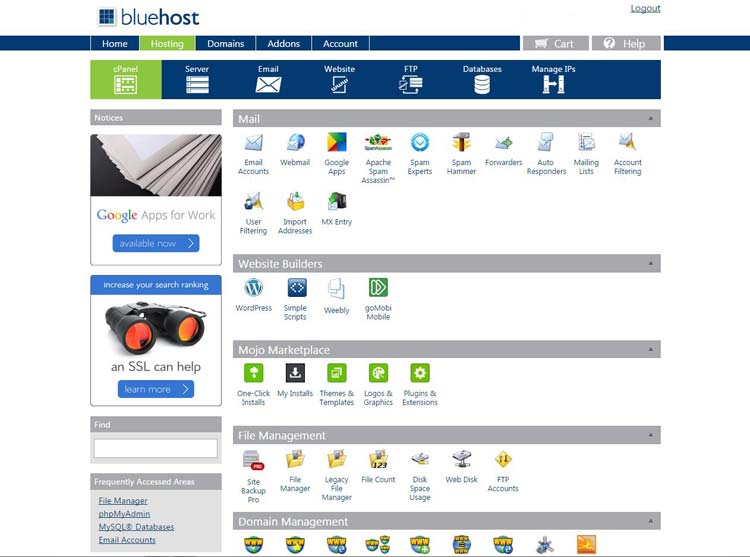
The dashboard is where Bluehost’s beginner-first philosophy shows. Rather than throwing dozens of icons at you, it surfaces the handful of things a new site owner needs: create a site, manage a domain, check email, view performance. WordPress-specific features like staging, one-click plugin and theme management, and automatic core updates are woven into the interface, so you rarely leave the Bluehost panel to run a WordPress site.
Security is handled with free SSL across the board, malware scanning on appropriate tiers, and optional add-ons like CodeGuard backups and domain privacy. Some extras are genuinely useful; others are the same pre-ticked upsells we keep warning about. The core hosting stack is capable and well-suited to the small-to-medium WordPress sites that make up most of Bluehost’s customer base. If that describes you, Bluehost’s current plans are worth a look.

Hosting plans & pricing
Bluehost offers a full ladder of hosting types, so most users can start small and move up without changing providers. Prices below reflect the general structure at the time of writing; always confirm the live figure on Bluehost’s site before you buy, because promotions shift and the exact number depends on the term length you choose. The headline pattern to remember: introductory rates are low, and renewal rates are meaningfully higher.
Shared hosting
This is the entry point and where most first-time site owners begin. Shared plans run across several tiers, from a basic single-site Starter plan up to plans that allow unlimited websites, more storage, and extra performance features. Introductory pricing is aggressive — often in the low single digits per month — but that rate typically requires a 36-month commitment, and it climbs substantially at renewal. Shared hosting is ideal for blogs, portfolios, and small business sites that are not yet pushing heavy traffic.
Managed WordPress hosting
For those who want WordPress handled for them — automatic updates, tuned performance, staging, and WordPress-specific support — Bluehost’s managed WordPress plans add a layer of convenience on top of the shared foundation. This is a sensible middle ground for people who take their WordPress site seriously but do not want to become server administrators.
WooCommerce hosting
Aimed at online stores, the WooCommerce plans bundle the ecommerce plugin plus store-oriented features like inventory management, gift cards, and shipping-label printing. These tiers are priced above standard shared hosting and are designed to support stores handling meaningful monthly visitor volumes. If you are launching a shop rather than a blog, this is the tier to compare.
Cloud hosting
Bluehost’s cloud offering targets sites that have outgrown shared resources and want better reliability, with an emphasis on high uptime and stronger performance. Cloud plans sit at a notably higher monthly price than shared hosting, reflecting the additional resources and resilience on offer.
VPS hosting
Virtual private server plans give you isolated, dedicated resources — guaranteed RAM, CPU allocation, and room to scale — for sites that have pushed past what shared hosting comfortably handles. VPS pricing is well above shared hosting because you are paying for isolation and predictable performance rather than a shared pool.
Dedicated hosting
At the top of the ladder, dedicated servers give you an entire physical machine. This is for large, high-traffic, or resource-hungry sites that need maximum control and performance. It is the most expensive option by a wide margin and is overkill for the average user, but it means you never have to leave the Bluehost ecosystem as you grow.
How to get the best deal (watch renewals)
This is the most important section of the review, so read it before you check out. Bluehost’s advertised prices are genuine, but they are introductory rates available to new customers for the initial term only. When that term ends, the plan renews automatically at the regular rate, which is often two to three times the promotional price. This is standard practice across the shared-hosting industry, but the size of the jump surprises people who did not read the fine print.
A few practical tips to get the most out of a Bluehost purchase:
- Understand the renewal math. A promo price that looks cheaper than a rival may cost more over three years once renewal kicks in. Calculate the full multi-year total, not just the first year.
- Choose your term deliberately. The lowest monthly promo rate usually requires a 36-month prepayment. That locks in the low rate for longer, but it is a larger upfront commitment. A 12-month term costs a bit more per month but ties up less cash.
- Untick the add-ons at checkout. Bluehost pre-selects extras like site backups, domain privacy, and security tools. Some are worthwhile, but they are opt-out, not opt-in. Review each line before paying.
- Use the money-back guarantee. The 30-day window is real. If the service does not suit you, you can request a refund on the hosting portion within that period.
- Consider paying annually and renewing manually. Some users prefer shorter terms so they can reassess — and potentially negotiate or switch — rather than auto-renewing at full price for three years.
Handled thoughtfully, Bluehost can be very good value, especially for a first site. The people who feel burned are almost always the ones who did not realize the renewal rate was coming. You can see the latest Bluehost pricing and read the term details directly before committing.
Watch: Bluehost in action
If you would rather see the signup and dashboard experience before reading further, this hands-on review walks through what actually using Bluehost feels like, including an honest take on the pricing and the upsells.
Bluehost vs alternatives
No host is right for everyone. Here is how Bluehost stacks up against two of the most common alternatives people weigh it against: Hostinger, the budget champion, and SiteGround, the performance-and-support favorite.
| Feature | Bluehost | Hostinger | SiteGround |
|---|---|---|---|
| Best for | Beginners wanting guided WordPress setup | Lowest long-term price | Speed and premium support |
| WordPress.org recommended | Yes (since 2005) | Yes | Formerly listed |
| Intro pricing | Low, term-dependent | Lowest of the three | Higher |
| Renewal pricing | Jumps significantly | Also jumps, but lower base | Jumps the most |
| Raw speed | Solid | Solid to strong | Class-leading |
| Support reputation | Good, occasionally inconsistent | Good | Excellent |
| Free domain (year 1) | Yes | On longer terms | No |
The short version: Hostinger tends to win on pure long-term cost, SiteGround tends to win on speed and support polish, and Bluehost wins on the beginner experience and the depth of its WordPress integration. If you value being guided through your first site over squeezing out the last dollar or millisecond, Bluehost is a strong pick.
Uptime, speed & value
Bluehost advertises a 99.99% uptime target, and independent testing generally backs that up, with reviewers reporting uptime in the high 99.9% range and only brief, infrequent outages. For a shared host, that is dependable and well within the range you would expect for typical small-business and blog workloads.
Speed is the more nuanced story. In testing, Bluehost consistently loads well-optimized sample sites quickly and handles moderate traffic spikes without collapsing. Measured time-to-first-byte and page load times are perfectly adequate for small to medium sites, but they trail the fastest premium managed hosts. In plain terms: your visitors will not sit around waiting, but if raw speed is your single top priority, a specialized managed host will edge Bluehost out.
On value, the honest answer depends on the renewal math. During the introductory term, Bluehost is genuinely affordable, especially with the free domain and SSL included. Over multiple years at renewal rates it moves into mid-market territory — you are paying for ease of use and WordPress integration, not rock-bottom pricing.
Who should use it — and who should not
Bluehost is a great fit if you are: a first-time website owner who wants the most hand-held path to a live WordPress site; a small business or blogger who values simplicity and 24/7 support over squeezing out maximum performance; or someone who wants a single provider they can grow with, from a shared plan up to VPS or dedicated over time. The guided setup alone saves beginners hours of frustration.
Bluehost is probably not for you if you are: a performance-obsessed developer who needs the fastest possible load times and is willing to manage more of the stack yourself; a bargain hunter focused purely on the lowest three-year cost, where a rival like Hostinger often wins; or an experienced sysadmin who finds the guided, upsell-heavy interface more of an obstacle than a help. Power users sometimes feel boxed in by the beginner-oriented panel.
Honest limits
To keep this balanced, here are the caveats we would want a friend to know. First, renewal pricing is the number one source of buyer’s remorse; the headline rate is not what you pay long term. Second, the checkout flow pre-checks paid add-ons, so an inattentive buyer can pay more than intended. Third, Bluehost was historically known for migration fees and for support that varies with queue volume; onboarding and migration tools have improved over time, but support consistency remains a fair concern at this scale. Finally, being part of a large conglomerate means Bluehost optimizes for the mainstream beginner, which is why advanced users sometimes feel constrained. None are dealbreakers for the target audience, but they are real.
Bluehost discount codes & deals
Bluehost runs promotional pricing more or less continuously, so there is rarely a need to hunt for a separate coupon code — the introductory discount is usually baked into the signup price you see. The best “deal” is simply choosing the right term for your situation and remembering to untick the add-ons you do not need at checkout. To see the current live offer, including whatever promotional rate and free-domain deal is active right now, use the link below.
Check the latest Bluehost deals and pricing here.
Because Bluehost includes a 30-day money-back guarantee, you can sign up, build your site, and test the service with very little risk. If it is not the right fit, request a refund within that window — a fair way to try before you commit.
Frequently asked questions
Is Bluehost really recommended by WordPress?
Yes. Bluehost has been on the official WordPress.org list of recommended hosts since 2005 and is the longest-standing name there. It is worth understanding that this is both a technical endorsement and a commercial partnership, so treat it as a strong positive signal rather than an absolute guarantee that it is the single best host for your specific needs.
Why is the renewal price so much higher than the intro price?
The advertised low price is an introductory rate for new customers, valid for the initial term only. When that term ends, the plan renews automatically at Bluehost’s standard rate, which is often two to three times the promo price. This is common across the shared-hosting industry; the key is to calculate your true multi-year cost before signing up.
Does Bluehost include a free domain?
Yes, most Bluehost plans include a free domain name for the first year, along with a free SSL certificate. After the first year the domain renews at its standard registration rate, so factor that into your ongoing costs.
Is Bluehost good for beginners?
This is arguably Bluehost’s strongest selling point. Its guided onboarding walks you through creating or migrating a WordPress site, choosing a theme, and configuring the basics, all without touching a command line. If you have never built a website before, this hand-held experience is one of the best in the industry.
Can I get a refund if I do not like it?
Yes. Bluehost offers a 30-day money-back guarantee on hosting. If you cancel within that window you can get a refund on the hosting portion of your purchase. Note that domain registration fees are typically non-refundable once the domain is registered.
Is Bluehost fast enough for my site?
For blogs, small business sites, and most WordPress projects, yes — Bluehost delivers dependable uptime and load times that keep visitors happy. For large or performance-critical sites, consider a premium managed host or Bluehost’s higher tiers like VPS, cloud, or dedicated.
How to choose a web host (a quick education)
If you are new to all this, here is a compact framework for choosing any web host. Use it to sanity-check whether Bluehost or a rival is right for you.
- Match the host to your project. A personal blog, a business site, and a busy online store have very different needs. Do not overpay for VPS or dedicated resources you will not use, and do not cram a high-traffic store onto an entry-level shared plan.
- Read the renewal price, not just the intro price. This is the single most common trap. Always calculate the total cost over the full period you expect to stay, using the renewal rate.
- Check uptime and speed reputation. Look for hosts with a solid uptime guarantee (99.9% or better) and independent speed testing, rather than relying only on marketing claims.
- Value real support. When your site goes down, responsive 24/7 support matters more than almost anything else. Beginners in particular should weight this heavily.
- Look for a money-back guarantee. A genuine refund window lets you test the service in practice with little risk, which is far more reliable than any review, including this one.
- Plan for growth. Choose a provider whose plan ladder lets you scale up without migrating to a whole new host later.
Measured against that checklist, Bluehost scores well on beginner-friendliness, support availability, WordPress integration, and its growth path, while asking you to stay alert on renewal pricing and checkout upsells. For a huge share of first-time site owners, that is a very reasonable trade. If it sounds like the right fit, you can check current Bluehost deals and get started with the 30-day guarantee behind you.