
Picking a web host usually comes down to a familiar trade-off: speed, price, or peace of mind, and rarely all three at once. GreenGeeks adds a fourth consideration to the mix that most hosts never mention: the environmental cost of keeping your site online. Data centers are power-hungry places, and GreenGeeks has built its entire identity around offsetting that footprint while still trying to compete on the fundamentals that actually matter to site owners.
The question we set out to answer is a practical one. Is GreenGeeks a genuinely good host that happens to be green, or is the eco-friendly angle a feel-good sticker slapped onto an average product? In this review we dig into the plans, the real-world pricing (including the renewal jump that trips up a lot of buyers), the underlying technology, support quality, and who this host is actually right for. As always, we cover the good and the bad, because a review that only lists positives is an advertisement, not a review.
AnalyzeBench Score: 8.3 / 10
Best for: Bloggers, small businesses, agencies, and WordPress users who want fast, reliable shared hosting and care about sustainability, as long as they go in with clear eyes about renewal pricing.
What we loved:
- 300% renewable energy matching, a tree planted per account, and EPA Green Power Partner recognition make this the most credible eco-friendly host we have tested.
- LiteSpeed web servers with LSCache deliver genuinely fast page loads on shared plans.
- Free CDN, free SSL, free nightly backups, and free website migration are bundled in on every plan.
- Responsive 24/7 live chat support that answered our questions quickly and competently.
- An unconditional 30-day money-back guarantee that lowers the risk of trying it.
Watch out for:
- Renewal rates climb sharply, roughly to four times the introductory price, once your first term ends.
- Data centers are limited to North America and Europe (plus Asia), so latency can suffer for audiences elsewhere.
- The cheapest Lite plan is capped to a single website and modest storage.
What makes GreenGeeks different
Almost every host promises speed, uptime, and support. GreenGeeks makes those same promises, but its differentiator is sustainability, and unlike a lot of “green” marketing this one has real substance behind it. The company matches the energy its servers and workstations consume with three times that amount of renewable energy, purchased through the Bonneville Environmental Foundation. In plain terms, for every unit of power the operation draws, GreenGeeks puts three units of wind-generated energy back into the grid. That 300% figure is the headline claim, and it is what earns the “carbon-reducing” label the company leans on so heavily.
The commitment does not stop at energy credits. GreenGeeks partners with One Tree Planted to plant a tree for every hosting account provisioned, and it has been recognized as a Green Power Partner by the United States Environmental Protection Agency since 2009. That is a long track record for a mission that plenty of competitors treat as a passing marketing trend. If reducing the environmental impact of your website genuinely matters to you, or to your clients, this is the most legitimate option in the mainstream hosting market.
The important nuance is that going green here does not mean settling for worse hosting. GreenGeeks runs the same category of modern infrastructure, LiteSpeed servers, SSD storage, and container-based account isolation, that you would expect from a performance-focused host. The eco angle is a bonus layered on top of a competent product, not a compromise you accept in place of one.
The core service
At its heart, GreenGeeks is a cPanel-based host built around the LiteSpeed web server. LiteSpeed is a meaningful choice: it handles high-traffic conditions far more gracefully than traditional Apache setups, and paired with the LSCache caching plugin it can dramatically speed up dynamic sites, WordPress in particular. This is one of the reasons GreenGeeks punches above its weight on performance despite sitting in the budget-to-midrange price bracket.
Every account runs inside a container-based isolation model, which keeps your resources walled off from neighboring accounts on the same server. That improves both security and stability, since a spike or a problem on someone else’s site is less likely to spill over onto yours. Storage is on SSD arrays throughout, which keeps read and write speeds quick.
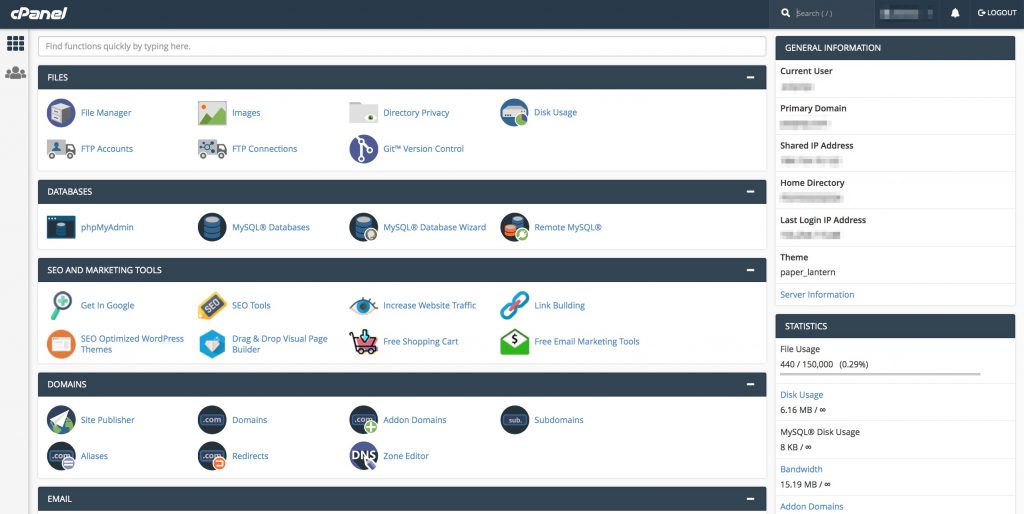
The bundled extras are where GreenGeeks quietly stacks up value. On every plan you get a free Wildcard SSL certificate, a free content delivery network (CDN) to speed up delivery to distant visitors, free nightly backups, staging environments for testing changes safely, and free website migration if you are moving in from another host. cPanel handles account management, so anyone who has used mainstream shared hosting before will feel immediately at home. For newcomers, one-click installers make getting WordPress or another CMS running a matter of minutes.
Hosting plans & pricing
GreenGeeks organizes its shared hosting into three tiers, and it also offers reseller and VPS hosting for people who have outgrown a basic plan. Below is how the lineup breaks down. Introductory prices assume you commit to a longer term up front; month-to-month billing costs more.
Lite
The entry plan starts around $2.95 per month on an introductory term. It is built for a single website, includes roughly 25 GB of SSD storage, unlimited data transfer, unlimited email accounts, a free domain for the first year, and all the standard freebies (SSL, CDN, nightly backups). For a personal blog, a portfolio, or a small brochure site, Lite is genuinely enough. The main limitation is the one-website cap.
Pro
The middle tier starts around $4.95 per month introductory and is the plan most people should actually look at. It removes the single-site restriction so you can host unlimited websites, bumps storage to roughly 50 GB, and adds performance improvements plus on-demand backups on top of the automatic nightly ones. If you run more than one project or expect any real traffic, the jump from Lite to Pro is worth it.
Premium
The top shared tier starts around $8.95 per month introductory. It layers on a dedicated IP address, an enhanced (premium) SSL, the highest performance settings GreenGeeks offers on shared hosting, and priority handling. This is aimed at busier sites and small online stores that want a little more headroom and a few extras without moving up to a VPS.
Reseller and VPS
Beyond shared hosting, reseller plans start around $19.95 per month and let agencies or freelancers manage multiple client accounts under one roof. VPS hosting, aimed at applications and sites that need dedicated resources, starts higher, around the $69.95 per month mark for the managed offering, and scales up with more RAM and CPU. There is no self-service cloud hosting tier at the moment, which is one gap in the range.
How to get the best deal (watch renewals)
Here is the single most important thing to understand before you buy, and it is the thing GreenGeeks is least eager to highlight. The attractive prices above are introductory rates. When your initial term ends, the plan renews at the standard rate, which is substantially higher, in the region of four times the promotional price. A plan you signed up for at a few dollars a month can renew in the teens or higher per month, and the top tiers renew higher still.
This is not unique to GreenGeeks; the entire budget shared-hosting industry runs on the same intro-then-renewal model. But it does mean the smart way to buy is to lock in the longest term you are comfortable with up front. Signing up for a two or three year term holds the low introductory rate across that whole window, which is where the real savings live. A one-month or one-year commitment means you hit the renewal cliff much sooner.
Two practical tips. First, do the math on total cost of ownership across your whole intended term, not just the first month, so the renewal is never a surprise. Second, take advantage of the 30-day money-back guarantee to actually test the service on real workloads before you are committed. If you plan ahead, GreenGeeks is very competitively priced; if you drift into renewal without thinking about it, it stops being a bargain.
Watch: GreenGeeks in action
If you would rather see the dashboard, the signup flow, and the day-to-day experience before reading further, this hands-on video walkthrough covers the features and what you actually get with a GreenGeeks account.
GreenGeeks vs alternatives
GreenGeeks does not exist in a vacuum. Two of the names people most often weigh it against are Hostinger, the aggressive budget option, and SiteGround, the premium performance-and-support choice. Here is how they compare on the points that matter most.
| Feature | GreenGeeks | Hostinger | SiteGround |
|---|---|---|---|
| Intro shared price | From ~$2.95/mo | Lowest of the three | Highest of the three |
| Renewal jump | Large (~4x) | Large | Large |
| Web server | LiteSpeed + LSCache | LiteSpeed | Nginx + custom caching |
| Eco commitment | 300% renewable, trees planted | Some renewable initiatives | Carbon-aware infrastructure |
| Control panel | cPanel | Custom hPanel | Custom Site Tools |
| Data center reach | US, Canada, EU, Asia | Broad global network | Broad global network |
| Best known for | Green hosting done credibly | Rock-bottom pricing | Support and performance |
The short version: Hostinger tends to be cheaper and has a wider server map, SiteGround tends to lead on polish and support but costs more, and GreenGeeks sits comfortably in between while being the only one of the three whose sustainability story is a genuine reason to choose it rather than a footnote. If the environment is part of your decision, GreenGeeks wins that column outright.
Uptime, speed & value
GreenGeeks advertises a 99.9% uptime commitment, and in practice independent testing generally shows it meeting or exceeding that target, which translates to a stable, dependably reachable site. Downtime is the metric that quietly costs you visitors and trust, so consistency here matters more than a flashy headline number.
On speed, the LiteSpeed-plus-LSCache combination does real work. Cached pages serve fast, the SSD storage keeps things snappy, and the free CDN helps shorten the distance between your server and visitors who are geographically far away. For the vast majority of blogs, business sites, and small stores, GreenGeeks feels quick without any tuning required. Where you may notice a ceiling is with very heavy, uncached, dynamic workloads on the entry plan, which is exactly the point at which moving up to Pro, Premium, or eventually a VPS makes sense.
On value, the verdict depends entirely on how you buy. At introductory pricing across a multi-year term, GreenGeeks offers strong performance and a generous bundle of free features for the money. Judged on renewal pricing alone, it is merely average for the category. The technology and the freebies are the same either way, so the value equation lives and dies on locking in the right term.
Who should use it — and who should not
GreenGeeks is a strong fit if you are a blogger, a small-business owner, a freelancer, or an agency running WordPress or another mainstream CMS, you want fast and reliable shared hosting without managing a server, and sustainability is something you or your clients actually care about. The cPanel environment, one-click installers, free migration, and 24/7 support make it especially friendly for people who do not want to become sysadmins. Agencies in particular benefit from the reseller tier and the eco-credentials they can pass along to environmentally conscious clients.
It is a weaker fit if the bulk of your audience lives in South America, Africa, the Middle East, or Oceania, where the lack of a nearby data center can add latency. It is also not the natural choice if you want the absolute rock-bottom price regardless of everything else (Hostinger typically undercuts it), if you need self-service cloud hosting, or if you are a large enterprise with demands that outstrip shared and entry VPS hosting. And if you refuse to commit beyond a short term, the fast-arriving renewal rate makes the economics much less attractive.
Honest limits
No host is perfect, and a fair review names the rough edges. The renewal pricing is the big one: the gap between the intro rate and the standard rate is steep, and anyone who signs up expecting the promotional price to last forever will feel stung. It is disclosed, but it is not exactly shouted from the rooftops.
The second real limitation is geographic. Data centers concentrated in North America, Europe, and Asia are great for those regions but leave visitors on other continents further from your server. A CDN mitigates static content delivery, but it is not a full substitute for a nearby data center on dynamic requests.
Smaller caveats round things out. The cheapest Lite plan’s single-website cap and modest storage push a lot of buyers up to Pro fairly quickly. There is no dedicated cloud hosting product. And while support is good, phone availability is limited to set hours rather than being round-the-clock like the live chat. None of these are dealbreakers for the target audience, but they are worth knowing before you buy rather than after.
GreenGeeks discount codes & deals
GreenGeeks runs its best pricing directly through promotional signup links rather than scattered coupon codes, so the reliable way to get the lowest rate is to start from a current deal page and choose the longest term you are comfortable committing to. That combination, the promotional rate applied across a multi-year term, is where the meaningful savings sit, and it shields you from the renewal jump for as long as possible.
Remember that the 30-day money-back guarantee is unconditional, so you can sign up, migrate a site, and put the performance and support through their paces with essentially no risk. If it is not for you, you get your money back; if it is, you have already locked in the low rate. You can review the latest plans and current promotional pricing here.
Frequently asked questions
Is GreenGeeks actually eco-friendly or is it just marketing?
It is substantive. GreenGeeks matches its energy usage with 300% renewable energy through the Bonneville Environmental Foundation, plants a tree per account via One Tree Planted, and has been an EPA-recognized Green Power Partner since 2009. That is a far more credible sustainability record than the vague “green” claims some hosts make.
Why is the renewal price so much higher than the signup price?
The advertised low price is an introductory rate tied to your initial term. When that term ends, the plan renews at the standard rate, roughly four times higher. This is standard practice across budget shared hosting. The way to minimize the impact is to sign up for the longest term you can, which holds the intro rate longer.
Is GreenGeeks good for WordPress?
Yes. The LiteSpeed servers with LSCache are especially effective at speeding up WordPress, and one-click installation, staging environments, and free migration make it easy to run a WordPress site. It is one of the more WordPress-friendly hosts in its price range.
Does GreenGeeks include a free SSL and CDN?
Yes. Every plan comes with a free SSL certificate and a free CDN, along with free nightly backups and free website migration. These are bundled at no extra cost across the shared hosting tiers.
Can I get my money back if I do not like it?
GreenGeeks offers an unconditional 30-day money-back guarantee on hosting, so you can try the service and request a refund within the first month if it does not meet your needs.
Where are GreenGeeks data centers located?
GreenGeeks operates data centers in North America (including Chicago and Montreal), Europe (Amsterdam), and Asia. You can choose the location closest to your audience at signup to reduce latency.
How to choose a web host: a quick buyer’s guide
Whether or not GreenGeeks ends up being your pick, the framework for choosing a host is worth internalizing. Start with your workload: a small blog has very different needs from a busy store, and buying far more (or far less) than you need is the most common mistake. Match the plan to the job.
Next, look past the sticker price to the total cost of ownership. Almost every mainstream host advertises a low introductory rate that renews much higher, so calculate what you will actually pay across your whole intended term, not just the first month. A host that looks cheap at signup can be middling once it renews, and vice versa.
Then weigh the technical fundamentals that determine real-world experience: the web server and caching stack (LiteSpeed and LSCache are a strong sign), SSD storage, uptime track record, and where the data centers sit relative to your visitors. Bundled extras like free SSL, CDN, backups, and migration add genuine value and save you money you would otherwise spend on add-ons. Finally, test the support and use the money-back guarantee as a real trial rather than a formality. Judged by that checklist, GreenGeeks scores well on technology, features, and support, asks you to be deliberate about pricing terms, and adds a sustainability dimension no mainstream competitor matches, which is exactly why it earns a place on the shortlist for the right kind of buyer.