
If you have spent time in developer forums arguing about which cloud host actually delivers the storage performance it advertises, the name UpCloud has almost certainly come up. This Finnish provider has built a loyal following not by being the cheapest, but by being one of the fastest and most consistent. This review looks at what UpCloud offers, how its pricing stacks up, where it genuinely shines, and — just as importantly — where it might not be the right fit for you.
AnalyzeBench Score: 8.6 / 10
Best for: Developers, agencies, SaaS teams, and European businesses that need consistently fast storage and networking, want a clean self-service cloud platform with a strong API, and are comfortable managing their own servers.
What we loved:
- MaxIOPS storage delivers outstanding, consistent disk performance that regularly outpaces similarly priced competitors.
- A strong uptime guarantee (a 99.999% SLA with generous payback terms) backed by a genuinely reliable track record.
- Zero-cost egress — outbound data transfer is free, which removes a major source of surprise bills.
- Excellent, fast, technically competent 24/7 support that users consistently rave about.
- A mature RESTful API, Terraform provider, CLI, and SDKs that make automation a pleasure.
- Strong European data-sovereignty story for teams that need to keep data in the EU.
Watch out for:
- Servers are unmanaged — there is no built-in control panel like cPanel and no hand-holding on the OS layer.
- Pricing is fair but not rock-bottom; pure bargain hunters may find cheaper elsewhere.
- Fewer one-click application marketplace images than some rivals.
- The free trial requires a card and has usage limits, so it is not a permanent free tier.
What makes UpCloud different
UpCloud was founded in Finland back in 2011, and from the beginning its pitch has been performance and reliability rather than the lowest possible price. That focus shows up most clearly in its storage. While many providers were happy to run standard SSDs and call it a day, UpCloud engineered its own block storage technology called MaxIOPS, a distributed storage backend designed to deliver very high input/output operations per second with low, predictable latency.
Why does that matter? For many real-world workloads — databases, busy WordPress or WooCommerce sites, e-commerce platforms, analytics jobs — the disk is the bottleneck long before the CPU is. UpCloud’s MaxIOPS is built to attack that problem, and independent benchmarks over the years have repeatedly shown it delivering several times the random IOPS of comparable budget-oriented offerings.
The second pillar is reliability. UpCloud backs its infrastructure with a 99.999% uptime SLA and a payback model that compensates you generously for downtime beyond a few minutes — the sort of guarantee a provider only makes if it is confident in its architecture. Storage runs on a dedicated backend separate from the compute hosts, so if a physical host fails, your server can be restarted elsewhere without losing data.
The third differentiator is philosophy. UpCloud is a self-service, developer-first cloud: a clean control panel, a powerful API, and infrastructure primitives you assemble yourself. It is not trying to be a managed WordPress host or a beginner-friendly shared host, and that clarity of purpose is a strength if you are the target user and a mismatch if you are not.
Try UpCloud if that performance-first, developer-first approach sounds like what you have been missing.
The core products
UpCloud has grown from a pure VPS provider into a fairly complete cloud platform. Here are the building blocks you will work with.
Cloud Servers
The flagship product. High-performance Linux or Windows VMs that deploy in seconds, with full root access, private networking, a firewall, and daily backups available. Hot Resize lets you scale up without downtime — a genuinely useful touch when a project outgrows its original sizing.
MaxIOPS and Block Storage
Storage comes in tiers: the flagship high-performance MaxIOPS, a medium-performance Standard tier, and a high-capacity Archive tier for cold data. Volumes range from 1 GB up to several terabytes, and you can attach multiple devices to a single server.
Managed Databases
Fully managed PostgreSQL, MySQL, Valkey (a Redis-compatible store), and OpenSearch, complete with automated backups, failover clustering, and monitoring — all covered by the same high uptime SLA. This offloads a lot of database operations grunt work.
Managed Kubernetes (UKS)
UpCloud Kubernetes Service gives you managed clusters where UpCloud runs the control plane and you focus on your workloads. The control plane is included at no extra cost under UpCloud Essentials, and you build worker node groups from the standard server plans.
Object Storage and File Storage
S3-compatible Object Storage for unstructured data, in fixed-capacity buckets you can grow without migrating, plus managed NFS File Storage for sharing data across multiple servers.
Networking
A full networking suite: Managed Load Balancers with free SSL, software-defined networking with private networks and floating IPs, a NAT Gateway, a VPN Gateway, network peering across UpCloud’s private global backbone, and the headline zero-cost egress that makes outbound bandwidth free.
GPU Servers
For AI/ML training and inference, LLM work, and rendering, UpCloud offers GPU servers with usage-based billing so you pay only for active compute time rather than idle infrastructure.
Automation
Everything is exposed through a mature RESTful API, an official Terraform provider, a CLI, and SDKs, making UpCloud a strong choice for infrastructure-as-code workflows.
Plans & pricing
UpCloud uses transparent, fixed pricing with no per-gigabyte egress fees, which makes bills predictable. Exact figures vary by currency, region, and promotions, so treat the numbers below as representative entry points — always confirm on the live pricing page before you commit.
Entry-level Cloud Server
The smallest general-purpose plan has historically started at around $5 per month for roughly 1 vCPU, 1 GB of RAM, and 25 GB of MaxIOPS storage — the classic starting point for small sites, side projects, and staging environments.
Mid-range Cloud Servers
Stepping up, plans scale in familiar increments — 2 GB, 4 GB, 8 GB, and 16 GB of RAM with more vCPUs and storage. These mid-tier configs are the sweet spot for production web apps, busy content sites, and small database servers, priced competitively for the performance you get.
Starter vs Premium tiers
UpCloud has streamlined its lineup into Starter plans aimed at development, self-hosting, and cost-sensitive workloads, and Premium plans built on the newest AMD EPYC processors with MaxIOPS storage and the highest-tier SLA for production. The Starter range keeps entry costs low, while Premium is where you go when raw, consistent speed matters most.
Block storage add-ons
Additional storage is billed per gigabyte per month, with MaxIOPS the most expensive tier, Standard notably cheaper, and Archive cheapest for cold data. Because you can mix tiers, you keep hot data fast and cold data affordable.
The overarching theme is honesty in billing: fixed monthly prices, free transfer, and a pricing calculator so you can model a configuration before deploying. Try UpCloud and run your own numbers through their calculator to see how it compares with your current bill.
How to get started / free trial
Getting started with UpCloud is refreshingly quick. The signup flow asks for your details and a payment method for verification, and UpCloud currently offers a free trial with credit — recently advertised as a sizeable trial balance you can spend across the platform during an initial period — so you can test real infrastructure rather than a crippled sandbox.
Once you are in, the typical path looks like this:
- Log into the control panel and pick a data center close to your users.
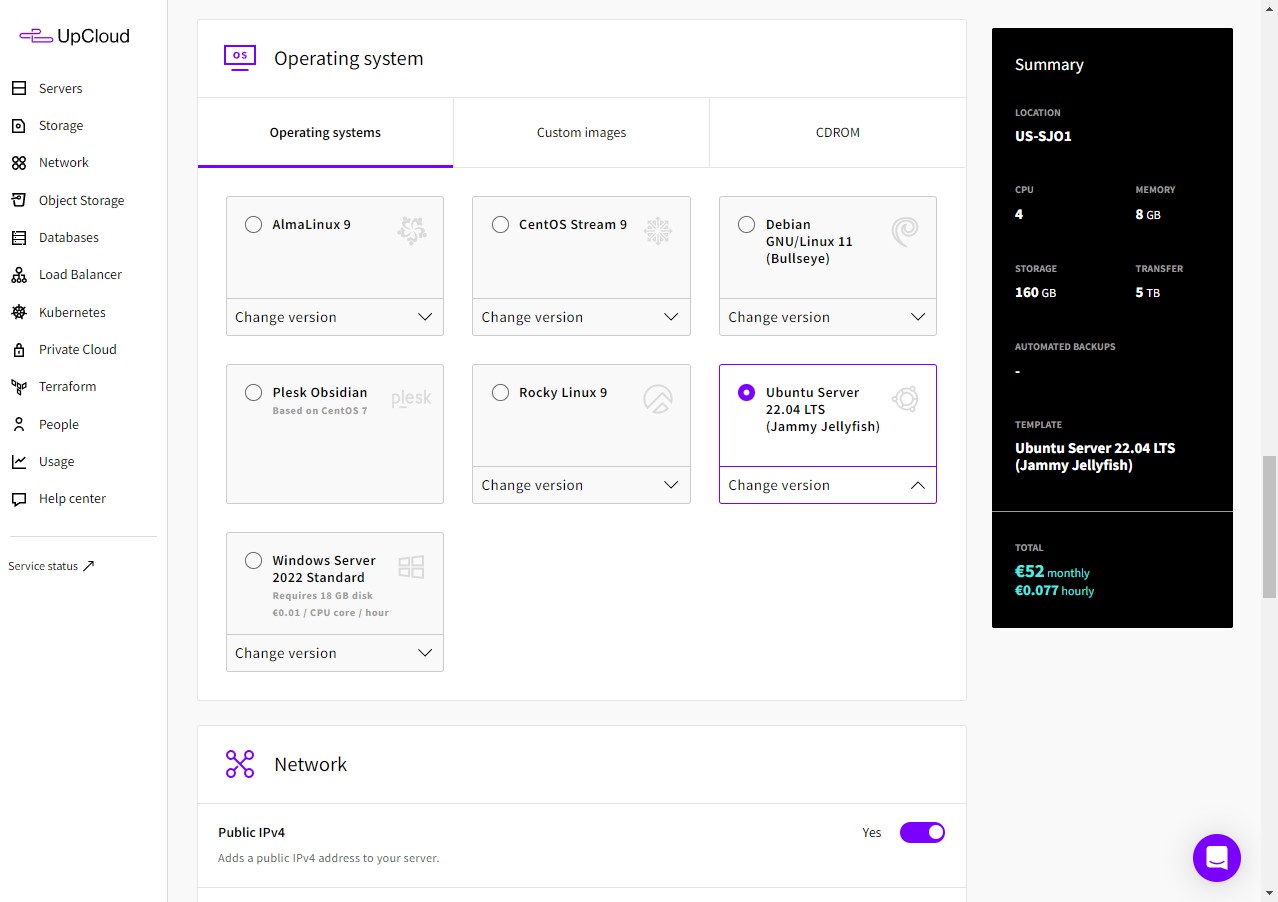
- Choose a plan (Starter or Premium) and an operating system image or a pre-built template.
- Add SSH keys, configure networking and firewall rules, and deploy — servers are usually ready in well under a minute.
- Connect over SSH and start configuring your stack, or drive the whole thing through the API or Terraform if you prefer infrastructure as code.
One honest caveat: because the trial requires a card and has usage limits, it is a genuine trial rather than a forever-free tier — standard for performance-focused clouds, but worth knowing. If you want to look before signing up at all, UpCloud also runs a live demo of its control panel that requires no account.
Watch: UpCloud in action
If you want to see how fast deployment really is, this short official clip shows a server going from nothing to running in under a minute.
UpCloud vs alternatives
No provider exists in a vacuum. Here is how UpCloud stacks up against two of the most common alternatives developers weigh it against.
| Factor | UpCloud | DigitalOcean | Vultr |
|---|---|---|---|
| Storage performance | MaxIOPS, class-leading and consistent | Standard NVMe SSD, solid but slower in IOPS tests | NVMe/High-Frequency, fast but variable |
| Uptime SLA | 99.999% with generous payback | 99.99% | 100% network/host SLA |
| Egress fees | Zero-cost egress | Included allowance, then metered overage | Included allowance, then metered overage |
| Ease of use / apps | Clean but developer-first, fewer one-click apps | Very beginner-friendly, large marketplace | Beginner-friendly, good app catalog |
| Support reputation | Excellent, fast, technical 24/7 | Good, tiered | Good, tiered |
| Global footprint | Strong in Europe, growing elsewhere | Very broad global coverage | Very broad global coverage |
The short version: DigitalOcean and Vultr win on sheer number of locations and beginner-friendly extras like large one-click app marketplaces. UpCloud tends to win on storage performance, egress economics, and support quality. If disk speed and predictable bills matter more than the widest map of regions, UpCloud is compelling.
Performance, support & value
Performance is where UpCloud earns its reputation. In repeated third-party benchmarks, MaxIOPS storage has delivered dramatically higher random IOPS than budget rivals and low time-to-first-byte figures in web tests. For database-heavy and I/O-bound applications that means real, felt speed — pages that render faster and queries that return quicker under load — and the newest Premium plans on recent AMD EPYC CPUs add strong compute to the storage advantage.
Support is the other pillar users consistently praise. UpCloud offers 24/7 support via live chat and email, and the recurring theme in reviews is that you reach knowledgeable engineers quickly rather than a script-following first line — which meaningfully lowers the operational risk of running your own servers.
On value, the honest framing is this: UpCloud is not the cheapest, but it is well priced for what it delivers. Factor in free egress, the storage performance, the uptime guarantee, and the support, and the effective value is strong — especially for workloads where a slow disk or a surprise bandwidth bill would cost far more than the modest premium over a bargain host. Try UpCloud if predictable performance and predictable billing are worth a little more to you than the absolute lowest sticker price.
Who should use it — and who should not
UpCloud is an excellent fit if you are a developer, technical founder, or agency that wants fast, reliable infrastructure you control. It is particularly strong for database-driven apps, e-commerce stores, SaaS backends, and any workload where storage is the bottleneck. It is also a natural choice for European businesses that need data to stay in the EU, and if you live in infrastructure-as-code — Terraform, CI/CD, automated provisioning — the mature API makes it a joy to automate.
It is probably not the right fit if you want a fully managed experience — a graphical panel like cPanel, one-click managed WordPress, and someone else patching your OS. Beginners who have never touched SSH may find it steeper than a shared or managed host, and if your one overriding priority is the lowest possible price regardless of performance or support, cheaper providers exist — you would just be trading away some of what makes UpCloud worth it.
Honest limits
No review is complete without a clear-eyed look at the downsides, so here they are without spin.
It is unmanaged. You are responsible for the operating system, security updates, and application stack. UpCloud gives you excellent infrastructure and support, but it will not manage your server software — if you want managed, you will need to add a third-party control panel yourself or choose a different kind of host.
Fewer one-click apps. Compared with DigitalOcean’s or Vultr’s marketplaces, UpCloud’s catalog of pre-built application images is smaller. You can absolutely deploy anything you like, but you may be doing more of the initial setup by hand.
Not the cheapest. UpCloud’s pricing is fair, but pure budget providers — particularly some EU-focused hosts — will undercut it on raw price. You are paying a modest premium for the performance and reliability.
Trial requires a card. The free trial is genuine but gated behind card verification and usage limits, so it is not a permanent free tier.
Footprint is Europe-strong. UpCloud has data centers across multiple continents, but its density and heritage are strongest in Europe. If you need a very specific, far-flung region, check availability first. None of these are dealbreakers for the target user — they are simply the trade-offs of a performance-first, developer-first cloud.
UpCloud deals
UpCloud regularly runs a trial-credit offer for new accounts, letting you deploy real servers and test MaxIOPS performance before spending your own money. Because the exact credit and terms change over time, check the current offer directly and model your configuration in UpCloud’s pricing calculator. If the numbers work — and for I/O-heavy workloads they often do — you can be running in minutes.
Try UpCloud to grab the current trial credit and benchmark it against whatever you are running today. Seeing the storage speed on your own workload is far more convincing than any benchmark chart.
Frequently asked questions
Is UpCloud good for WordPress and WooCommerce?
Yes. Because WordPress and especially WooCommerce lean heavily on database and disk performance, MaxIOPS storage tends to make them feel noticeably snappier under load. You will need to manage the server yourself or pair UpCloud with a control panel, but the underlying performance is excellent for these workloads.
Does UpCloud really offer a 100% uptime guarantee?
UpCloud has long been associated with an aggressive uptime promise and today backs its infrastructure with a 99.999% uptime SLA plus a payback model that compensates you generously for downtime beyond a few minutes. In practice its reliability track record is one of the strongest in the industry.
Is UpCloud managed or unmanaged?
Cloud Servers are unmanaged — you control the OS and software. However, UpCloud does offer fully managed higher-level services such as Managed Databases and Managed Kubernetes, where it handles the operational heavy lifting for those specific components.
How does UpCloud handle data transfer costs?
Outbound data transfer (egress) is free under UpCloud’s zero-cost egress model. This is a meaningful differentiator, because metered egress is one of the most common sources of surprise bills on other clouds.
Where are UpCloud’s data centers?
UpCloud operates data centers across Europe, North America, and Asia-Pacific, with particularly strong coverage in Europe. Check the current list for exact locations when you sign up.
Can I automate UpCloud with Terraform?
Absolutely. UpCloud provides a mature RESTful API, an official Terraform provider, a CLI, and SDKs, making it a strong choice for infrastructure-as-code and automated provisioning workflows.
Is there a free trial?
Yes, UpCloud offers a free trial with credit for new accounts, though it requires card verification and comes with usage limits. It is a real trial rather than a permanent free tier.
What to look for in a cloud VPS
Whether or not you end up choosing UpCloud, it is worth understanding the criteria that separate a good cloud VPS from a mediocre one. Use this as a checklist the next time you evaluate any provider.
Storage performance, not just capacity. Two servers with identical CPU and RAM can perform wildly differently depending on their disks. Look at random IOPS and latency, not just gigabytes — for databases and busy sites, storage is usually the first bottleneck you hit.
Predictable, transparent pricing. Watch for metered egress and hidden add-on fees. A slightly higher sticker price with free bandwidth can easily be cheaper in practice than a low headline rate that balloons once you add data transfer.
A real uptime guarantee. An SLA is only as good as the payback behind it and the track record that supports it. A high percentage with meaningful compensation signals a provider that is confident in its architecture.
Quality of support. On an unmanaged cloud, support is your safety net. Fast access to engineers who understand the platform can save you hours during an incident, so weight it heavily.
Automation and API maturity. If you plan to scale, a clean API, a Terraform provider, and good SDKs are not luxuries — they are what let you manage infrastructure as code instead of clicking through panels forever.
Data location and compliance. Know where your data physically lives. For many businesses, keeping data in a specific jurisdiction is a legal requirement, not a preference, so confirm the provider’s regions and compliance posture.
Room to grow. Finally, check whether the provider offers the higher-level services — managed databases, Kubernetes, load balancers, object storage — you will likely need as your project matures, so you are not forced to migrate later.
Judged against that checklist, UpCloud scores highly on almost every axis that matters to a performance-conscious team, its main compromises being the unmanaged model and a Europe-strongest footprint. If those trade-offs suit you, it is one of the most rewarding clouds you can build on today. Try UpCloud and judge the performance for yourself.