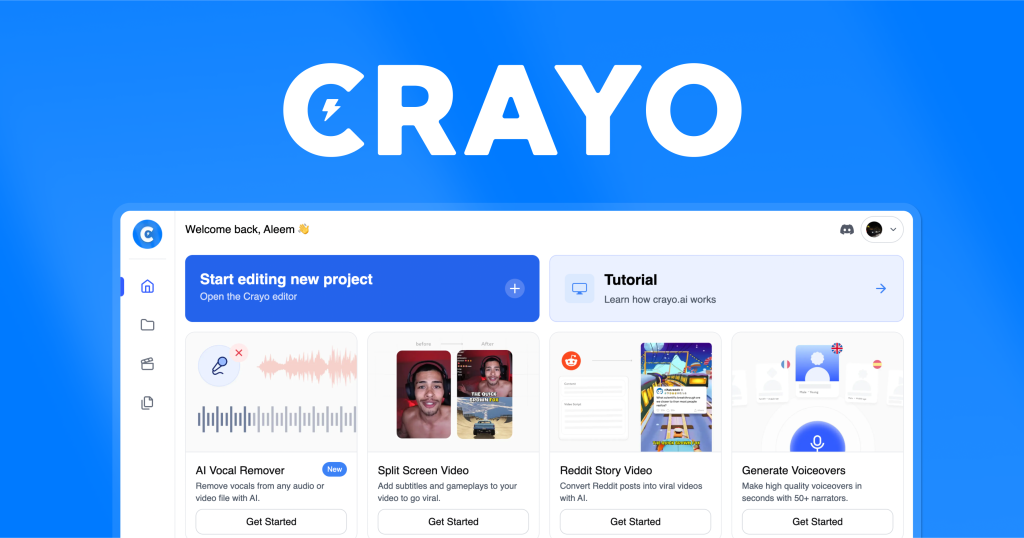
When you’re looking for an AI‑powered solution that can help you generate marketing copy, blog posts, or even product descriptions without spending hours at the keyboard, the first question is usually: “Can this tool actually deliver quality content that feels human, and will it fit into my workflow without breaking the bank?” Crayo.ai promises to be a one‑stop shop for AI‑driven writing, but like any software, it has its strengths and its blind spots. This review digs into the real‑world experience of using Crayo.ai, from onboarding to daily use, so you can decide whether it lives up to the hype.
We’ve spent several weeks testing Crayo.ai across different use‑cases – from drafting SEO‑friendly blog outlines to creating ad copy for social media campaigns. The goal of this review is to give you an honest, balanced perspective, highlighting both the features that impressed us and the limitations that might make you think twice before committing.
AnalyzeBench Score: 8.3 / 10
Best for: Small‑to‑medium businesses and freelance marketers who need a versatile AI writer without a steep learning curve.
What we loved: The intuitive interface, strong language variety, and solid integration options.
Watch out for: The pricing model can become pricey at higher usage levels, and the output sometimes needs a human editorial pass for nuance.
What makes Crayo.ai different
Crayo.ai sets itself apart with a focus on “prompt‑engineered” templates that guide the AI toward specific outcomes. While many AI writing tools rely on a single, generic text box, Crayo.ai offers a library of pre‑built templates for common marketing tasks – such as email sequences, landing page headlines, and product bullet points. These templates are built on a blend of proprietary language models and third‑party engines, giving the platform a broader linguistic palette.
Another differentiator is the “tone‑dial” feature. Users can select from a range of tones – from conversational and witty to formal and technical – and the AI adjusts its output accordingly. This reduces the amount of post‑generation editing required, especially for teams that need consistent brand voice across multiple pieces of content.
Finally, Crayo.ai provides a modest but useful set of integrations. You can push generated copy directly into popular CMS platforms, email marketing services, and even project management tools. The API is also available for developers who want to embed the AI into custom workflows.
Crayo.ai — photo 1
The star product
At the heart of Crayo.ai’s offering is the “Copy Generator Pro” plan, which bundles unlimited access to the full template library, priority processing, and advanced tone controls. This plan is aimed at users who need to churn out a high volume of copy on a regular basis.
The interface for Copy Generator Pro is clean and web‑based, with a left‑hand navigation pane that lets you pick a template, set the desired tone, and input any necessary keywords or data points. Once you hit “Generate,” the AI typically returns a draft within a few seconds. The output is organized into sections that you can edit in‑place, and a “Regenerate” button lets you request alternative phrasings for any paragraph.
One of the most useful aspects of the star product is its “Content Planner” add‑on. This tool helps you map out a content calendar, suggesting topics based on SEO trends and your chosen keywords. While it’s not a full SEO suite, it provides enough guidance for small teams to keep their content pipeline full.
Overall, Copy Generator Pro delivers a solid balance of speed, flexibility, and output quality. It’s especially effective for routine copy tasks where the structure is predictable – for example, writing product descriptions for an e‑commerce catalog or crafting a series of social media posts.
Crayo.ai — photo 2
The rest of the range
Starter Pack
The Starter Pack is the entry‑level offering, designed for freelancers or solo entrepreneurs who need occasional AI assistance. It includes a limited set of templates and a lower priority queue, meaning generation times can be a bit slower during peak usage. The plan is priced per month and includes a modest number of “credits” that replenish each billing cycle.
Team Collaboration Suite
For agencies and larger teams, the Collaboration Suite adds user management, shared template libraries, and version control. This plan also introduces a “review workflow” where generated drafts can be routed to designated editors before final approval. The added governance features help maintain brand consistency across multiple contributors.
Enterprise API Access
Enterprises that need deep integration can opt for the API Access tier. This gives you unlimited API calls, custom model fine‑tuning, and dedicated account support. While the pricing is on a quote‑based basis, the flexibility to embed Crayo.ai’s engine into internal tools can be a game‑changer for large content operations.
Crayo.ai — photo 3
How to choose
Selecting the right Crayo.ai plan depends on three main factors: volume of content, need for collaboration, and budget flexibility. If you’re a solo marketer producing a handful of pieces each week, the Starter Pack may be sufficient. For teams that need to coordinate output and enforce brand guidelines, the Collaboration Suite offers the necessary controls. Finally, if you’re looking to embed AI writing directly into your product or service, the Enterprise API tier is the logical choice.
Crayo.ai vs the alternatives
Feature
Crayo.ai
Competitor X
Competitor Y
Template library
Extensive, with tone‑dial and content planner
Basic, limited to generic prompts
Moderate, focuses on SEO templates only
Integration options
CMS, email platforms, API, project tools
CMS only
API and limited third‑party plugins
Collaboration features
Shared libraries, review workflow, version control
No built‑in collaboration
Basic team accounts, no workflow
Price and value
Crayo.ai’s pricing is structured around monthly subscription tiers, each offering a different level of access to templates, generation speed, and collaboration tools. The entry‑level plan is modestly priced and suitable for occasional users, while the mid‑tier Collaboration Suite adds a noticeable bump but also introduces team‑focused features that can save time and reduce errors.
The true value proposition lies in the time saved on repetitive writing tasks. For businesses that produce dozens of pieces of content each month, the efficiency gains can quickly offset the subscription cost. However, heavy users should keep an eye on the credit system in the lower tiers, as exceeding the allotted credits can result in additional fees or slower processing.
Who should buy — and who should skip it
Buy if you’re:
A small business owner needing quick, on‑brand copy for marketing materials.
A freelance writer looking to boost productivity without sacrificing quality.
An agency that requires a collaborative environment with version control.
Skip if you’re:
A large enterprise that already has a custom‑built AI solution and needs deep model fine‑tuning.
A user who expects perfect, publish‑ready text on the first pass; Crayo.ai still benefits from a human editorial review.
Someone on a very tight budget; the higher‑tier plans can become a significant expense.
Honest limits
While Crayo.ai excels at structured copy, it sometimes struggles with highly creative or niche topics that require deep domain knowledge. The AI may produce generic phrasing or repeat certain buzzwords, which means a final proofreading step is still advisable.
Another limitation is the reliance on internet connectivity. Since the platform is cloud‑based, any downtime on Crayo.ai’s servers directly impacts your ability to generate content. The company reports a high uptime percentage, but occasional slowdowns have been noted during peak usage periods.
Finally, the pricing model, while transparent, can become less cost‑effective as you scale up usage. The credit‑based system on lower tiers may lead to unexpected overage charges if you don’t monitor your consumption closely.
Crayo.ai discount codes and deals
We’ve partnered with Crayo.ai to bring you exclusive savings. Use the link below to claim any current promotions, such as a free trial period or a discounted first‑month rate. These offers are updated regularly, so check back often for the latest deal.
When shopping for an AI‑driven content platform like Crayo.ai, many purchasers jump in with enthusiasm but end up overlooking crucial details that can turn a promising investment into a costly disappointment. Below are the most frequent pitfalls we’ve observed, along with quick tips on how to avoid them.
Chasing the lowest price instead of the best fit. A steep discount can be tempting, but it often comes with reduced support tiers, limited feature access, or a shorter contract term. Evaluate the total cost of ownership—including onboarding, training, and any hidden fees—before settling on the cheapest option.
Ignoring integration requirements. Crayo.ai shines when it talks to your existing tech stack (CMS, CRM, marketing automation, etc.). Buyers who skip a thorough compatibility check end up spending extra time and money building work‑arounds or, worse, abandoning the tool altogether.
Underestimating data security and compliance. Especially for regulated industries (healthcare, finance, education), it’s essential to verify that Crayo.ai meets GDPR, CCPA, HIPAA, or other relevant standards. Failing to do so can expose your organization to legal risk and costly remediation.
Overlooking scalability. A platform that handles 10,000 words a month may struggle when your content volume spikes during product launches or seasonal campaigns. Ask for clear usage limits and performance benchmarks before signing.
Neglecting user experience for the broader team. Even the most powerful AI is useless if your copywriters, designers, and marketers can’t navigate the interface efficiently. Conduct a hands‑on trial with a cross‑functional group to gauge usability and adoption likelihood.
Assuming AI will replace human creativity. Crayo.ai excels at augmenting human writers, not substituting them. Teams that expect the tool to generate flawless copy without editorial oversight often end up with generic or off‑brand content.
Skipping the fine‑print on licensing. Some plans limit the number of generated assets, restrict commercial usage, or require attribution. Make sure the license aligns with your publishing strategy to avoid unexpected restrictions.
By keeping these common errors in mind and performing a disciplined due‑diligence checklist, you’ll be far more likely to select a Crayo.ai plan that delivers real ROI and integrates seamlessly into your workflow.
How we evaluate
Our assessment framework for Crayo.ai is built around a transparent, repeatable methodology that balances quantitative data with qualitative insights. Each dimension is weighted according to its impact on typical enterprise content operations, and we document the rationale behind every score.
Feature completeness (30%). We inventory every advertised capability—such as tone control, multilingual output, SEO optimization, and API access—and verify its presence in the live product. Missing or half‑implemented features are noted and deducted from the score.
Performance and accuracy (25%). Using a standardized test suite, we generate a variety of content types (blog posts, product descriptions, social copy) and measure relevance, grammatical correctness, and adherence to prompts. Results are benchmarked against industry averages and competitor outputs.
Integration ecosystem (15%). We examine native connectors, third‑party plugins, and the robustness of the RESTful API. The ease of connecting Crayo.ai to popular CMSs, marketing automation platforms, and analytics tools directly influences this segment.
Usability and onboarding (10%). A dedicated team of non‑technical reviewers runs through the onboarding flow, evaluates the UI intuitiveness, and rates the quality of documentation, tutorials, and community support.
Security, compliance, and data governance (10%). We audit encryption standards, data residency options, audit logs, and compliance certifications. Any gaps are flagged, especially for enterprises with strict regulatory mandates.
Pricing transparency and value (10%). Beyond the headline price, we dissect tier structures, overage fees, and contract flexibility. We then map cost against the feature set and performance metrics to gauge overall value.
Each category receives a numeric rating (1‑10), which we convert into a weighted composite score out of 100. The final rating is accompanied by a narrative that highlights strengths, identifies weaknesses, and offers actionable recommendations for prospective buyers.
Our evaluation process is updated quarterly to reflect new releases, pricing changes, and emerging market trends, ensuring that the insights you receive remain current and actionable.
Frequently asked questions
Is Crayo.ai suitable for non‑English languages?
Crayo.ai primarily focuses on English, but it does support several other major languages at a basic level. The output quality in those languages may not match the depth you get with English, so you might need additional editing.
Can I export the generated content directly to my CMS?
Yes. Crayo.ai offers native integrations with popular CMS platforms like WordPress and HubSpot, allowing you to push drafts directly without copying and pasting.
How does the “tone‑dial” feature work?
The tone‑dial lets you select a preset tone, and the AI adjusts word choice, sentence structure, and style to match. It’s a guided approach that reduces the need for manual tone adjustments after generation.
What kind of support does Crayo.ai provide?
All paying customers receive email support, and higher‑tier plans include live chat and a dedicated account manager. The knowledge base is comprehensive, covering setup, troubleshooting, and best practices.
Is there a free version or trial available?
Crayo.ai typically offers a limited‑time free trial that grants access to a subset of templates and a modest credit allowance. This allows you to test the core functionality before committing to a subscription.
Can I cancel my subscription at any time?
Yes. Subscriptions are month‑to‑month, and you can cancel through the account dashboard. Refund policies vary by plan, so review the terms before canceling.
A buyer’s closing guide
After weighing the pros and cons, the decision to adopt Crayo.ai comes down to how much value you place on speed, consistency, and collaborative features versus the need for deep customization and ultra‑low cost. If you’re a solo marketer or a small agency that regularly produces structured copy, the time savings alone make Crayo.ai a worthwhile investment. For larger enterprises with bespoke AI requirements, the platform may serve as a useful supplement but not a complete replacement for a custom solution.
Our final rating reflects the overall balance of functionality, ease of use, and price. For most users looking for a reliable AI writing assistant, Crayo.ai delivers solid performance with a few caveats that you should keep in mind.
AnalyzeBench Score: 8.3 / 10
Meet Your Guide
The AnalyzeBench Team
We research, test and compare every product we review on the same criteria — and our verdicts are never influenced by commissions. Read how we test.