
Choosing a web host is one of those decisions that feels small until it isn’t. Pick the wrong one and you spend your weekends wrestling with slow load times, confusing dashboards, and support agents who read from a script. Pick the right one and hosting fades into the background, exactly where it belongs. DreamHost has been quietly doing the “fade into the background” thing for a very long time – nearly three decades – and it remains one of only three hosts officially recommended on WordPress.org. That endorsement alone earns it a serious look.
But recommendations and history don’t automatically translate into the right fit for your project. DreamHost does some things differently, and a few of those differences will either delight or annoy you depending on how you work. This review digs into what DreamHost offers in 2026, where it shines, and where it falls short – the honest version, cons included.
AnalyzeBench Score: 8.4 / 10
Best for: WordPress site owners, freelancers, small businesses, and privacy-minded users who want an independent host with flexible, no-long-lock-in billing and a clean, jargon-free dashboard.
What we loved:
- Genuine month-to-month billing – you’re not forced into a multi-year contract to get started.
- An industry-leading 97-day money-back guarantee on shared hosting, far longer than the usual 30 days.
- WordPress.org-recommended, with managed WordPress (DreamPress) and one-click installs.
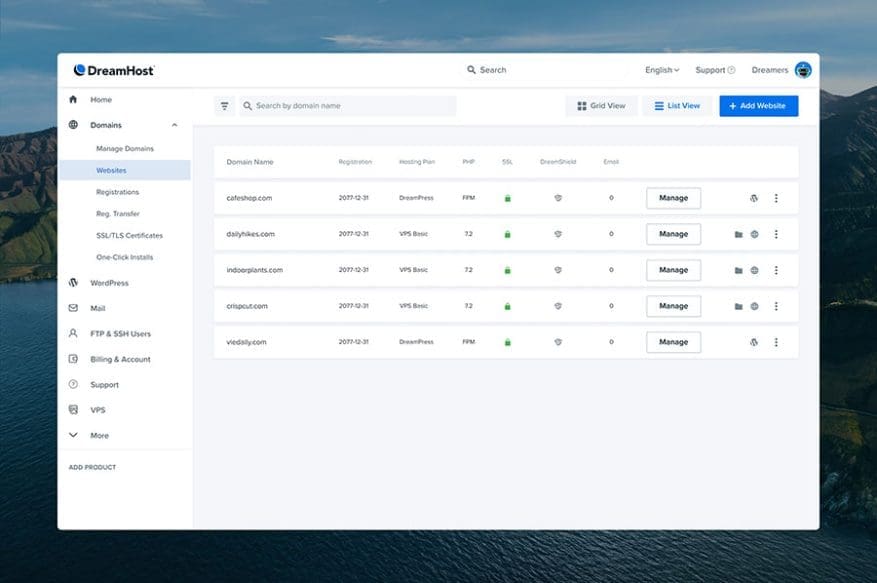
- A clean, custom control panel that’s approachable for beginners.
- Independently owned for nearly 30 years, with a strong stance on privacy and free domain privacy.
- NVMe SSD storage and a global CDN baked into the modern stack.
Watch out for:
- No cPanel – the custom panel is friendly but different, which can frustrate power users and agencies expecting a standard interface.
- Phone support isn’t included by default; it’s a paid callback, and live chat has set hours rather than being truly 24/7 by phone.
- Renewal prices climb significantly after the promotional term, as with almost every host.
- Fewer one-click “everything” extras than some mega-hosts; it’s focused rather than sprawling.
What makes DreamHost different
Most hosting names you recognize belong to the same handful of parent companies, folded together over years of industry consolidation. DreamHost didn’t go that route. It has stayed independently owned since 1996, and that independence shows up in ways that matter: the company answers to its customers rather than to a portfolio manager chasing quarterly upsell targets.
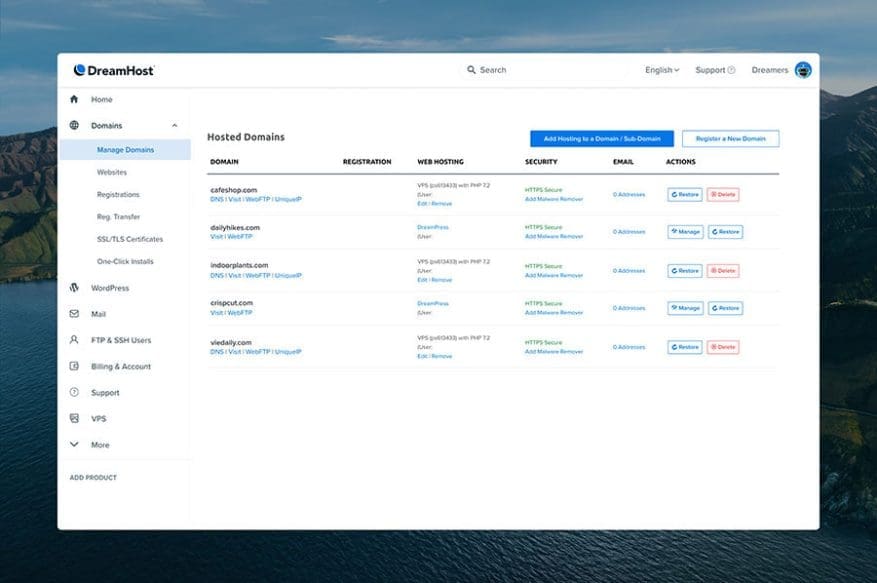
The second thing that sets DreamHost apart is its refusal to use cPanel. Nearly every budget host ships the same cPanel interface, which is powerful but cluttered and intimidating for newcomers. DreamHost built its own control panel from scratch. The trade-off cuts both ways – more on that in the cons – but the upshot is a cleaner, more modern dashboard that doesn’t bury what you need under 40 icons you’ll never touch.
Third, and this is the one that quietly wins people over: DreamHost offers honest month-to-month billing. Many hosts advertise a jaw-dropping headline price that only applies if you prepay for years upfront. DreamHost has multi-year deals too, but it also lets you pay monthly without a punishing penalty. Combine that with the 97-day guarantee and you get one of the lowest-risk ways to try a host before committing.
Finally, DreamHost takes privacy seriously. It includes free domain privacy registration and has publicly pushed back on overbroad data requests. For anyone who cares about who owns their infrastructure and what happens to their data, that track record is worth something.
The core service
At its heart, DreamHost is a full-stack web host: domains, shared hosting, managed WordPress, VPS, dedicated servers, and cloud compute all live under one roof. The modern stack runs on NVMe SSD storage – faster than the older SATA drives some budget hosts still use – paired with a global CDN spanning 100-plus edge locations, so pages load quickly regardless of where a visitor sits.
The onboarding is deliberately gentle. DreamHost walks you through domain setup, WordPress installation, and SSL provisioning without demanding that you understand DNS records or certificate authorities. Free SSL via Let’s Encrypt comes standard on every plan, automated daily backups run in the background, and unmetered bandwidth means you’re not sweating a traffic spike from a post that unexpectedly takes off.
For WordPress – where a huge share of DreamHost’s customers land – the experience is tuned. One-click installs, automatic core updates, and the WordPress.org recommendation all point to a host that treats WordPress as a first-class citizen. If you’re running WooCommerce, a portfolio, a blog, or a small business site, DreamHost’s core service was designed with you in mind.
Support is delivered by an in-house team over live chat and email, backed by a knowledge base and community forums. The company advertises a 100% uptime guarantee, and DreamHost’s reliability record is strong – more on that later.
Hosting plans & pricing
DreamHost’s lineup covers the full spectrum, from a first blog to a resource-hungry application. Here’s how the plans break down. Note that introductory prices assume a longer commitment; renewal rates are higher, and monthly billing costs more per month than the multi-year deals – a normal industry pattern, but one DreamHost is refreshingly upfront about.
Shared Hosting (Starter and Unlimited)
This is the entry point and where most personal sites and small businesses begin. The Starter tier hosts a single website with generous storage, free SSL, automated backups, and a free domain for the first year on annual terms. Introductory pricing on the longest terms dips to around a couple of dollars per month, which is competitive with the cheapest hosts on the market. The Unlimited tier steps up to unlimited websites and includes unlimited email, making it a strong pick for freelancers juggling multiple client sites. Both tiers use the DreamHost custom panel rather than cPanel.
DreamPress (Managed WordPress)
DreamPress is DreamHost’s managed WordPress offering, built for people who want WordPress performance without babysitting the server. It layers on server-side caching, a built-in CDN, automatic WordPress updates, staging environments on higher tiers, and 24/7 WordPress-specialist support. Entry pricing sits in the low-to-mid teens per month on a multi-year term. If your WordPress site is your business – an online store, a membership site, a high-traffic blog – DreamPress is the plan worth paying up for, because the managed layer removes a genuine class of headaches.
VPS Hosting
When a shared plan starts feeling cramped, DreamHost’s VPS tier gives you isolated, scalable resources without the complexity of managing a raw server. It’s a managed VPS, meaning DreamHost handles the underlying system administration while you get dedicated RAM and CPU. Entry pricing starts around ten dollars per month on a longer commitment, scaling up as you add resources. This is the sweet spot for growing sites that have outgrown shared hosting but aren’t ready for a full dedicated box.
Dedicated Servers
For high-traffic sites, large applications, or anyone who needs the entire machine, DreamHost offers dedicated servers with the full hardware resources at your disposal. Pricing here starts well above the hundred-dollar-per-month mark, reflecting the fact that you’re renting an entire physical server. This tier is aimed at established businesses and developers with serious performance or compliance requirements.
DreamCompute (Cloud Hosting)
DreamCompute is DreamHost’s OpenStack-powered cloud platform, aimed squarely at developers who want to spin up compute instances on demand. It uses pay-as-you-go pricing tied to actual resource consumption, so you pay for what you run rather than a flat monthly fee. This is the most technical product in the catalog and expects you to bring your own DevOps comfort.
How to get the best deal
Getting the most out of DreamHost comes down to matching the billing term to your confidence level. If you’re new and unsure, start month-to-month – the 97-day guarantee means you can test drive shared hosting for over three months and still walk away with a refund. Almost no other host gives you that long a runway.
Once you know DreamHost is a keeper, switch to the longest term you’re comfortable with. The per-month price on multi-year commitments is dramatically lower than monthly billing. Just go in clear-eyed about the renewal rate – the introductory price is a first-term promotion and steps up when the term ends. Budget for the renewal number, not the headline.
A few more money-savers: take the free domain that comes with annual shared and DreamPress plans, lean on the included free SSL and automated backups, and if you’re a freelancer, the Unlimited shared tier with unlimited sites and email is often cheaper than running separate plans per client. Promotional pricing changes periodically, so check the live offer before you commit.
Watch: DreamHost in action
If you’d rather see the dashboard and setup flow before reading further, this independent walkthrough gives a good feel for what using DreamHost is actually like day to day.
https://www.youtube.com/watch?v=ooyTp1zWmHI
DreamHost vs alternatives
DreamHost doesn’t exist in a vacuum. Two of the hosts it’s most often weighed against are Hostinger, the aggressive value player, and SiteGround, the premium managed-WordPress specialist. Here’s how they stack up on the dimensions that matter most.
| Feature | DreamHost | Hostinger | SiteGround |
|---|---|---|---|
| Control panel | Custom (no cPanel) | Custom hPanel | Custom Site Tools |
| Money-back guarantee | 97 days (shared) | 30 days | 30 days |
| Month-to-month billing | Yes | Limited | Yes (higher rate) |
| WordPress.org recommended | Yes | No | Yes |
| Entry pricing | Very low (long term) | Lowest in class | Higher |
| Ownership | Independent since 1996 | Independent | Independent |
| Phone support | Paid callback only | No phone | Yes (higher tiers) |
| Best for | Privacy, flexibility, WordPress | Rock-bottom pricing | Premium WP performance |
The short version: if raw price is your only metric, Hostinger usually undercuts everyone. If you want premium managed WordPress with white-glove support, SiteGround is the benchmark. DreamHost sits in the thoughtful middle – competitively priced, flexible on billing, independently owned, and backed by that unusually generous refund window.
Uptime, speed & value
DreamHost advertises a 100% uptime guarantee, which is a bold marketing promise – in the real world, no host is literally never down. What matters is the track record, and DreamHost’s is genuinely solid. Independent monitoring consistently places its uptime in the neighborhood you’d want from a serious host, and the guarantee means that if downtime exceeds the promised threshold, you’re entitled to compensation.
On speed, the modern stack pulls its weight. NVMe SSD storage is meaningfully faster than SATA, and the global CDN shortens the distance between your content and your visitors. For a well-built WordPress site with sensible caching, DreamHost delivers load times that hold up against pricier competitors. It won’t magically fix a bloated theme stuffed with 30 plugins – no host will – but the infrastructure gives you a fast foundation.
On value, the picture is nuanced. The introductory pricing is excellent, especially paired with the 97-day guarantee. Renewal pricing is where you keep expectations grounded; like nearly every host, DreamHost’s promotional rate steps up at renewal. Factor that in and DreamHost still represents strong value, particularly for WordPress users. You’re paying for reliability, independence, and flexibility, not just a low first-year number.
Who should use it – and who should not
DreamHost is an excellent match if you’re a WordPress user, a freelancer running multiple client sites, a small business owner who wants a clean dashboard without a steep learning curve, or a privacy-conscious person who values an independent host. The month-to-month flexibility and 97-day guarantee make it especially appealing if you’re new to hosting. If you fall into any of those buckets, DreamHost belongs near the top of your shortlist.
It’s a weaker fit in a few cases. If you’re an agency or developer whose workflows are built around cPanel, DreamHost’s custom panel will feel like an obstacle. If phone support is non-negotiable – some businesses need to talk to a human immediately when something breaks – the paid-callback model may not cut it. And if you’re chasing the absolute lowest sticker price, a value-first host like Hostinger will typically undercut DreamHost.
For everyone in between – which is most website owners – DreamHost lands comfortably in the “recommend” column.
Honest limits
No review is worth much without a straight accounting of the weak spots. The custom control panel, while beginner-friendly, is a genuine limitation for anyone who expects cPanel. Habits, tutorials, and certain third-party tools that assume cPanel take adjustment, and there’s less community documentation written for DreamHost’s interface than for the ubiquitous standard.
Support is the other real constraint. The in-house team is knowledgeable and the chat and email channels are solid, but phone support isn’t bundled – it’s a paid callback add-on – and live chat runs on set hours rather than around the clock. If you’ve been spoiled by hosts with instant 24/7 phone lines, this will feel like a step down.
Renewal pricing is the third thing to keep honest about. The introductory rates are terrific, but they’re first-term promotions; when the term ends, prices rise, sometimes substantially. This is standard across the industry and DreamHost is transparent about it, but the true long-run cost is higher than the headline suggests. Finally, DreamHost’s feature catalog, while complete, is more focused than the kitchen-sink approach of some mega-hosts – you get what you need rather than a hundred extras you’ll never open.
DreamHost discount codes & deals
DreamHost runs promotional pricing that rotates through the year, and the biggest savings almost always come from choosing a longer billing term at signup rather than hunting for a coupon code. The introductory rates on multi-year shared and DreamPress plans are where the real discounts live, often bundling a free domain for the first year.
Because the current offer changes periodically – and because the 97-day money-back guarantee means you can start with essentially zero risk – the smartest move is to check the live pricing before you commit and lock in the best available term. If you’re ready to get started, use the link below to see today’s DreamHost deals and pricing.
Get the latest DreamHost deals here
Frequently asked questions
Does DreamHost use cPanel?
No. DreamHost uses its own custom-built control panel instead of cPanel. It’s designed to be cleaner and more approachable for beginners, but if you’re used to cPanel you’ll need a short adjustment period, since the layout and terminology differ from the industry-standard interface.
How long is DreamHost’s money-back guarantee?
DreamHost offers a 97-day money-back guarantee on shared hosting plans purchased with a credit card. That’s more than three times the typical 30-day window most competitors offer, giving you an unusually long runway to test the service risk-free.
Can I pay monthly instead of committing to years?
Yes. DreamHost offers genuine month-to-month billing, so you’re not forced into a multi-year contract just to get started. The per-month price is higher than the long-term deals, but the flexibility is real and rare among budget-friendly hosts.
Does DreamHost offer phone support?
Phone support isn’t included by default. DreamHost provides in-house support via live chat and email, with a paid callback option if you specifically need to speak to someone by phone. For urgent situations where you must talk to a human immediately, this is worth factoring into your decision.
Is DreamHost good for WordPress?
Very. DreamHost is one of only three hosts officially recommended on WordPress.org, offers one-click WordPress installs, and provides DreamPress, a managed WordPress product with caching, a built-in CDN, and specialist support. It’s one of the platform’s strongest fits for WordPress users.
Who owns DreamHost?
DreamHost has been independently owned since 1996. Unlike many hosting brands that were absorbed into large parent companies during industry consolidation, DreamHost remains independent, which shapes its customer-first approach and its strong stance on privacy.
Will my price go up at renewal?
Yes. Like nearly every web host, DreamHost’s introductory rates are first-term promotions, and prices step up when the term renews. Budget for the renewal rate rather than the headline promotional price so there are no surprises down the line.
How to choose a web host: a quick buyer’s guide
The “best” web host is the one that fits your specific project, not the one with the flashiest ad. Here is a compact framework for choosing wisely, using DreamHost as a running example.
Start with your platform. If you’re on WordPress, prioritize hosts that are optimized for it – official WordPress.org recommendation, one-click installs, and a managed option like DreamPress are strong signals. Running something else? Make sure the host supports your stack cleanly before you’re charmed by the price.
Weigh the real cost, not the headline. Look at both the introductory rate and the renewal rate, and do the math on the full term you plan to stay. A host that’s cheap for year one but expensive at renewal can end up costing more than a steadier competitor. DreamHost is upfront about this, which makes the calculation easier.
Check the escape hatch. A generous money-back guarantee and month-to-month billing dramatically lower your risk. DreamHost’s 97-day window is a standout here – it lets you commit slowly and back out cleanly if the fit is wrong.
Match support to your temperament. If you’re comfortable troubleshooting via chat, email, and documentation, most modern hosts will serve you well. If you need to pick up a phone the moment something breaks, verify that the host offers it the way you expect before you sign up.
Consider ownership and values. Independent ownership, a privacy track record, and green-hosting commitments affect who you are doing business with. For some people that matters a great deal; for others it is a tiebreaker. DreamHost scores well on all three.
Run any host through that checklist and you will make a confident, informed decision. DreamHost earns a strong 8.4 / 10 – an independent, flexible, privacy-minded host that is especially compelling for WordPress users willing to trade cPanel familiarity and always-on phone support for a cleaner experience and an unbeatable refund window.