If you have spent time comparing cloud hosts, you know the market splits into two camps. On one side sit the hyperscalers — AWS, Google Cloud, Azure — with limitless capability and pricing spreadsheets that require a finance degree. On the other side sit the simple, fixed-plan VPS providers that trade flexibility for a friendly flat rate. Kamatera tries to live in the gap between them: enterprise-grade infrastructure you can configure resource by resource, billed by the hour or the month, without the sprawling complexity or the surprise invoices. It is a promise that sounds almost too tidy, so we spent time with the platform, the pricing, and the fine print to see how it actually holds up.
This review is written for people who want a real answer, not a brochure. Below you will find where Kamatera shines, where it frustrates, who should sign up, and who should keep looking. If you decide it fits, you can Try Kamatera through the link we use throughout this article.
AnalyzeBench Score: 8.4 / 10
Best for: developers, agencies, startups, and IT teams that want configurable, scalable cloud servers with hourly billing and global datacenter choice — and are comfortable managing the server themselves (or paying for managed support).
What we loved:
- Fully configurable servers — pick exact CPU cores, RAM, storage, and bandwidth instead of squeezing into fixed tiers.
- Genuine hourly (per-minute) billing that makes short-lived and burst workloads cheap.
- A large global datacenter footprint spanning North America, Europe, Asia, and the Middle East.
- A 30-day free trial with meaningful credit, so you can test before committing a card charge.
- 24/7 human technical support, plus an optional fully managed tier for teams without sysadmins.
Watch out for:
- Servers are unmanaged by default — you own patching, security, and configuration unless you pay for managed support.
- The control panel is functional but feels dated next to newer, design-forward competitors.
- Entry pricing is competitive but not the absolute cheapest; add-ons like load balancers and managed support raise the real monthly total.
What makes Kamatera different
The single idea that defines Kamatera is configurability. Most budget VPS hosts sell you a box: a plan with a set amount of CPU, RAM, and disk, and if you need something in between two plans, tough luck. Kamatera flips that model. When you create a server, you assemble it from individual dials — the number of vCPUs, the CPU type, the amount of RAM, the size and type of storage, and the network bandwidth. If your application needs a lot of memory but very little CPU, you can build exactly that, and you are not paying for cores you will never touch.
The second defining idea is elastic, pay-for-what-you-use billing. Kamatera offers both monthly pricing and hourly pricing, and the hourly model is calculated by the minute. You pay while a server is powered on, which makes it realistic to spin up a beefy machine for a few hours of rendering, testing, or batch processing and then shut it down without eating a full month’s cost. A small charge still applies for retained storage and IP addresses while a server is powered off, which is normal for cloud platforms and worth knowing before you assume “off” means “free.”
Kamatera also leans hard into scalability without downtime. The platform markets a concept it calls diagonal scaling — the ability to scale a single server up (more resources) and out (more servers) as demand grows, and to add load balancers, firewalls, and private networking around it. In practice this means you can start with a modest machine and grow into a small fleet without re-architecting from scratch. That is the enterprise-grade part of the pitch, and it is backed by a 99.95% uptime service level for the infrastructure.
Put those three ideas together — configurable hardware, per-minute billing, and frictionless scaling — and you get a host that behaves more like a lightweight cloud provider than a traditional VPS host.
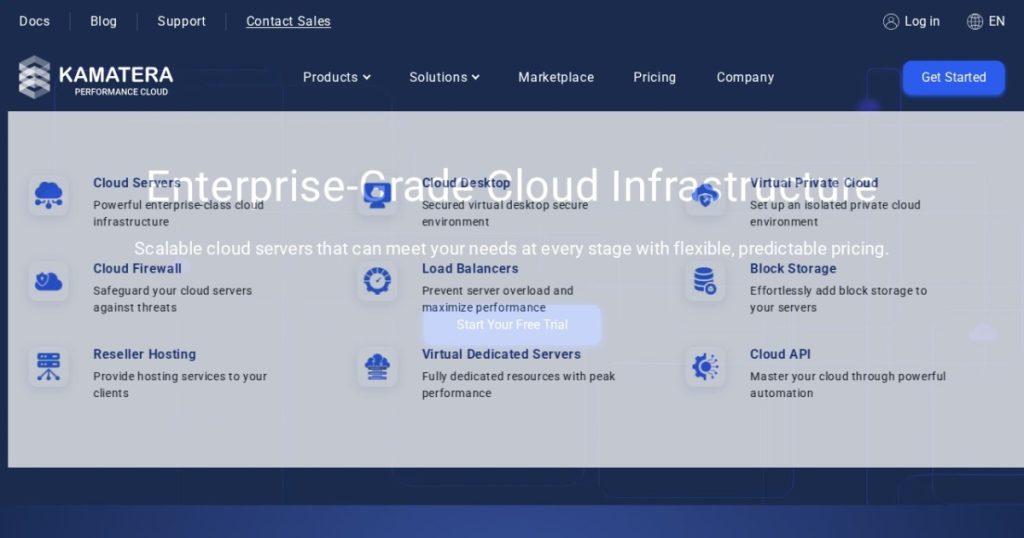
The core products
Kamatera is more than a single VPS product. It is a small suite of infrastructure building blocks, and understanding them helps you see whether the platform can grow with you.
Cloud Servers
This is the flagship. Configurable virtual machines running on modern processors, with full root access on Linux or administrator access on Windows. You choose the OS, the resources, and the datacenter, and the machine is provisioned in minutes. This is what most people mean when they say they use Kamatera.
Load Balancers
Cloud load balancers distribute traffic across multiple backend servers so no single machine gets overwhelmed. They support scaling to many backends and are billed on the same pay-as-you-go basis as the rest of the platform, which suits applications that need to grow their capacity gracefully.
Block Storage
Additional block storage volumes let you attach extra capacity to a server for media libraries, databases, or backups without over-provisioning the server’s primary disk. It is a cost-effective way to store large volumes of data separately from compute.
Cloud Firewall and Virtual Private Cloud
A managed cloud firewall adds a security layer in front of your servers, and the Virtual Private Cloud lets you build an isolated private network for multi-server environments. Together they cover the networking and security needs of a more serious deployment.
Managed Cloud Services
This add-on changes the experience for non-technical teams. Kamatera.s managed tier hands off OS updates, security hardening, monitoring, and troubleshooting to its specialists, turning an unmanaged server into something close to fully managed hosting. It is optional and priced separately.
Additional building blocks
Rounding out the catalog are virtual dedicated servers for isolated workloads, cloud desktop hosting, reseller hosting for agencies, and a Cloud API for automating provisioning through code.
Plans & pricing
Kamatera does not really sell “plans” in the traditional sense — it sells resources you assemble — but there are clear starting points and add-on prices worth knowing. As always, confirm current numbers on the Kamatera site before you buy, because cloud pricing changes.
Entry cloud servers from around $4/month
The smallest configurable cloud servers start at roughly $4 per month. That gets you a modest machine suitable for a small site, a development box, or a lightweight service. From there, the price climbs smoothly as you add cores, memory, and storage — there is no jump from one rigid tier to the next.
Hourly billing, calculated per minute
If you choose hourly pricing, you pay only for the minutes a server is running. This is the mode to use for temporary, experimental, or bursty workloads, and it is where Kamatera’s model genuinely saves money compared with hosts that only bill monthly.
Block storage from about $0.05/GB
Extra block storage is priced per gigabyte at a low rate, making it economical to keep large datasets or backups attached to your infrastructure without inflating your server cost.
Load balancers from around $20/month
A cloud load balancer starts at roughly $20 per month and supports many backend servers, so it scales with your application rather than forcing you into a new pricing bracket as you grow.
Managed support as an optional add-on
Managed technical support is sold per server per month and scales with the depth of service you want, from a light touch up to a comprehensive managed arrangement. Teams without in-house sysadmins should budget for this, because it is the difference between a raw server and a hands-off one.
The honest total
The headline “$4 a month” is real, but the number you actually pay depends on your configuration and add-ons. A production setup with a right-sized server, block storage, a load balancer, and managed support will land well above the entry price — still competitive for what you get, but not a $4 story. Budget for the real stack, not the teaser. Ready to price your own build? You can Try Kamatera and configure a server to see the exact cost before committing.
How to get started / free trial
Getting onto Kamatera is refreshingly low-risk thanks to its 30-day free trial. The trial includes a meaningful credit toward one server, so you can build a real machine, deploy your stack, and evaluate performance without paying up front. That is a stronger offer than the short, small-credit trials some competitors run.
The flow is straightforward:
- Create an account and start the free trial from the Kamatera site.
- Choose a datacenter close to your users to minimize latency.
- Configure your server — select CPU type and cores, RAM, storage size and type, and bandwidth.
- Pick an operating system or a pre-built image (Linux distributions, Windows, or application images such as WordPress).
- Deploy and connect over SSH or remote desktop within minutes.
Because the servers are unmanaged by default, plan to handle initial hardening yourself — updates, a firewall policy, SSH key authentication, and backups — or add managed support during setup. If you want to follow along, you can Try Kamatera and use the trial credit to build your first server before deciding.
Watch: Kamatera in action
Sometimes it is easier to understand a platform by watching someone build on it. The walkthrough below covers Kamatera.s pricing, features, and beginner setup so you can see the console and provisioning flow before you sign up.
Kamatera vs alternatives
No host exists in a vacuum. Kamatera competes most directly with flexible cloud VPS providers like Vultr and Akamai’s Linode. Here is how they stack up on the dimensions that matter most.
| Feature | Kamatera | Vultr | Linode (Akamai) |
|---|---|---|---|
| Server model | Fully configurable resources | Fixed plans plus some flexibility | Mostly fixed plans |
| Billing | Hourly (per-minute) or monthly | Hourly or monthly | Hourly or monthly |
| Entry price | From about $4/month | From about $2.50/month | From about $5/month |
| Datacenter footprint | Very large, global | Large, global | Global, fewer regions |
| Managed support | Optional paid add-on | Limited managed options | Limited managed options |
| Best fit | Custom configs and scaling | Lowest entry price | Developer simplicity |
The short version: Vultr often wins on rock-bottom entry pricing, Linode wins on a clean developer experience and predictability, and Kamatera wins when you want to configure exact resources, scale without re-architecting, and optionally hand off management.
Performance, support & value
On performance, Kamatera runs on modern processors with SSD-backed storage, and independent testing and user reports generally describe responsive, stable machines that hold up under load. The 99.95% infrastructure uptime commitment is in line with what serious cloud providers offer, and the ability to scale resources on the fly means you can respond to traffic spikes without migrating to a new plan.
Support is a genuine strength. Kamatera provides 24/7/365 human technical support across its infrastructure, and reviewers frequently note that you can reach a real person rather than being routed endlessly through automated tiers. For teams that want more than break-fix help, the managed services add-on effectively rents you a sysadmin, which is invaluable if nobody on your team wants to own patching and monitoring.
On value, the calculus depends on how you use it. For a static, always-on small server, a fixed-plan competitor may be marginally cheaper. But for workloads that scale up and down, need unusual resource ratios, or benefit from per-minute billing, Kamatera.s flexibility routinely pays for itself — the value is in never paying for resources you do not use.
Who should use it — and who should not
Kamatera is a strong fit if you are:
- A developer or DevOps engineer who wants precise control over server specs.
- An agency or MSP managing infrastructure for multiple clients across regions.
- A startup that needs to scale quickly and unpredictably without re-platforming.
- A team running bursty or temporary workloads that benefit from hourly billing.
- A business that wants enterprise features but also wants an optional managed safety net.
You should probably look elsewhere if you are:
- A complete beginner who wants a one-click, fully managed website host with a polished dashboard — a managed WordPress or shared host will be gentler.
- Chasing the single lowest possible monthly price above all else — an ultra-budget fixed VPS may edge it out.
- Unwilling to either manage a server yourself or pay for managed support — an unmanaged server left unpatched is a liability.
Honest limits
We promised a balanced review, so here are the caveats that did not make the highlight reel. First, unmanaged by default is the big one. Out of the box, you are responsible for the operating system, security updates, and configuration. That is completely normal for cloud infrastructure, but it will blindside anyone expecting shared-hosting hand-holding. If that describes you, buy the managed add-on and treat it as part of the price.
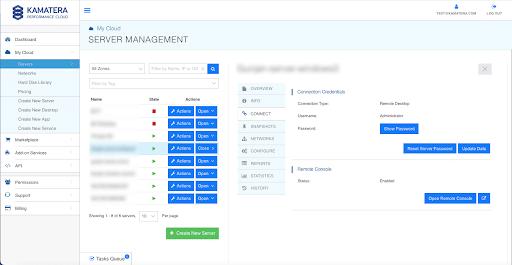
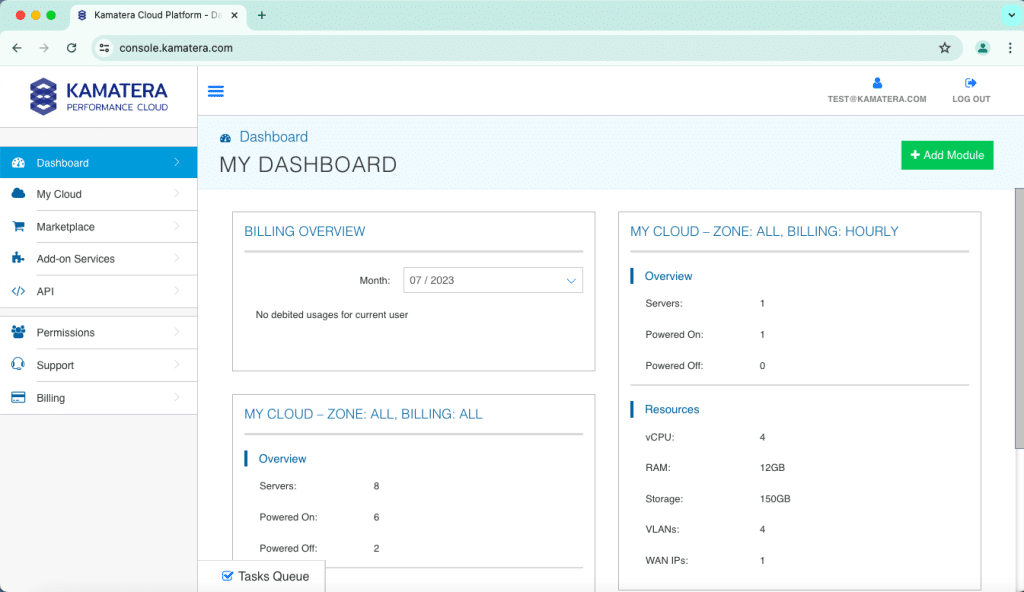
Second, the control panel feels dated. It is capable and gets the job done, but next to the slick, modern dashboards of some newer competitors it looks utilitarian. This is cosmetic rather than functional, yet first impressions matter, and the console has a small learning curve.
Third, the real cost is a stack, not a single line item. The attractive entry price grows once you add storage, a load balancer, backups, and managed support. None of that is hidden — it is all pay-as-you-go — but model your full configuration rather than anchoring on the teaser number.
Finally, the sheer number of configuration options, while a strength, can be mildly overwhelming for first-timers.
Kamatera deals
The most valuable “deal” here is the one Kamatera runs itself: a 30-day free trial with credit toward a real server. It lets you validate performance, test your stack, and confirm the console works for you before any meaningful spend. Rather than trusting benchmarks alone, build the machine you would actually run and measure it against your workload.
If Kamatera’s configurable, scalable model matches what you need, the trial is the smart first step. You can Try Kamatera to start the free trial, spin up a server, and see whether the flexibility lives up to the promise for your specific use case.
Frequently asked questions
Is Kamatera managed or unmanaged?
By default, Kamatera cloud servers are unmanaged, meaning you handle the operating system, security, and configuration yourself with full root or administrator access. Managed support is available as a separate, optional add-on priced per server if you want Kamatera’s specialists to handle updates, monitoring, and troubleshooting for you.
How does Kamatera billing work?
You can choose monthly pricing or hourly pricing. Hourly is calculated per minute, so you pay only for the time a server is powered on. A small charge still applies for retained storage and IP addresses while a server is powered off.
Does Kamatera offer a free trial?
Yes. Kamatera provides a 30-day free trial that includes credit toward one server, letting you build and test a real machine before committing to ongoing payment. It is one of the more generous trials among comparable cloud providers.
Where are Kamatera’s datacenters located?
Kamatera operates a large global network of datacenters spanning North America, Europe, Asia, and the Middle East. Choosing a region close to your users helps minimize latency and improve responsiveness.
Can I scale a Kamatera server without downtime?
Yes. A core part of Kamatera’s model is the ability to adjust CPU, RAM, storage, and bandwidth as your needs change, and to add load balancers, firewalls, and additional servers around your deployment. This “scale up and out” approach means you can grow without rebuilding your infrastructure from scratch.
Is Kamatera good for beginners?
It can be, with a caveat. Beginners who want a fully managed, click-and-go experience may find the unmanaged default intimidating. Those willing to learn — or who purchase managed support — can absolutely succeed, and the free trial is a low-risk way to find out.
Managed vs unmanaged cloud: which do you actually need?
Because Kamatera sits right on this line, it is worth understanding the distinction in plain terms, since it is the single most important decision you will make when choosing any cloud server.
Unmanaged cloud means you rent the raw infrastructure and take full responsibility for everything above the hardware: installing and updating the operating system, applying security patches, configuring firewalls, setting up backups, and fixing things when they break. You get control and lower cost, but you own the consequences of neglect. An unpatched, unmonitored server is one of the most common ways small businesses get compromised. Unmanaged is the right choice when you have technical skills in-house and you value control and price.
Managed cloud means the provider takes over those operational responsibilities. Updates, monitoring, hardening, and troubleshooting become someone else.s job. You pay more, and you give up some low-level control, but you buy back time and dramatically reduce the risk of an unattended server becoming a liability. Managed is the right choice when you would rather focus on your application or business than on server administration, or when nobody on your team wants to be woken up at 3 a.m. by an outage.
Kamatera.s advantage is that it does not force the choice on you. You can start unmanaged to keep costs down and add managed support later, or run some servers managed and others not. Be honest about which camp you are in — choosing unmanaged and then failing to actually manage the server is the worst of both worlds. If a hands-off option with room to grow appeals to you, you can Try Kamatera and decide once you have a real server in front of you.