
If you have spent any time researching premium WordPress hosting, you have almost certainly run into Kinsta. It is one of the most talked-about names in managed hosting, with a reputation for speed, polish, and a support team people genuinely rave about. But Kinsta is also expensive, and it deliberately avoids the crowded “cheap hosting” market where $3-per-month plans compete on price alone. So the real question is not whether Kinsta is good. It is whether Kinsta is worth the premium for your specific project.
In this review we take an honest, hands-on look at what Kinsta offers: its managed WordPress tiers, its newer application and database hosting, the MyKinsta dashboard, the infrastructure behind it, and the trade-offs of a premium, WordPress-first platform. We cover the good and the not-so-good so you can decide with clear eyes.
AnalyzeBench Score: 8.6 / 10
Best for: business sites, agencies, e-commerce stores, and developers who want fast, reliable managed WordPress hosting on premium infrastructure and are willing to pay for support and stability rather than chase the lowest price.
What we loved:
- Consistently fast performance on Google Cloud’s Premium Tier network
- The MyKinsta dashboard is one of the cleanest control panels in the industry
- Free enterprise-level Cloudflare integration with CDN and edge caching on every plan
- Staging environments, daily automatic backups, and free SSL included across the board
- 24/7 support that reviewers repeatedly single out as best-in-class
- A genuine 30-day money-back guarantee to test it risk-free
Watch out for:
- Pricing is premium; there is no cheap introductory tier
- Visit and storage caps mean high-traffic sites can outgrow a plan quickly
- No email hosting, so you will need Google Workspace or a similar service
- Support is chat and ticket based rather than phone
- Managed WordPress is WordPress-focused; it is not a general shared-hosting or VPS shop
Ready to look at plans directly? You can check Kinsta plans and compare tiers while you read.
What makes Kinsta different
Plenty of companies call themselves “managed WordPress hosts,” but the label covers a wide range of quality. Kinsta sits firmly at the premium end, and a few decisions explain why.
First, the infrastructure. Kinsta runs on Google Cloud Platform, and specifically on Google Cloud’s Premium Tier network. In practical terms, that means traffic travels across Google’s private, high-performance backbone for as much of its journey as possible, rather than being handed off to the public internet early. The result is lower latency and more consistent routing, which is exactly what you want for a site that needs to feel fast everywhere, not just near the data center.
Second, every plan ships with an enterprise-level Cloudflare integration. That brings a global CDN, DDoS protection, a web application firewall, HTTP/3 support, and edge caching. Edge caching in particular is a meaningful performance win, because it lets cached pages be served from locations physically close to your visitors instead of always reaching back to the origin server. Bundling this at no extra cost is a genuine differentiator, since comparable Cloudflare features would be a significant separate line item.
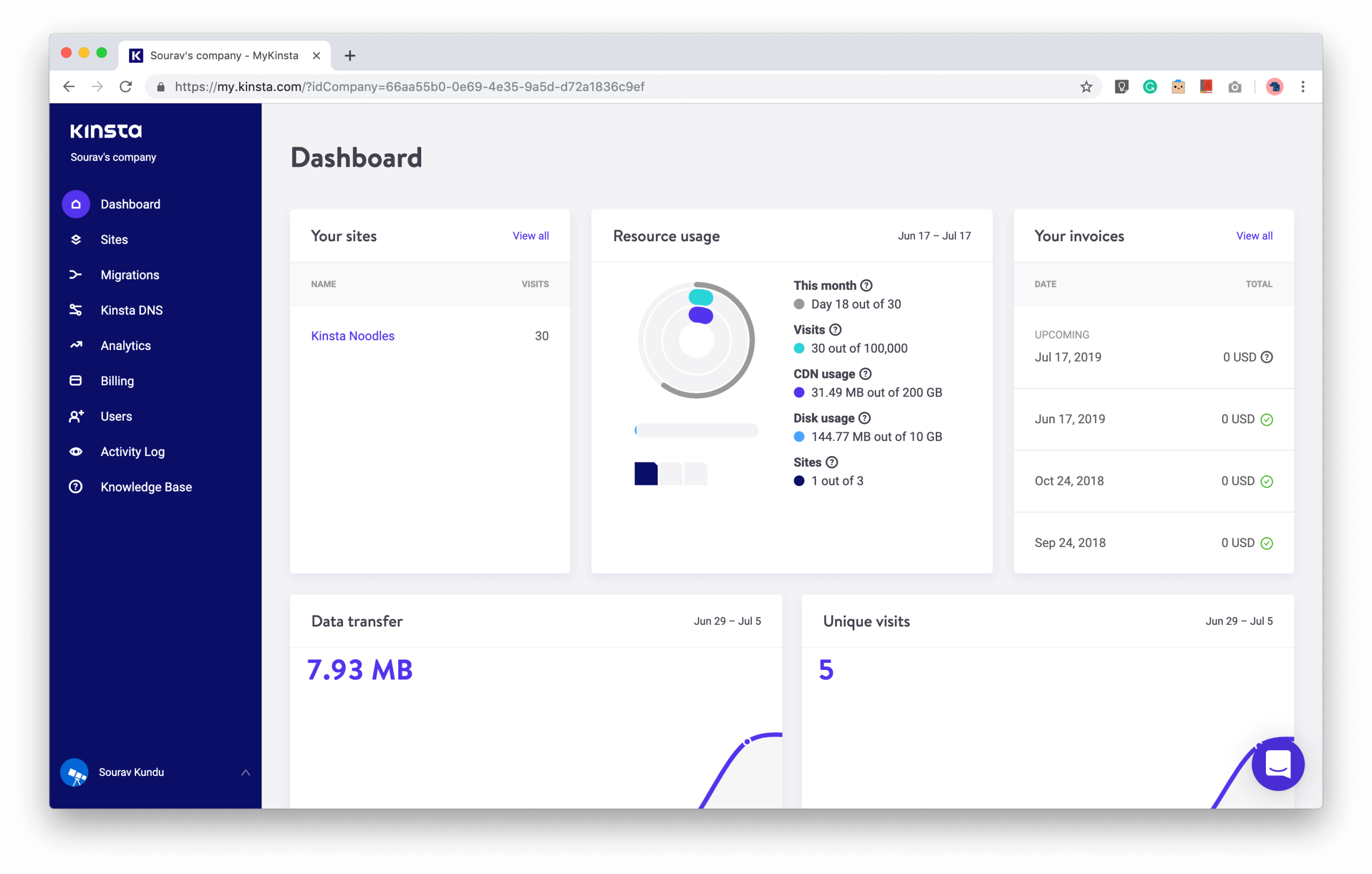
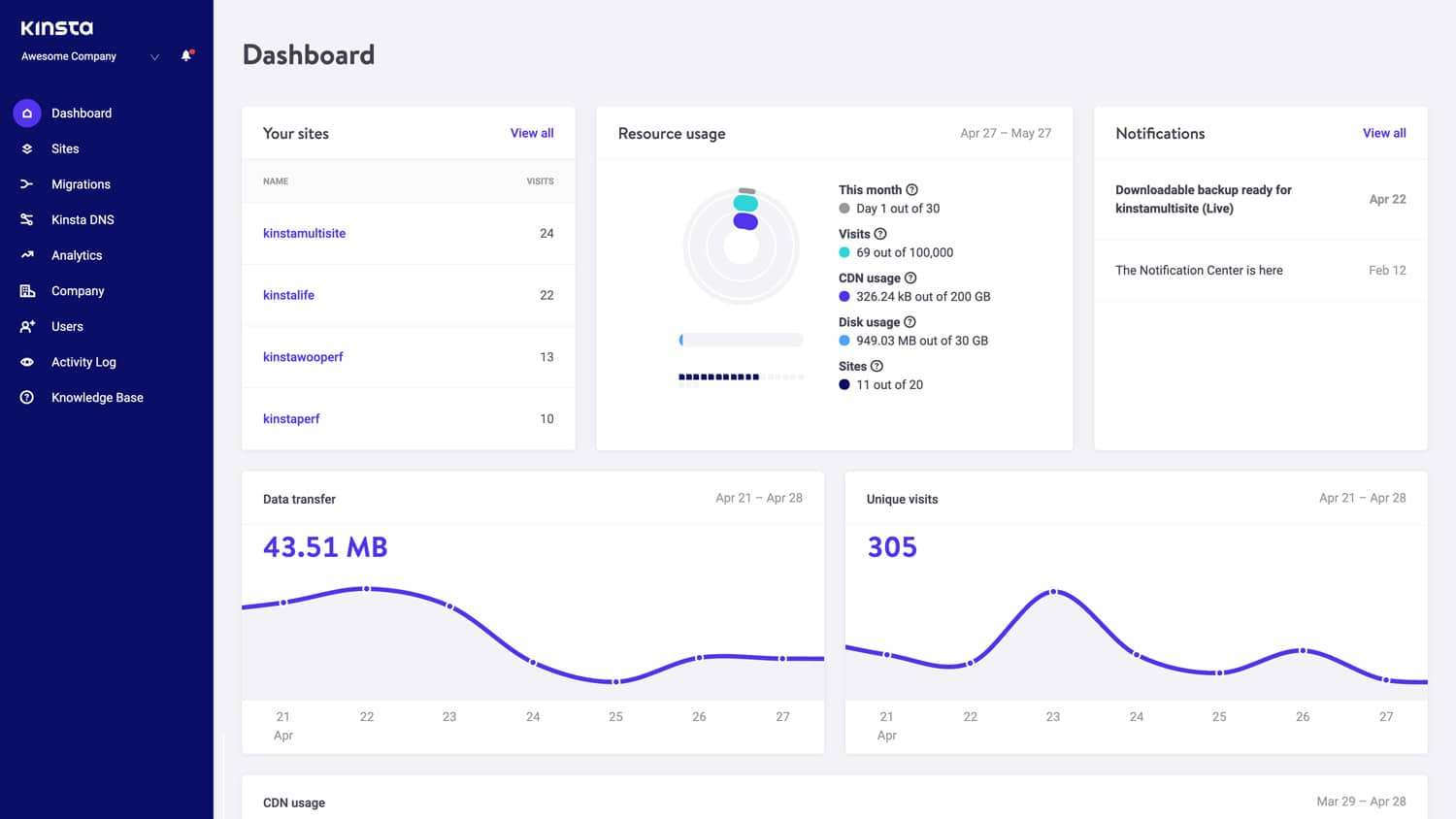
Third, Kinsta has built its own tooling rather than leaning on cPanel. The MyKinsta dashboard is purpose-built for the platform, and it is one of the reasons Kinsta feels different to use day to day. The software experience is a real part of the product, not an afterthought.
The core service
At its heart, Kinsta is a managed hosting platform, and “managed” is doing a lot of work in that sentence. When you host a WordPress site with Kinsta, a long list of things are handled for you: server-level caching, automatic daily backups, free SSL certificates, security monitoring and hack fixes, and the underlying scaling and maintenance of the environment.
Every managed WordPress plan includes staging environments, so you can clone your live site, test changes or updates safely, and push to production when you are confident. This alone saves a huge amount of stress for anyone who has ever broken a live site with a bad plugin update. You also get the MyKinsta analytics view, which surfaces real-time and historical data on performance, resource usage, and visitor traffic in a clean interface.
MyKinsta deserves a specific mention because it is consistently praised. Instead of the sprawling, dated feel of traditional control panels, MyKinsta gives you a modern dashboard where backups, staging, CDN settings, domains, and analytics all live in one coherent place. For people who found cPanel intimidating, this is a breath of fresh air; for developers, the workflow tools and Git-friendly deployment options make it productive rather than limiting.
Kinsta has also expanded well beyond WordPress. Its Application Hosting supports a wide range of languages and frameworks, including Node.js, PHP, Ruby, Python, Java, and Go, with deployment straight from GitHub, GitLab, or Bitbucket and orchestration handled by Google Kubernetes Engine under the hood. Its Database Hosting lets you spin up managed, containerized databases in minutes across a large set of data center locations, with no shared resources. Together these turn Kinsta from a pure WordPress host into a broader cloud platform, all fronted by the same Cloudflare layer and the same MyKinsta experience.
Plans & pricing
Kinsta’s pricing is straightforward in structure but unapologetically premium. There is no $2 or $3 loss-leader tier here. Instead you pay for managed infrastructure, and the plans are organized around how many sites you run and how much traffic you expect. Annual billing typically gives you roughly two months free compared with paying monthly, so committing for a year is the standard way to get the best rate.
Managed WordPress tiers
The managed WordPress lineup scales by number of WordPress installs, monthly visits, and storage. Entry plans are built for a single site with a modest visit allowance and a fixed amount of SSD storage, and they still include the full feature set: CDN, staging, daily backups, free SSL, and support. From there, higher tiers add more sites, larger visit allowances, more PHP workers, and additional storage, moving up through business-oriented plans and into enterprise plans designed for high-traffic properties. Agencies managing large client portfolios can arrange custom arrangements. The key thing to understand is that visits and storage are metered, so choosing the right tier is about matching your real traffic rather than picking the cheapest option and hoping.
Application Hosting
Application Hosting is priced differently, in a more usage-based, resource-oriented way that fits how modern apps are deployed. You choose the build and runtime resources your application needs, connect a Git repository, and pay for the compute you use. This flexibility makes it a fit for developers who want to run custom apps on the same premium Google Cloud infrastructure without managing the underlying Kubernetes themselves.
Database Hosting
Database Hosting is similarly resource-based. You pick a database engine, choose a data center location, and configure the resources you need, then pay according to that configuration. Because each database is containerized with dedicated resources rather than shared, performance is predictable, which matters a great deal for apps where the database is the bottleneck.
Across all of these, the 30-day money-back guarantee gives you a real window to test performance and support before committing. If Kinsta is not right for you, you can request a refund within that period. You can check Kinsta plans to see the current tiers and pick the one that matches your traffic.
How to get the best value
Because Kinsta is premium, getting good value is mostly about not overpaying for headroom you do not need and not underbuying and hitting caps. A few practical tips:
- Right-size to real traffic. Look at your actual monthly visits from analytics rather than guessing. Starting on a plan that comfortably fits today’s traffic and upgrading as you grow is cheaper than paying for enterprise headroom prematurely.
- Commit annually. The annual billing discount effectively gives you a couple of months free each year, which meaningfully lowers the true monthly cost.
- Use the free migrations. Kinsta offers migrations, so you do not have to pay a developer to move your site or risk downtime doing it yourself.
- Lean on the included Cloudflare and CDN. Since the enterprise Cloudflare integration is bundled, you can drop any separate CDN or security subscriptions you may be paying for elsewhere.
- Test during the 30-day window. Run your real site, push some traffic, and open a few support tickets so you can judge speed and service before the guarantee period ends.
Done well, the “expensive” label softens: you consolidate hosting, CDN, security, staging, and backups into one bill, on faster infrastructure.
Watch: Kinsta in action
If you would rather see the platform and hear an independent take before reading further, this video walks through what Kinsta offers and how it feels to use.
Kinsta vs alternatives
Kinsta does not exist in a vacuum. Two of the most common alternatives people weigh are SiteGround and Cloudways. Here is how they compare at a high level.
| Provider | Best for | Key trade-off |
|---|---|---|
| Kinsta | Premium managed WordPress on Google Cloud with top-tier support and dashboard | Higher price and metered visits/storage; WordPress-focused with no email hosting |
| SiteGround | Beginners and smaller sites wanting an easier entry price and general-purpose hosting | Great starting point, but can feel constrained as traffic and resource needs scale up |
| Cloudways | Developers and advanced users who want cloud flexibility and more resources per dollar | More configuration and cloud knowledge required; less hand-holding than Kinsta |
The pattern is fairly consistent across independent tests: Kinsta and Cloudways both land in the “fast” category with very close time-to-first-byte figures, while SiteGround is the friendlier on-ramp for beginners. Kinsta’s edge is the combination of speed, the best-in-class MyKinsta dashboard, and support that reviewers repeatedly highlight. Cloudways tends to give you more raw server resources per dollar if you are comfortable managing more yourself.
Performance, support & value
Performance is where Kinsta earns much of its reputation. Sites benefit from server-level caching, edge caching through Cloudflare, and Google Cloud’s Premium Tier network, and the practical result is fast, consistent page loads. Kinsta also backs its infrastructure with a 99.9% uptime commitment, and its service level agreement includes credits if uptime falls short. For a business where downtime translates directly into lost revenue, that reliability is a large part of the value.
Support is the other pillar. Kinsta’s team is available 24/7 and is frequently cited as one of the best in the industry. The support is delivered through chat and tickets rather than phone, and it is available in multiple languages. In our reading of user feedback, the recurring theme is that agents are knowledgeable about WordPress specifically, so you are not stuck explaining basics to a generalist. That depth is a meaningful part of what you are paying for.
On value, the honest framing is this: Kinsta is not trying to be the cheapest, and it will never win a pure price comparison against budget hosts. What it offers instead is a bundle of premium infrastructure, enterprise Cloudflare, staging, backups, and elite support, delivered through excellent software. For projects where speed, uptime, and time saved matter more than shaving a few dollars, that bundle is very reasonably priced. For a hobby blog with little traffic, it is likely more than you need.
Who should use it — and who should not
Kinsta is an excellent fit if you run a business website, an online store, a high-traffic blog, or a portfolio of client sites, and you value reliability and support over rock-bottom pricing. It is also a strong choice for developers who want managed application and database hosting on premium cloud infrastructure without operating Kubernetes themselves. If your site earns money, or its downtime costs you customers, Kinsta’s stability and support usually justify the premium.
It is probably not the right choice if you are launching a small personal blog on a tight budget, if you need bundled email hosting from your provider, or if you want general-purpose hosting for non-WordPress sites outside the application and database offerings. In those cases a cheaper general host or a more budget-friendly managed option will serve you better without leaving value on the table.
Honest limits
No review is complete without the caveats, and Kinsta has real ones. The most obvious is price: there is no cheap intro tier, and the monthly cost is higher than mainstream shared hosting. Second, plans are metered by monthly visits and storage, so a sudden traffic spike or a media-heavy site can push you toward an upgrade sooner than you expected; you need to watch your usage. Third, Kinsta does not offer email hosting at all, so you must run your professional email through Google Workspace or a comparable service. Fourth, support is chat and ticket based rather than phone, which suits most people but not everyone. Finally, the managed WordPress product is, by design, WordPress-focused; if you want to host arbitrary non-WordPress sites, you are looking at the separate application and database products rather than a traditional cPanel-style general host. None of these are dealbreakers for the right customer, but they are worth knowing before you commit.
Kinsta discount codes & deals
Kinsta’s most reliable “deal” is not a flashy coupon but its structural pricing: choosing annual billing effectively gives you around two months free versus paying month to month, and free migrations save you the cost and risk of moving your site yourself. Combined with the bundled Cloudflare enterprise integration, staging, and backups, the effective value is higher than the sticker price suggests once you account for the services you would otherwise buy separately. Best of all, the 30-day money-back guarantee lets you try the whole platform with essentially no risk.
If you are ready to move forward, the smartest step is to look at the live tiers and match one to your real traffic. Check Kinsta plans and get started, test it during the 30-day guarantee window, and see whether the performance and support live up to the reputation for your specific site.
Frequently asked questions
Is Kinsta worth the higher price?
For business sites, stores, agencies, and high-traffic blogs, yes. You are paying for premium Google Cloud infrastructure, enterprise Cloudflare, staging, backups, and support that consistently ranks among the best. For a low-traffic hobby site, a cheaper host is likely more sensible.
Does Kinsta offer a free trial or money-back guarantee?
Kinsta offers a 30-day money-back guarantee. That gives you a genuine window to test performance and support, and to request a full refund within the period if it is not the right fit.
Does Kinsta include email hosting?
No. Kinsta does not provide email hosting and recommends using Google Workspace or a similar dedicated email service for professional email.
What infrastructure does Kinsta run on?
Kinsta runs on Google Cloud Platform using Google Cloud’s Premium Tier network, and every plan includes an enterprise-level Cloudflare integration providing a global CDN, edge caching, and security features.
Can Kinsta host non-WordPress applications?
Yes. Beyond managed WordPress, Kinsta offers Application Hosting for languages and frameworks like Node.js, PHP, Ruby, Python, Java, and Go, plus managed Database Hosting, all on the same premium infrastructure.
How does Kinsta compare to Cloudways and SiteGround?
Kinsta and Cloudways both perform in the top tier for speed, with Kinsta offering a more polished managed experience and Cloudways offering more raw resources per dollar for hands-on users. SiteGround is friendlier for beginners and cheaper to start, but can feel constrained as you scale.
What happens if I exceed my visit limit?
Kinsta meters monthly visits by plan. If you consistently exceed your allowance, you will be prompted to move to a higher tier that fits your traffic. Monitoring your usage in MyKinsta helps you upgrade at the right time rather than being caught off guard.
What managed WordPress hosting is (and why it matters)
If you are newer to this space, it helps to understand what “managed WordPress hosting” actually means, because it explains why a company like Kinsta can charge more than a basic shared host. With ordinary shared hosting, you rent a slice of a server and you are largely responsible for keeping WordPress healthy: updates, caching, security, backups, and performance tuning are your problem, and when something breaks, you are often on your own.
Managed WordPress hosting flips that model. The host optimizes the entire environment specifically for WordPress and takes over the operational burden. That typically includes server-level caching tuned for WordPress, automatic core and security updates, daily backups, malware scanning and hack remediation, staging environments for safe testing, and a support team that understands WordPress deeply rather than generically. In effect, you are outsourcing the sysadmin and maintenance work so you can focus on your content, your store, or your clients.
The trade-off is cost and, sometimes, flexibility: managed hosts often place limits around what you can install or how you tune the server, precisely because those constraints let them keep every site fast and secure. For most business owners that is a fair deal. Kinsta is a flagship example of this philosophy done well: premium infrastructure, strong tooling, and support that removes the operational headaches so your site simply works.
If that model fits how you want to run your site, the next move is simple: check Kinsta plans, pick a tier that matches your traffic, and use the 30-day guarantee to see whether the performance and support are worth the premium for you.