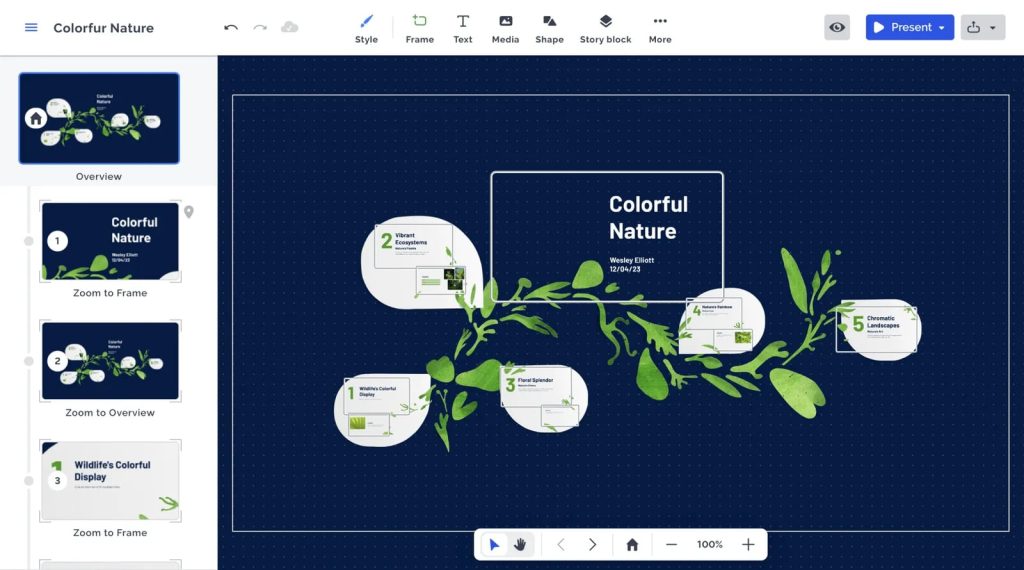
When it comes to creating presentations that stand out, most buyers ask themselves a fundamental question: “Will Prezi help me convey my ideas more dynamically without a steep learning curve?” The answer isn’t a simple yes or no, because it depends on how you plan to use the tool, the type of content you produce, and how much you value visual storytelling over traditional slide decks.
In this review we break down the user experience, feature set, pricing, and the real-world pros and cons of Prezi. Our goal is to give you a balanced view so you can decide whether the platform is worth the time and money for your specific needs.
Our Verdict – AnalyzeBench Score: 8.2 / 10
Best for: Creatives, educators, and marketers who want a non‑linear, visually engaging presentation format.
What we loved: The zoom‑based canvas that lets you move fluidly between ideas, and the collaboration tools that make teamwork a breeze.
Watch out for: The occasional performance lag on older devices and a pricing structure that can become pricey for larger teams.
What makes Prezi different
Prezi’s core differentiator is its canvas‑based approach. Instead of a series of linear slides, you work on an infinite canvas where each “frame” can be placed anywhere. This design encourages a storytelling mindset: you zoom in on details, pull back for context, and create a spatial relationship between ideas that a traditional slide deck can’t easily replicate.
The platform also emphasizes collaborative editing. Multiple users can edit a presentation in real time, comment, and leave feedback directly on the canvas. Integration with cloud storage services such as Google Drive and Dropbox simplifies file management, and an extensive template library provides a starting point for users who lack design experience.
Another notable feature is the analytics dashboard, which tracks viewer engagement—how long viewers spent on each part of the presentation, which sections they re‑watched, and where they dropped off. This data can be valuable for sales teams and educators looking to fine‑tune their messaging.
Prezi — photo 1
The star product
Prezi’s flagship offering, often referred to as “Prezi Present,” is the all‑in‑one solution for creating and sharing interactive presentations. It includes the full canvas editor, a library of professionally designed templates, and the ability to publish presentations online, embed them on websites, or download them for offline use.
Key capabilities include:
Zoomable canvas: Seamlessly transition between topics with animated zooms.
Rich media support: Embed videos, PDFs, charts, and audio directly on the canvas.
Live collaboration: Real‑time editing, commenting, and version history.
Presenter view: Private notes, a timer, and a preview of upcoming frames.
Analytics: Insight into how audiences interact with your presentation.
For most individual users, Prezi Present covers the essential needs. It’s also the most frequently chosen plan for small businesses that want an engaging way to showcase products or pitches.
Prezi — photo 2
The rest of the range
Prezi Video
Prezi Video allows you to record yourself speaking while a Prezi canvas appears alongside you on screen. This is a great tool for webinars, virtual sales demos, and educational content because it merges the presenter’s face with dynamic visuals. The integration with Zoom, Microsoft Teams, and other video platforms makes it a practical addition for remote teams.
Prezi Design
Prezi Design expands the visual toolkit beyond presentations. It offers templates for infographics, reports, social media graphics, and newsletters. The drag‑and‑drop editor is similar to Canva, but the design assets are fully integrated with the Prezi ecosystem, allowing you to repurpose graphics across presentations and videos.
Prezi Business
Targeted at larger teams, Prezi Business bundles the core presentation tools with advanced admin controls, single sign‑on (SSO) integration, and deeper analytics. It also includes priority support and the ability to enforce brand guidelines across all user‑created content.
Prezi — photo 3
How to choose
Choosing the right Prezi plan hinges on three primary considerations:
Purpose of the content: If you primarily need dynamic presentations, Prezi Present is sufficient. For video‑centric communication, add Prezi Video.
Team size and collaboration needs: Solo users can thrive on the standard plan, while teams of five or more will benefit from the Business tier’s admin features.
Budget constraints: Weigh the value of advanced analytics and premium support against the recurring cost of the higher‑tier plans.
Take note of the platform’s performance on your typical devices. If you or your audience frequently use older laptops or low‑end tablets, test a live presentation beforehand to ensure smooth zoom transitions.
Prezi vs the alternatives
Feature
Prezi
PowerPoint / Google Slides / Keynote
Canvas layout
Infinite, zoom‑able canvas
Linear slide‑by‑slide
Real‑time collaboration
Native, multi‑user editing
Google Slides: strong; PowerPoint: limited; Keynote: basic
Embedded video presenter
Prezi Video integration
Requires third‑party tools or workarounds
Analytics
Viewer engagement metrics
Basic view counts (Google Slides) or none (PowerPoint, Keynote)
Offline access
Downloadable PDFs/EXE, but full zoom features need internet
Full offline editing and playback
Learning curve
Moderate – canvas navigation takes time
Low – familiar slide paradigm
Price and value
Prezi’s pricing follows a subscription model with monthly or annual billing cycles. The basic individual plan offers the core presentation features and a modest amount of cloud storage. Upgrading to the Pro tier adds advanced analytics, premium templates, and the ability to brand presentations with custom logos and colors. For teams, the Business plan introduces admin controls, SSO, and priority support.
While the exact numbers can vary by region and promotional periods, the value proposition is strongest for users who truly leverage the zoom‑based storytelling and the integrated video features. If you only need static slides, a traditional slide deck tool may provide a more cost‑effective solution.
Who should buy — and who should skip it
Buy if you are:
A marketer or sales professional seeking to make pitches more memorable.
An educator who wants to create interactive lessons that keep students engaged.
A creative team that values collaborative design and wants analytics on viewer interaction.
Skip if you are:
Someone who only needs straightforward bullet‑point slides for internal meetings.
A user with limited internet bandwidth, as the full zoom experience relies on a stable connection.
Someone whose organization already has a deep investment in another suite (e.g., Microsoft 365) and prefers to stay within that ecosystem.
Honest limits
Prezi’s visual strengths can also become its Achilles’ heel. The canvas can feel overwhelming for new users, and the learning curve may deter those who need to produce a presentation quickly. Performance is another area of concern: on lower‑end hardware, the zoom animations can stutter, which may distract the audience.
In terms of export options, while you can download a PDF, the dynamic zoom effects are lost, limiting offline sharing. The platform also relies heavily on an internet connection for full functionality, so remote presentations in bandwidth‑restricted environments may suffer.
Prezi discount codes and deals
If you’re ready to give Prezi a try, keep an eye on seasonal promotions and educational discounts that can shave a few percent off the subscription fee. Many partners also offer bundled deals that include access to Prezi Design or additional storage.
When shopping for a presentation platform like Prezi, it’s easy to fall into familiar traps that end up costing time, money, or both. Below are the most frequent missteps we see, along with a brief explanation of why they matter.
Focusing solely on visual flair. Many buyers are dazzled by Prezi’s dynamic zoom‑in/zoom‑out effects and assume that a flashy design guarantees a better presentation. In reality, the effectiveness of a deck depends on clarity, storytelling, and audience relevance—not just on eye‑catching animations.
Over‑estimating the learning curve. Some users think they’ll need weeks of training to become proficient, only to discover that Prezi’s interface is quite intuitive for most. Conversely, others underestimate the time required to master advanced features like custom paths and interactive elements, leading to frustration when deadlines loom.
Ignoring collaboration needs. Prezi offers real‑time co‑authoring, but buyers often purchase the most basic plan without checking whether it supports the number of collaborators they need. This can result in having to upgrade later, disrupting workflow and inflating costs.
Neglecting offline access. Presenters who travel frequently or work in venues with spotty internet sometimes forget to verify that their chosen plan includes offline viewing. Without this, a reliable presentation can suddenly become impossible.
Choosing based on price alone. While the free tier is tempting, it comes with watermarks and limited storage. Some buyers jump straight to the cheapest paid tier, only to discover that essential features—like analytics, custom branding, or advanced export options—are locked behind higher‑level plans.
Skipping a trial run. Many skip the free trial or demo, assuming the platform will work “out of the box.” A short test run often reveals compatibility issues with existing media assets, integration quirks with other tools, or performance hiccups on specific hardware.
Under‑estimating support needs. Not all plans include priority support. Buyers who anticipate heavy usage or have complex deployment scenarios should verify the level of assistance they’ll receive before committing.
By keeping these pitfalls in mind, you can make a more informed decision and avoid costly surprises after purchase.
How we evaluate
Our assessment of Prezi follows a rigorous, multi‑dimensional framework designed to capture both the quantitative and qualitative aspects of the platform. We blend hands‑on testing with research into user feedback, industry benchmarks, and feature roadmaps. Below is a breakdown of the key criteria we consider.
Usability & onboarding. We measure how quickly a new user can create a basic presentation, the clarity of tutorials, and the intuitiveness of the drag‑and‑drop interface. This includes testing the mobile and desktop experiences.
Feature depth. We inventory core capabilities (templates, zoom paths, animations) and advanced tools (interactive hotspots, data visualizations, integrations with CRM or LMS platforms). Each feature is scored on its flexibility, customization options, and performance impact.
Collaboration & sharing. We evaluate real‑time co‑authoring, comment threads, version history, and permission controls. The ease of exporting to PDF, PowerPoint, or HTML5 and the reliability of sharing links are also examined.
Performance & reliability. Using a range of devices and network conditions, we test load times, rendering smoothness during zoom sequences, and stability under heavy media loads (high‑resolution images, embedded video).
Integration ecosystem. We look at native connections to popular tools such as Google Workspace, Microsoft 365, Slack, and learning management systems. The availability of APIs or Zapier workflows is also factored into the score.
Pricing structure. We compare plan tiers, feature gating, and the cost‑per‑user ratio against industry benchmarks. Hidden fees, renewal price changes, and the value of included storage are scrutinized.
Customer support & community. Response times, availability of live chat, phone support, and the richness of self‑service resources (knowledge base, video tutorials, community forums) are rated.
Security & compliance. We verify encryption standards, data residency options, GDPR compliance, and any certifications (ISO 27001, SOC 2) that are relevant for enterprise users.
Future‑proofing. We assess the vendor’s product roadmap, frequency of updates, and commitment to emerging presentation trends such as AR/VR integration or AI‑driven design assistance.
Each category receives a weighted score, and the aggregate determines our final recommendation. This systematic approach ensures that our evaluation reflects real‑world usage scenarios and aligns with the diverse needs of both individual creators and large organizations.
Frequently asked questions
What devices does Prezi run on?
Prezi is a web‑based application, so it works on any modern browser across Windows, macOS, and Linux. There are also native apps for iOS and Android that let you view presentations on the go.
Can I import PowerPoint files into Prezi?
Yes. Prezi offers an import tool that converts PowerPoint decks into its canvas format, preserving most text and images while allowing you to enhance them with zoom effects.
Is there a free version of Prezi?
Prezi provides a limited free tier that lets you create and share presentations publicly. It includes a watermarked canvas and a smaller set of templates, making it a good option for experimenting before committing to a paid plan.
How does collaboration work?
Multiple users can edit a presentation simultaneously, with changes syncing in real time. You can also leave comments on specific frames, assign tasks, and view a detailed edit history.
Do presentations work offline?
You can export a presentation as a PDF for static offline viewing, but the interactive zoom features require an internet connection. Some paid plans allow a limited offline mode that caches the presentation on the device.
What kind of customer support does Prezi offer?
All paid subscribers receive email support, while Business‑level customers get priority chat and phone assistance. The help center also includes a robust library of tutorials and community forums.
A buyer’s closing guide
To wrap up, consider the following checklist before signing up for Prezi:
Identify the primary purpose of your presentations—storytelling, data‑driven, or video‑centric?
Test the free version to see if the canvas workflow fits your style.
Check device compatibility for yourself and your audience.
Compare the total cost of ownership against alternative tools you already use.
Look for seasonal discounts or educational offers if you qualify.
When the benefits of dynamic zooming, real‑time collaboration, and built‑in analytics outweigh the extra learning curve and subscription cost, Prezi becomes a powerful asset for elevating your visual communication.