
If you have spent any time in WordPress speed circles, you have almost certainly bumped into Rocket.net. It is the host that gets name-dropped whenever someone posts a jaw-dropping GTmetrix or PageSpeed score and says, “I barely optimized anything.” The reason is simple: Rocket.net bundles Cloudflare Enterprise into every plan, so your site is served from a global edge network that most hosts either charge a fortune for or cannot offer at all. But raw speed is only part of the story, and a host that looks perfect in a benchmark screenshot can still be the wrong fit for your project.
In this review I walk through what Rocket.net actually is, how the plans and pricing break down, where it genuinely shines, and the real trade-offs you should weigh before moving your site. I have kept it honest: the caps, the WordPress-only limitation, and the pricing floor all get airtime alongside the praise, so you should have a clear yes-or-no by the end.
AnalyzeBench Score: 8.7 / 10
Best for: Bloggers, agencies, and business owners who run WordPress (and only WordPress), care about page speed and security, and want an almost hands-off managed experience without configuring a CDN themselves.
What we loved:
- Cloudflare Enterprise baked into every plan, including the entry tier, delivering genuinely fast global load times out of the box.
- A clean, purpose-built control panel that makes staging, backups, and site creation almost trivial.
- 24/7 support staffed by WordPress specialists with response times measured in minutes, not hours.
- Serious security stack: enterprise WAF, real-time malware scanning, and on-demand malware removal at no extra charge.
- Transparent pricing with no renewal price hikes and free unlimited migrations so you can test before committing.
Watch out for:
- Storage and bandwidth caps on the lower plans are modest and overages are billed per gigabyte.
- Entry pricing sits well above shared hosting, so it is overkill for a tiny hobby site.
- WordPress only, and no email hosting, so you will need Google Workspace or similar for mail.
- Membership and heavily logged-in sites cannot lean on edge caching for their most active users.
What makes Rocket.net different
Most managed WordPress hosts follow a familiar recipe: fast NVMe servers, a caching layer, automatic backups, and a friendly dashboard. Rocket.net does all of that, but its defining move is putting Cloudflare Enterprise in front of every single site, on every plan, including the cheapest one. That matters more than it sounds. Cloudflare Enterprise is normally a five-figure annual commitment that only large companies negotiate directly. By partnering at the platform level, Rocket.net hands you the enterprise edge, the enterprise-grade web application firewall, argo-style smart routing, and image and content optimization without you ever touching a Cloudflare dashboard.
The practical result is that your content is cached and served from a network spanning hundreds of edge locations worldwide. A visitor in Sydney and a visitor in Frankfurt both hit a nearby node rather than waiting on a single origin server on the other side of the planet. Time to first byte drops dramatically, and because static assets are served from the edge, your origin barely breaks a sweat under traffic spikes. This is the mechanism behind all those impressive speed screenshots, and it is real rather than marketing fluff.
The second thing that sets Rocket.net apart is focus. It does one thing, WordPress, and refuses to dilute that. There is no generic cPanel, no attempt to also host Laravel apps or static sites or email. Every layer of the stack, from the caching rules to the support team’s expertise, is tuned for WordPress specifically. For some people that laser focus is a limitation; for the target audience it is exactly the point.
The core service
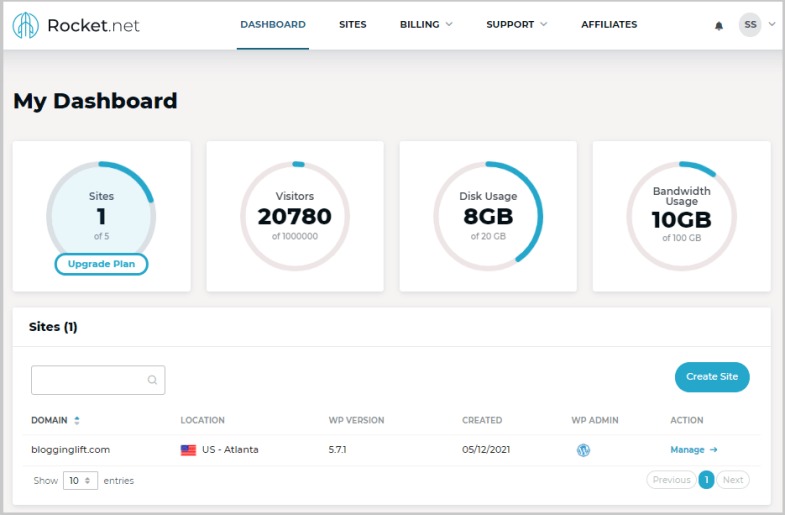
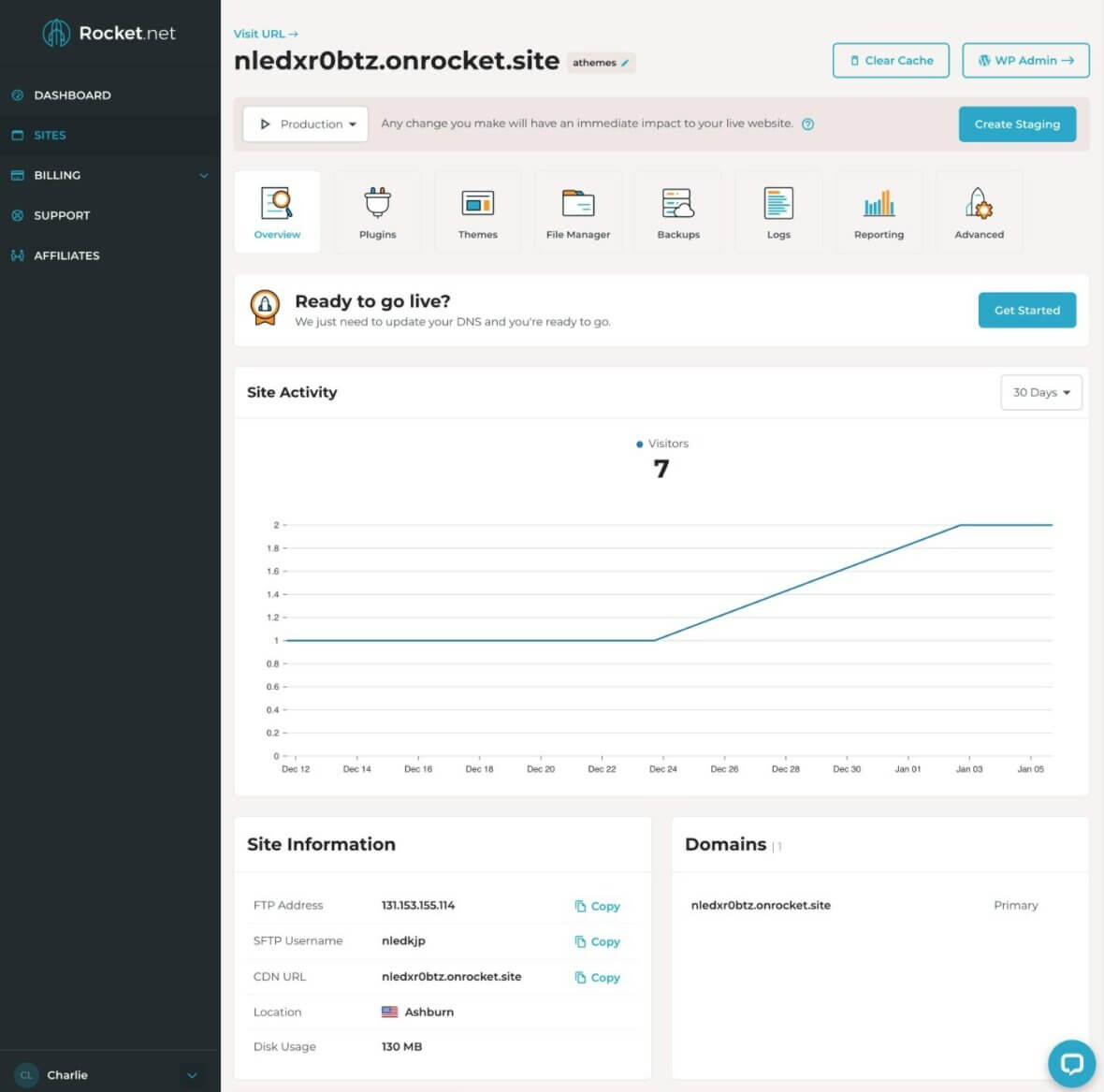
At its heart Rocket.net is a fully managed WordPress platform. You do not manage a server, patch an operating system, or configure NGINX. You log into a custom control panel the company calls Mission Control, spin up a WordPress install in under a minute, and start building. The managed layer handles the parts most people would rather not think about.
Caching is the headline feature, but the security suite is nearly as important. Every site sits behind an enterprise WAF at the network layer, plus a server-level firewall and a malware scanner that inspects files in real time. If something does slip through, Rocket.net offers on-demand hack and malware cleanup rather than pointing you to a third-party service. Free SSL certificates are provisioned automatically, and SFTP and SSH access are available for developers who want to work closer to the metal.
Around that core you get the conveniences that define good managed hosting: automated daily backups with 30-day retention, one-click staging environments so you can test changes safely, and free unlimited migrations handled by the Rocket.net team. Two premium plugins that many people pay for separately, WP Rocket for page-level caching tweaks and WP Umbrella for monitoring and maintenance, are included at no extra cost. It is a well-rounded package where the expensive, fiddly pieces are already done for you.
Plans & pricing
Rocket.net splits its lineup into three families: standard Managed Hosting for individuals and small businesses, Agency Hosting for people managing many client sites, and high-end Enterprise plans for large-volume operations. Every standard plan carries a 30-day money-back guarantee, a $1 first-month intro offer, and, notably, no price increase on renewal. Annual billing knocks off two months compared to paying monthly. The figures below reflect current published rates and can change, so confirm on the pricing page before you buy.
Starter
The entry plan runs $30/month, or the equivalent of roughly $25/month on annual billing. It covers a single WordPress install with 10GB of storage and 50GB of bandwidth, unmetered visits, unlimited PHP workers, and the full Cloudflare Enterprise CDN, WAF, and malware protection. For one well-optimized site this is often plenty, and it is the plan most solo bloggers and small business owners start on.
Pro
Pro sits at $60/month, or about $50/month annually. It bumps you to three WordPress installs, 20GB of storage, and 100GB of bandwidth. This is the sweet spot for freelancers or small studios juggling a couple of projects, or anyone who wants headroom beyond a single site without jumping to a business tier.
Business
The Business plan is $100/month, roughly $83/month on annual billing, and it is marked as the popular choice. You get 10 WordPress installs, 40GB of storage, and 300GB of bandwidth. For a growing agency or a content site with real traffic, the higher bandwidth ceiling and larger install count make this the practical workhorse tier.
Expert
Expert costs $200/month, about $166/month annually, and raises you to 25 WordPress installs, 50GB of storage, and 500GB of bandwidth. It is aimed at agencies managing a sizeable client roster who want ample resources under one account.
Above these sit the Agency Hosting tiers, which layer in an agency toolkit and scale installs and resources much higher, and the Enterprise plans, which start at $649/month and climb to $2,599/month for dedicated CPU cores, large RAM allocations, NVMe storage measured in terabytes, Object Cache Pro, and private Slack plus phone support. Most readers of this review will live comfortably in the standard four plans. If you outgrow them, the ladder keeps going. Check Rocket.net for the latest tier-by-tier details.
How to get the best value
The single biggest lever is annual billing. Paying yearly effectively gives you two months free versus month-to-month, which on the Business plan alone adds up to a meaningful saving over a year. If you are confident Rocket.net is your long-term home, commit annually.
The $1 first-month intro is a genuinely low-risk way to test the platform with your real site rather than a demo. Combine that with the free migration service and the 30-day money-back guarantee, and you can move your live site over, benchmark it properly, and still walk away at no cost if it does not deliver. Use that window deliberately: run before-and-after speed tests, check your slowest pages, and confirm your plugins behave.
On plan selection, be honest about your storage and bandwidth. Because overages are billed per gigabyte, a site with heavy media or a lot of traffic can quietly cost more than the sticker price if you cling to a plan that is too small. Finally, lean on the included extras. WP Rocket and WP Umbrella come free, so activate them rather than paying for competing plugins elsewhere.
Watch: Rocket.net in action
If you want to see the control panel and setup flow before committing, this walkthrough covers the beginner experience end to end.
Rocket.net vs alternatives
Rocket.net competes most directly with Kinsta and WP Engine, two of the best-known premium managed WordPress hosts. All three are fast and well-supported, but they position differently on price and on how they deliver global performance. The table below sketches the broad picture; exact plan details shift over time, so treat it as a starting point.
| Factor | Rocket.net | Kinsta | WP Engine |
|---|---|---|---|
| Edge / CDN | Cloudflare Enterprise on every plan, hundreds of edge locations | Cloudflare-powered CDN with global edge caching | Global CDN with edge caching, enterprise options higher up |
| Entry price | Lower entry point for an enterprise-CDN plan | Higher starting price | Higher starting price |
| Focus | WordPress only | WordPress only | WordPress (plus adjacent products) |
| Support | 24/7 chat and tickets, minutes-fast | 24/7 chat, strong reputation | 24/7 chat and phone on higher tiers |
| Email hosting | Not included | Not included | Not included |
The short version: Rocket.net’s pitch is that you get an enterprise edge network for less than the traditional premium hosts charge, while matching them on management quality and support. Kinsta and WP Engine have longer track records and broader ecosystems, but neither undercuts Rocket.net on delivering Cloudflare Enterprise at the entry level. If edge performance per dollar is your priority, Rocket.net is hard to beat. Check Rocket.net to compare against your current host.
Performance, support & value
Performance is the reason most people land on Rocket.net, and it lives up to the reputation. Because static content is served from the Cloudflare edge, time to first byte is consistently low no matter where your visitors are, and the platform holds up under traffic bursts that would strain a single-origin setup.
Support is the other pillar. Every plan includes 24/7/365 access to a team of WordPress specialists via live chat and tickets, and the response times are genuinely fast, often within a few minutes.
On value, the calculus depends entirely on your site. If you would otherwise be paying separately for a premium CDN, a security suite, WP Rocket, and monitoring, then bundling all of it into one managed plan makes Rocket.net look like a bargain. If you run a small, low-traffic site that a $10 shared plan would serve fine, the value proposition evaporates. Rocket.net is priced and built for people who treat their WordPress site as a serious asset.
Who should use it — and who should not
Rocket.net is an excellent fit for a specific set of people. Bloggers and content creators with real, global audiences benefit enormously from the edge caching. Agencies managing multiple client sites get a clean multi-site dashboard, staging, and fast support that reduces their own workload. Business and WooCommerce site owners who need speed, uptime, and security without hiring a sysadmin get exactly that. If page speed directly affects your revenue or your rankings, this is squarely your kind of host.
It is not the right choice for everyone. If you are launching a personal hobby blog with a handful of visitors, the entry price is more than you need to spend. If your project is not WordPress, Rocket.net simply cannot host it. And if you run a membership site or forum where the majority of your traffic is logged in, you should temper your speed expectations, because edge caching cannot fully accelerate personalized, logged-in pages the way it accelerates public content.
Honest limits
No host is perfect, and Rocket.net has a few genuine constraints worth naming plainly. The storage allowances on the lower plans are modest; 10GB on Starter and 20GB on Pro fill up faster than you might think if you host a lot of images or video. Bandwidth is capped too, and overages are billed per gigabyte, so a traffic spike or a media-heavy site can add to your bill if you are undersized. Sizing your plan correctly matters more here than on hosts with looser limits.
The WordPress-only policy is a hard line. There is no option to host a non-WordPress application, a static site, or anything else. Likewise, there is no email hosting at all, so you will need a separate provider such as Google Workspace for your mailboxes. Neither is a flaw exactly, they are deliberate scoping decisions, but they are limits you should plan around rather than discover after signing up.
Finally, the edge-caching model that makes Rocket.net so fast is optimized for content that can be cached. Highly dynamic, personalized, or logged-in experiences benefit less. If your site is mostly that kind of traffic, you are paying a premium for an advantage you will only partially use.
Rocket.net deals
The most attractive offer on the table is the $1 first-month intro pricing available across the standard plans, paired with a 30-day money-back guarantee and free unlimited migrations. Together they let you move your real site over, benchmark it against your current host, and decide with actual data rather than a promise. Annual billing then locks in the equivalent of two months free, and because Rocket.net does not raise prices on renewal, the rate you sign up at is the rate you keep. There is no manufactured countdown here, just a genuinely low-friction way to try a premium platform. If that sounds like the right test for your site, Check Rocket.net and start with the plan that matches your storage and traffic.
Frequently asked questions
Is Rocket.net really faster than other managed hosts?
For cacheable, public-facing content, yes, it is among the fastest available because every plan includes Cloudflare Enterprise edge delivery. The advantage is largest for sites with a geographically spread audience. Logged-in and highly dynamic pages benefit less because they cannot be fully served from the edge.
What does “unmetered visits” actually mean?
Rocket.net does not cap the number of visitors on its standard plans, which is unusual since many managed hosts charge by monthly visit counts. Your practical limits are storage, bandwidth, and PHP workers rather than a visitor ceiling, so a viral post will not automatically trigger overage fees on the visit metric.
Does Rocket.net include email hosting?
No. Rocket.net focuses purely on WordPress hosting and does not provide mailboxes. You will need a dedicated email service such as Google Workspace, Microsoft 365, or a specialist mail host for your domain email.
Can I host non-WordPress sites?
No. The platform is built and tuned exclusively for WordPress. If you need to host a static site, a custom application, or another CMS, you will need a different provider for those projects.
What happens if I exceed my storage or bandwidth?
You can upgrade to a larger plan, or Rocket.net will bill overages per gigabyte for storage and bandwidth. Fixed monthly add-ons at a discount are available if you consistently need more, but for most people upgrading a tier is the cleaner solution.
Is there a money-back guarantee?
Yes, the standard plans come with a 30-day money-back guarantee, so you can try the service risk-free within that window. Combined with the $1 first month and free migrations, it is a genuinely low-risk trial. Enterprise plans are the exception and are not covered by the guarantee.
Does Rocket.net handle migrations for me?
Yes. Free unlimited migrations are included, and the team handles moving your WordPress sites over from any provider. Most migrations complete well within a day, even for large sites, which makes testing the platform straightforward.
What makes WordPress hosting fast: a short primer
Since speed is the whole selling point here, it helps to understand what actually makes a WordPress site fast so you can judge any host on its merits. The first factor is time to first byte, the delay between a browser’s request and the first data coming back. Shorter physical distance to the server and effective caching both shrink it, which is exactly why an edge network with hundreds of global locations matters: your visitor talks to a nearby node instead of a distant origin.
The second factor is caching strategy. Every uncached page view forces WordPress to run PHP and query the database, which is slow. Good hosts cache full pages, cache database objects in memory, and serve static assets like images, CSS, and JavaScript from a CDN so the origin server does as little work as possible. When most requests are answered from cache at the edge, your site stays fast even under load.
The third factor is the underlying stack: modern PHP versions, fast NVMe storage, sensible PHP worker limits, and compression like Brotli for text assets all add up. Finally, security and speed are linked. A web application firewall that blocks malicious traffic before it reaches your server also protects your performance, because bots and attacks consume resources that would otherwise serve real visitors. A host that gets all of these right, as Rocket.net largely does, gives you a fast site without you having to become a performance engineer yourself. If that is the outcome you want with minimal fuss, Check Rocket.net and see how your own site benchmarks.