
When you’re looking for a content marketing platform that promises to streamline collaboration, publishing, and distribution, the first question is usually: “Can this tool actually deliver on its promises without turning my workflow into a nightmare?” StoryChief.io markets itself as an all‑in‑one hub for teams that want to plan, write, and push content to multiple channels from a single dashboard. For many marketers, the appeal is obvious, but the reality often hinges on how intuitive the interface is, how flexible the integration options are, and whether the pricing scales sensibly as your content needs grow.
In this review we’ll break down the core experience of using StoryChief.io, from onboarding to daily publishing, and we’ll weigh the genuine strengths against the practical limitations that real users encounter. The goal is to give you a clear picture of whether StoryChief.io fits your specific workflow, budget, and growth plans, without the hype that typically surrounds SaaS marketing claims.
Verdict
AnalyzeBench Score: 8.2 / 10
Best for: Teams that need a unified editorial calendar and multi‑channel publishing in one place.
What we loved: The drag‑and‑drop editorial calendar, built‑in SEO guidance, and the ability to push content to dozens of platforms without leaving the dashboard.
Watch out for: Limited customization on the free tier, and a learning curve for advanced automation features.

What makes StoryChief.io different
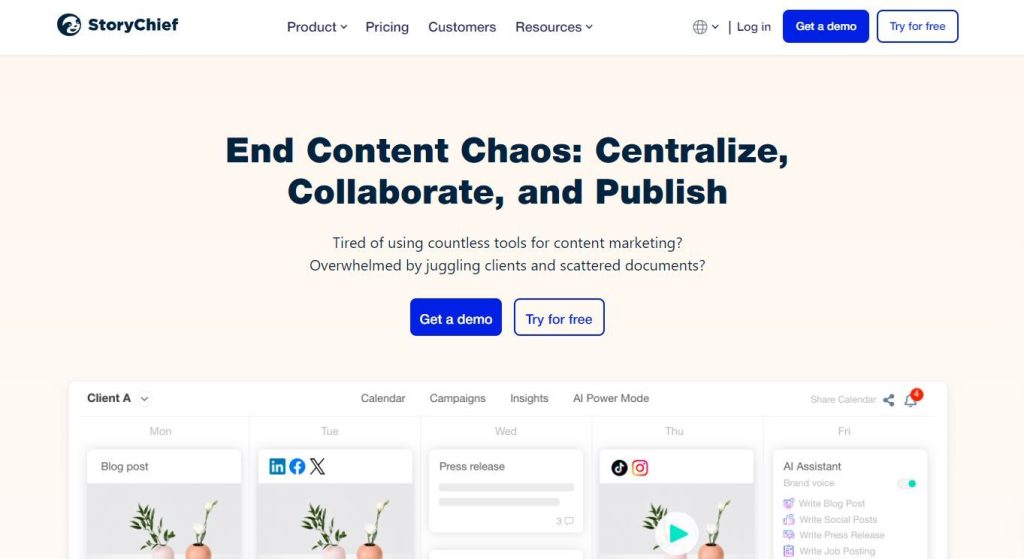
StoryChief.io positions itself as a “content hub for modern marketers,” but the differentiators go deeper than a catchy tagline. First, the platform combines an editorial calendar with a collaborative writing environment, meaning that writers, editors, and designers can all work on the same piece without toggling between separate tools. Second, StoryChief.io offers native integrations with a wide range of publishing destinations—including WordPress, Medium, LinkedIn, and even email newsletters—so you can publish once and distribute everywhere.
Another standout feature is the built‑in SEO assistant. As you type, the system provides real‑time suggestions on keyword usage, meta descriptions, and readability scores. This is more than a simple checklist; it pulls data from multiple search engines to give you a balanced view of how your content might perform. Finally, the analytics dashboard aggregates data from all connected channels, giving you a single pane of glass for measuring reach, engagement, and conversion metrics.
The star product
The flagship offering of StoryChief.io is its “Enterprise Publishing Suite.” This package bundles the core editorial calendar, collaboration tools, SEO assistant, and a full suite of integrations into one subscription. What makes this suite truly shine is the “Publish Once, Distribute Everywhere” workflow. After drafting an article, you can map it to each destination, customize the headline or excerpt per channel, and schedule the entire rollout in a single step. The platform also supports version control, so you can revert to earlier drafts if needed, and it tracks every change with a clear audit log—an essential feature for agencies handling multiple client brands.
Beyond basic publishing, the Enterprise suite includes advanced automation triggers. For example, you can set up a rule that automatically shares a newly published blog post to your company’s Twitter account, adds it to a weekly roundup email, and notifies your sales team via Slack. While the automation builder is visual and relatively easy to use, mastering it does require a bit of trial and error, especially when dealing with conditional logic across different platforms.

The rest of the range
Starter plan
The Starter plan is aimed at solo creators or very small teams. It provides access to the editorial calendar, basic SEO suggestions, and a limited set of integrations (WordPress, Medium, and LinkedIn). The biggest limitation is the cap on the number of published pieces per month, which can be a bottleneck for content‑heavy businesses. However, the plan is priced competitively for freelancers who need a central hub without the expense of an enterprise license.
Growth plan
The Growth plan expands on the Starter by unlocking additional integrations (such as HubSpot, Mailchimp, and Shopify), removing the publishing cap, and adding team permissions. This tier also introduces the “Content Hub” feature, allowing you to store and reuse assets like images, snippets, and templates across multiple projects. For medium‑sized teams, the Growth plan strikes a reasonable balance between cost and capability, though the UI can feel crowded when many team members are active simultaneously.
Agency bundle
Designed for agencies handling multiple client accounts, the Agency bundle adds white‑labeling options, client‑specific workspaces, and bulk user management tools. It also offers priority support and dedicated onboarding sessions. While the price point is higher than the Growth plan, the ability to segregate client data and maintain brand consistency across campaigns can justify the investment for agencies with a steady stream of content projects.
How to choose
Choosing the right StoryChief.io tier depends on three core factors: team size, publishing volume, and integration needs. If you’re a solo blogger, the Starter plan is likely sufficient—especially if you primarily publish to a single CMS. For growing teams that need to push content to email, social, and e‑commerce platforms, the Growth plan’s expanded integration list and unlimited publishing become essential. Agencies should weigh the value of white‑labeling and client workspaces against the higher cost of the Agency bundle.
Another practical consideration is your existing tech stack. StoryChief.io integrates via API keys or OAuth for most platforms, but some older systems may require custom connectors. It’s worth testing the integration during the free trial to ensure there are no hidden friction points. Finally, think about your reporting needs: the built‑in analytics are robust, but if you rely heavily on a third‑party BI tool, verify that the data export formats meet your requirements.
StoryChief.io vs the alternatives
| Feature | StoryChief.io | Competitor A (CoSchedule) | Competitor B (Contentful) |
|---|---|---|---|
| Unified editorial calendar | Yes, with drag‑and‑drop | Yes, but less visual | No, focuses on content modeling |
| Multi‑channel publishing | 30+ native integrations | 15+ integrations, relies on Zapier for many | Limited to headless CMS output |
| Built‑in SEO assistance | Real‑time suggestions | Basic keyword checklist | None, requires external plugins |
| Automation workflow builder | Visual, conditional logic | Simple triggers only | Requires custom development |
| White‑labeling for agencies | Available on Agency bundle | Not offered | Available but costly |
Price and value
StoryChief.io follows a tiered subscription model that scales with the number of users and the breadth of integrations. The Starter plan starts at a modest monthly rate, which is comparable to other solo‑creator tools on the market. The Growth plan adds a per‑user cost that becomes more economical as you add team members, especially when you factor in the savings from not having to purchase separate plugins for each publishing destination.
The Agency bundle is priced higher, but it bundles several services that agencies typically purchase separately—white‑labeling, client workspaces, and premium support. When you calculate the total cost of ownership—including the time saved by using a single dashboard for content planning, SEO, and distribution—StoryChief.io generally offers good value for teams that publish frequently across multiple channels.

Who should buy — and who should skip it
If you run a content‑heavy operation that requires tight coordination between writers, designers, and marketers, StoryChief.io can serve as the connective tissue that keeps everything aligned. Its strengths shine for teams that need to publish to a diverse set of platforms without juggling separate tools. On the other hand, if your workflow is simple—say, a single‑author blog that only publishes to WordPress—the platform’s extensive feature set may be overkill, and a lighter‑weight solution could be more cost‑effective.
Agencies that manage multiple client brands will appreciate the white‑labeling and client‑specific workspaces, while freelancers or very small teams might find the learning curve and subscription cost less justifiable. Additionally, organizations that rely heavily on a headless CMS architecture may prefer a platform that is built around that paradigm, as StoryChief.io’s strength lies in its multi‑channel publishing rather than deep content modeling.
Honest limits
Despite its many advantages, StoryChief.io isn’t without drawbacks. The free tier is quite limited, offering only a handful of integrations and a low monthly publishing cap, which can frustrate teams that want to test the platform thoroughly before committing. The automation builder, while powerful, can be unintuitive for users without prior experience in workflow design, leading to a period of trial and error.
Another limitation is the reporting depth. While the built‑in analytics provide a solid overview, they lack the granularity that power users might expect, such as cohort analysis or custom funnel tracking. For organizations that need deep data insights, you’ll likely need to export data to a third‑party analytics suite.
StoryChief.io discount codes and deals
StoryChief.io occasionally runs seasonal promotions, offering a percentage discount on the first three months of a new subscription. Existing users can also benefit from referral credits that apply toward future invoices. To make sure you’re getting the best possible deal, check the official website or sign up for their newsletter, where they announce upcoming sales and exclusive coupon codes.
Frequently asked questions
What platforms can I publish to with StoryChief.io?
StoryChief.io supports native publishing to over 30 platforms, including WordPress, Medium, LinkedIn, Facebook, Twitter, Instagram, Mailchimp, HubSpot, and Shopify, among others.
Is there a free trial available?
Yes, StoryChief.io offers a 14‑day free trial for new users, giving access to most core features so you can evaluate the platform before committing.
Can I use StoryChief.io with a headless CMS?
While StoryChief.io is primarily designed for traditional CMSs, you can push content to a headless CMS via API integrations, though this may require some custom configuration.
How does the SEO assistant work?
The SEO assistant analyzes your content in real time, suggesting keyword placement, meta description length, readability improvements, and provides a score based on best‑practice guidelines.
Do I get unlimited users on the Enterprise plan?
The Enterprise plan allows you to add as many users as needed, but pricing scales with the number of seats, so you’ll need to contact sales for a customized quote.
What kind of support does StoryChief.io offer?
All paid plans include email support, while the Agency and Enterprise tiers receive priority support with faster response times and optional dedicated account managers.
A buyer’s closing guide
Before you make a final decision, list your core requirements: number of publishing destinations, team size, and the level of automation you need. Test the platform during the free trial, focusing on the editorial calendar workflow and the integration setup for your most important channels. Compare the total cost—including any additional plugins you might otherwise need—to the value of time saved by consolidating tasks into a single dashboard.
If your team regularly collaborates on content and needs to push pieces to multiple platforms, StoryChief.io’s unified approach can streamline your process and reduce the risk of missed publishing deadlines. For smaller operations with minimal distribution needs, a simpler tool might be more appropriate.
AnalyzeBench Score: 8.2 / 10



