
If you’ve ever felt stuck manually pulling data from LinkedIn, Instagram, or other social platforms, you’re not alone. Many marketers, recruiters, and growth hackers ask themselves whether there’s a reliable way to automate those repetitive tasks without hiring a developer.
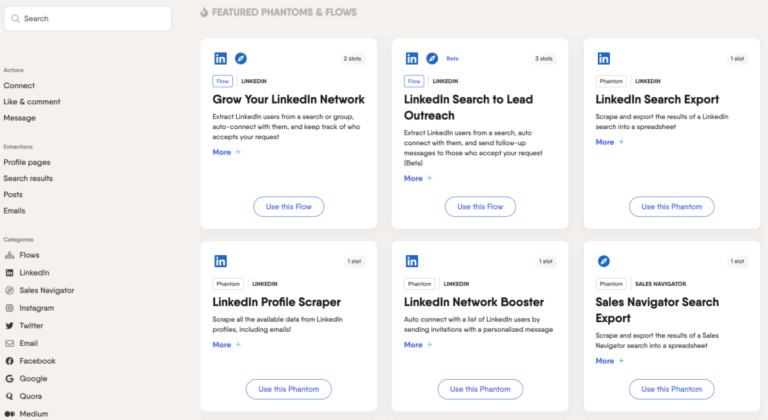
PhantomBuster promises to bridge that gap, offering a library of “Phantoms” that can scrape profiles, send connection requests, extract comments, and more—all from a simple web dashboard. But does it truly deliver on the hype, and is it worth the subscription for someone who isn’t a coding wizard?
Verdict: PhantomBuster is a solid middle‑ground solution for non‑technical users who need scalable automation without building custom scripts. It shines in flexibility and community support, though occasional reliability hiccups and a learning curve around API limits keep it from being perfect.
AnalyzeBench Score: 8.2 / 10
Best for: Small‑to‑medium teams that need a no‑code way to pull data from multiple social networks.
What we loved: The breadth of pre‑built Phantoms and the ability to chain them together.
Watch out for: Inconsistent run times on heavily throttled sites and a pricing model that can become pricey at scale.

What makes PhantomBuster different
PhantomBuster’s core differentiator is its “Phantom” marketplace. Each Phantom is essentially a pre‑configured automation script that runs in the cloud, meaning you never have to install software locally. The platform also offers a visual “API Builder” that lets you stitch multiple Phantoms together, creating multi‑step workflows without writing a single line of code.
Another noteworthy aspect is the community‑driven repository. Users can share custom Phantoms, rate existing ones, and even request new features. This crowdsourced ecosystem keeps the tool fresh and often ahead of the official roadmap.
From a technical standpoint, PhantomBuster runs on headless browsers, which helps it navigate sites that employ heavy JavaScript rendering or anti‑bot measures. This approach is more robust than simple HTTP request libraries that many competitors rely on.
The star product
The flagship offering is the PhantomBuster Automation Suite. It bundles the most popular Phantoms—LinkedIn Profile Scraper, Instagram Hashtag Explorer, Twitter Follower Collector, and a generic Web Scraper—into a single subscription tier. Users receive a shared pool of “credits” that are consumed each time a Phantom runs, allowing for flexible allocation across projects.
What truly sets the suite apart is the built‑in scheduler. You can set Phantoms to run hourly, daily, or at custom intervals, and the platform will handle queuing and retry logic automatically. For teams that need to keep a CRM up‑to‑date with fresh leads, this scheduler can be a massive time‑saver.
Additionally, the suite includes a “Data Export” feature that lets you push results directly to Google Sheets, CSV files, or even a webhook endpoint. This eliminates the manual step of downloading files and re‑uploading them into your analytics stack.

The rest of the range
Entry‑level plan
Designed for freelancers or solo entrepreneurs, this tier offers a limited number of monthly credits and access to a subset of the most popular Phantoms. The UI is the same as the higher tiers, but you won’t get priority support or the ability to run more than a handful of concurrent jobs.
Growth‑team plan
Targeted at small marketing teams, this plan expands the credit pool, unlocks the full Phantom library, and adds team collaboration tools such as shared dashboards and role‑based permissions. It also includes a modest amount of API calls for integrating PhantomBuster data into internal tools.
Enterprise solution
For larger organizations, PhantomBuster offers custom contracts that include dedicated account management, SLAs on uptime, and on‑premise data residency options. This tier also provides advanced security features like SSO and granular IP whitelisting.
How to choose
When deciding which tier fits your needs, start by mapping out the number of automations you plan to run each month. If you only need to pull a few hundred LinkedIn contacts for a quarterly outreach, the entry‑level plan will likely suffice. However, if you’re running daily Instagram hashtag scrapes across multiple accounts, you’ll quickly outgrow the credit limits and should consider the growth‑team plan.
Another factor is team size. PhantomBuster’s collaboration tools become valuable once more than two people need to edit or monitor the same workflows. If you’re a solo operator, the extra cost of shared dashboards may not be justified.
Finally, think about data governance. Companies in regulated industries should evaluate the enterprise option for its stronger security guarantees.
PhantomBuster vs the alternatives
| Feature | PhantomBuster | Zapier + Custom Scripts | ScrapingBee |
|---|---|---|---|
| No‑code workflow builder | Yes, visual chaining of Phantoms | Partial – Zapier handles triggers, but custom code needed for complex scraping | No, requires API calls |
| Community‑shared Phantoms | Large, active marketplace | None | None |
| Built‑in scheduling | Advanced, cron‑style options | Zapier offers scheduling but limited granularity | External scheduler required |
| Credit‑based pricing | Flexible, pay‑as‑you‑go within tier | Pay per task in Zapier, plus hosting costs for scripts | Pay per API request |
| Support for anti‑bot challenges | Headless browser, automatic CAPTCHA handling (limited) | Depends on custom implementation | Basic HTTP requests, often blocked |
Price and value
PhantomBuster’s pricing follows a tiered subscription model, where each level grants a monthly allotment of “credits.” Credits are consumed based on the complexity and runtime of each Phantom. Simpler tasks, like a LinkedIn profile fetch, use fewer credits than a multi‑step Instagram scraper.
The entry‑level tier is priced competitively for freelancers, offering enough credits for occasional use. As you move up to the growth‑team plan, the cost rises but so does the credit pool, plus you unlock premium Phantoms and priority support. The enterprise tier is quoted on a case‑by‑case basis, reflecting the bespoke security and SLA requirements.
When you compare the cost to hiring a developer to build similar automations, PhantomBuster often provides a better ROI, especially for teams that need to iterate quickly. However, heavy users should keep an eye on credit consumption; exceeding the allotment can lead to unexpected overage fees.

Who should buy — and who should skip it
Buy if you are:
- A marketer or recruiter who needs to pull contact data at scale without learning Python.
- A small team looking for a shared automation hub with visual workflow building.
- A startup that wants to test growth hacks quickly and iterate based on data.
Skip if you are:
- A developer comfortable writing custom scripts—PhantomBuster may feel restrictive.
- A large enterprise that requires on‑premise data processing for compliance.
- Someone who needs 100 % guaranteed uptime; occasional platform maintenance can pause runs.
Honest limits
While PhantomBuster handles many sites well, it still struggles with platforms that aggressively block bots, such as certain newer TikTok endpoints. Users have reported occasional “CAPTCHA not solved” errors that require manual intervention.
The credit system, while flexible, can be opaque. It’s sometimes hard to predict exactly how many credits a complex workflow will consume, leading to surprise overages.
Customer support is generally responsive, but free‑tier users may experience longer wait times. The knowledge base is extensive, yet some advanced troubleshooting topics are only covered in paid support channels.
PhantomBuster discount codes and deals
We’ve negotiated a limited‑time discount for AnalyzeBench readers. Use the code ANALYZE10 at checkout to receive a percentage off your first month. The offer applies to any paid tier and can be combined with the platform’s seasonal promotions.
Take advantage of the discount while it lasts and start automating your social data collection without a steep learning curve.
Frequently asked questions
What platforms does PhantomBuster support?
PhantomBuster offers pre‑built Phantoms for LinkedIn, Instagram, Twitter, Facebook, TikTok, YouTube, and generic web pages. New integrations are added regularly based on community demand.
Do I need any coding skills to use PhantomBuster?
No. The platform is designed for non‑technical users. While you can add custom JavaScript if you wish, the core workflow builder works entirely through drag‑and‑drop configuration.
How does the credit system work?
Each Phantom run consumes a set number of credits depending on factors like runtime, data volume, and complexity. Credits are refreshed monthly based on your subscription tier.
Can I export data directly to my CRM?
Yes. PhantomBuster includes native integrations for Google Sheets, CSV export, and webhook endpoints that can push data into most CRMs, including HubSpot and Salesforce.
Is there a free trial?
PhantomBuster provides a limited free tier that includes a small credit allowance each month. This lets you test a few Phantoms before committing to a paid plan.
What happens if a Phantom fails mid‑run?
The platform automatically retries failed steps up to a configurable limit. You’ll receive an email notification if the job ultimately fails, and you can view detailed logs in the dashboard.
A buyer’s closing guide
Before you click “Subscribe,” map out the exact automations you need and estimate the monthly credit consumption. Start with the entry‑level plan if you’re unsure; you can always upgrade as your data needs grow. Remember to set up the export destination (Google Sheets or webhook) early to avoid manual data handling later.
Finally, take advantage of the exclusive discount code and test the platform with the free tier. If the Phantoms deliver reliable data and the scheduling fits your workflow, PhantomBuster can become a cornerstone of your growth stack.
AnalyzeBench Score: 8.2 / 10



