
Framer is what happens when a design tool grows a publish button. The 2026 consensus crowns it the best no-code builder for design-led sites — freeform visual editing, the category's best animations, and an AI stack (Wireframer, Workshop, full-site generation from a prompt) now included on every plan. Landing pages, portfolios, brand sites and startup MVPs are its lane, and nothing in it executes better.
Pricing runs Free (framer.app subdomain) → Basic $10/mo → Pro $30/mo → Scale $100/mo (annual billing), with the honest caveats reviewers flag: CMS limitations for content-heavy operations, usage-based costs that surprise at scale, and a learning curve steeper than Squarespace for freeform-canvas newcomers.
Our verdict: Framer is the designer's website builder without rival — visual freedom, motion craft and AI acceleration in one canvas — best for marketing sites that must look expensive, less so for blog-heavy or commerce-heavy builds. Score: 8.6 / 10.
→ Try Framer — see current pricing

What makes Framer different
The canvas is the differentiator: true freeform positioning (no block-grid jail), breakpoints handled visually, and animation tooling — scroll effects, page transitions, component states — that produces the motion language expensive agencies charge for. The AI layer accelerates rather than replaces: Wireframer drafts page structures, Workshop iterates designs conversationally, and prompt-to-site generation delivers editable starting points, not locked templates. Everything remains hand-editable after — the adult difference from template builders.
Pricing decoded
| Plan | Annual price | For |
|---|---|---|
| Free | $0 | Subdomain, learning |
| Basic | $10/mo | Custom domain, simple sites |
| Pro | $30/mo | The standard: CMS, analytics |
| Scale | $100/mo+ | Traffic + usage tiers |
The hidden-cost note reviews keep flagging: bandwidth-and-visitor tiers can escalate busy sites past sticker — audit the usage tables before committing a high-traffic property.
The build experience
For designers, homecoming: Figma-adjacent canvas logic, components and variants, and the publish moment that skips the developer handoff entirely. For non-designers, the curve is real — freeform freedom means freeform responsibility, and the Squarespace crowd will feel unmoored for a week. The template-and-remix ecosystem softens entry, and the AI drafts give everyone a professional starting skeleton.
Framer vs the field
Against Webflow: Framer wins design velocity and animation ease; Webflow wins CMS depth and complex-site structure — the standing fork. Against Squarespace/Wix: different ambition tiers entirely. Against Lovable-class app builders: sites versus applications — marketing surface versus working software. The lane discipline is the buying wisdom: match the tool to the artifact.
Pros, cons and limits
Pros: best-in-class visual freedom and animations; AI included on all plans; fast publish pipeline; strong template ecosystem; localisation and staging on higher tiers.
Cons: CMS ceilings for content-heavy sites; usage-based cost creep; learning curve for canvas newcomers; commerce is not the strength; export limitations versus code-first stacks.
Framer deals
Annual billing saves meaningfully; startup and education programs exist — check current pages before paying list.
Inside the Framer canvas: design that ships itself
Framer's core wager is that the design file and the website should be the same object. The canvas feels like Figma — frames, auto-layout stacks, components, variants — but every element is production markup: publish and the exact thing you drew is live on a fast CDN with clean HTML. This erases the classic designer-to-developer handoff loss entirely, and it is why agencies that adopted Framer describe timeline compressions from weeks to days: the mockup review is the site review. The learning curve tracks your starting point — Figma natives feel at home within hours (there is a faithful Figma import plugin), while spreadsheet-brained beginners face a steeper first week than Wix would give them, repaid later in control.

The interaction layer is where Framer laps the traditional builders. Scroll transforms, appear effects, hover states, page transitions and springy micro-interactions are visual properties, not plugins — the exact effects that scream "expensive custom site" in 2026 are checkbox-level work. Components with variants let a team build a mini design system inside marketing: one card component, forty pricing pages, single-source updates. CMS collections handle the structured content — blog posts, case studies, job listings — with fields, filters and dynamic pages that stay editable by non-designers.
The AI layer, honestly weighed
Framer's AI features — Wireframer generating full multi-section layouts from a prompt, Workshop building custom components from a description, AI-assisted localisation and translation — are genuinely useful accelerants and honestly secondary to the product's value. Wireframer produces layouts noticeably above template quality because it composes from Framer's own design primitives rather than stitching stock sections; but nobody should buy Framer for the AI. The correct mental model: AI gets you a credible first draft in minutes, the canvas is why the tenth revision is still pleasant, and the two together are why solo designers now credibly deliver agency-look sites.

Framer Pricing: Which Plan Fits You?
| Plan | Price | Fits |
|---|---|---|
| Free | $0 | Full editor on a framer.app subdomain — real evaluation, portfolio-usable |
| Mini | ~$5/mo | Custom domain, landing-page scale (2 pages) |
| Basic | ~$15-20/mo | Full site, modest CMS |
| Pro | ~$25-30/mo | Bigger CMS, analytics, staging — the business default |
Per-site pricing stings agencies managing dozens of properties (each client site is its own subscription), but against the alternative maths — WordPress hosting plus a premium theme plus a page builder plus maintenance hours, or a Webflow bill that runs similar-to-higher — Framer lands mid-pack on cost with the lowest total-fuss score of the three. The free tier deserves emphasis: it is the entire product minus the domain, which makes the evaluation risk zero.
Framer vs Webflow vs Wix Studio vs WordPress
Against Webflow: the defining rivalry. Webflow exposes the box model and rewards front-end thinking with deeper structural control, larger CMS ceilings and richer integrations; Framer rewards design thinking with faster time-to-beautiful and interactions Webflow makes you sweat for. Marketing site under fifty pages: Framer. Content operation with complex collections and logic: Webflow. Against Wix Studio: Wix wins on bundled business apps (bookings, e-commerce) and loses on design ceiling — sites look like their template DNA. Against WordPress: WordPress wins on plugins, portability and blog-scale SEO tooling; Framer wins on speed, security surface (nothing to hack, nothing to update) and the simple fact that the designer needs no one's permission to ship. The pattern among sophisticated teams: Framer for the brand site, something else for the store or the 500-post content engine.

SEO and performance, measured not promised
The technical foundation is quietly excellent: server-rendered pages, automatic image optimisation and responsive variants, global CDN, and Core Web Vitals scores that embarrass most WordPress stacks out of the box. Meta titles, descriptions, OG images, redirects, sitemaps and per-page canonical control are all native. The honest limits: no server-side custom logic, app-like SEO plugins do not exist (no Rank-Math-style content analysis — bring your own process), and very large content operations will feel CMS item limits per plan. For the 95% of marketing sites whose SEO problems are actually content problems, Framer's defaults remove the technical excuses entirely — the ranking work that remains is writing, links and patience, which no builder sells.
A 30-day path from blank canvas to live business site
Week one: free account, import your Figma file or run Wireframer on your value proposition, and rebuild your current homepage — the comparison against what you have is the motivation engine. Week two: componentise (nav, footer, cards), wire the CMS for your two content types, and draft the remaining pages from your own components — this is where the design-system discipline pays. Week three: interactions pass (restraint wins — two signature effects beat twelve), mobile breakpoint audit, copy polish. Week four: custom domain on a paid plan, redirects from old URLs mapped, analytics connected, publish — then measure the Core Web Vitals delta against your old stack and enjoy the only migration in web history that routinely makes sites both prettier and faster in the same move.
Framer for freelancers: the productised-site business
The strongest commercial pattern built on Framer is the productised website service: a fixed-price, fixed-scope offer — "launch-ready business site in five days" — sold to founders and local businesses who cannot brief an agency and will not fight a DIY builder. Framer makes the unit economics work in a way WordPress never did for solo operators: no hosting to manage per client, no plugin updates, no security incidents at 2am, and revisions handled live on a call because changes publish instantly. Freelancers running this model report the maintenance retainer — the profit engine of WordPress agencies — largely replaced by a lighter "updates on request" arrangement, traded willingly for the hours recovered. The pricing psychology matters too: because the output carries the custom-interaction polish clients associate with five-figure builds, a $800-2,500 fixed price reads as a bargain rather than a budget option, and the Framer per-site subscription passes through to the client as their only ongoing cost.
The portfolio flywheel is unusually strong here because Framer sites demonstrate the service — smooth transitions and confident type do the selling before the call. A freelancer's own site plus three client examples, all visibly fast and visibly designed, converts better than any proposal document; several successful operators report their entire funnel is the site plus a Calendly link. For designers sitting on Figma skills without a shipping path, this is arguably the shortest current route from craft to recurring income.
The limits that should inform your choice
Deal-breaker checklist, stated plainly. Native e-commerce is not Framer's game — a two-product checkout embeds fine via third parties, a real store belongs on Shopify. User accounts, gated content and app-like logic exceed the platform's scope by design. CMS ceilings (items per collection, collections per plan) are generous for marketing sites and confining for publications planning thousands of entries. Migrations preserve design intent but not URLs automatically — redirect mapping is manual diligence. Exported code is not the product; leaving Framer means leaving the canvas, so treat the subscription as platform rent, not a build fee. None of these are hidden traps — they are the boundary of a tool that chose to be the best at one job. Within that boundary, the verdict earned across this review stands: the fastest path from design taste to a live, fast, genuinely impressive website that exists in 2026.
Working with the Framer community and marketplace
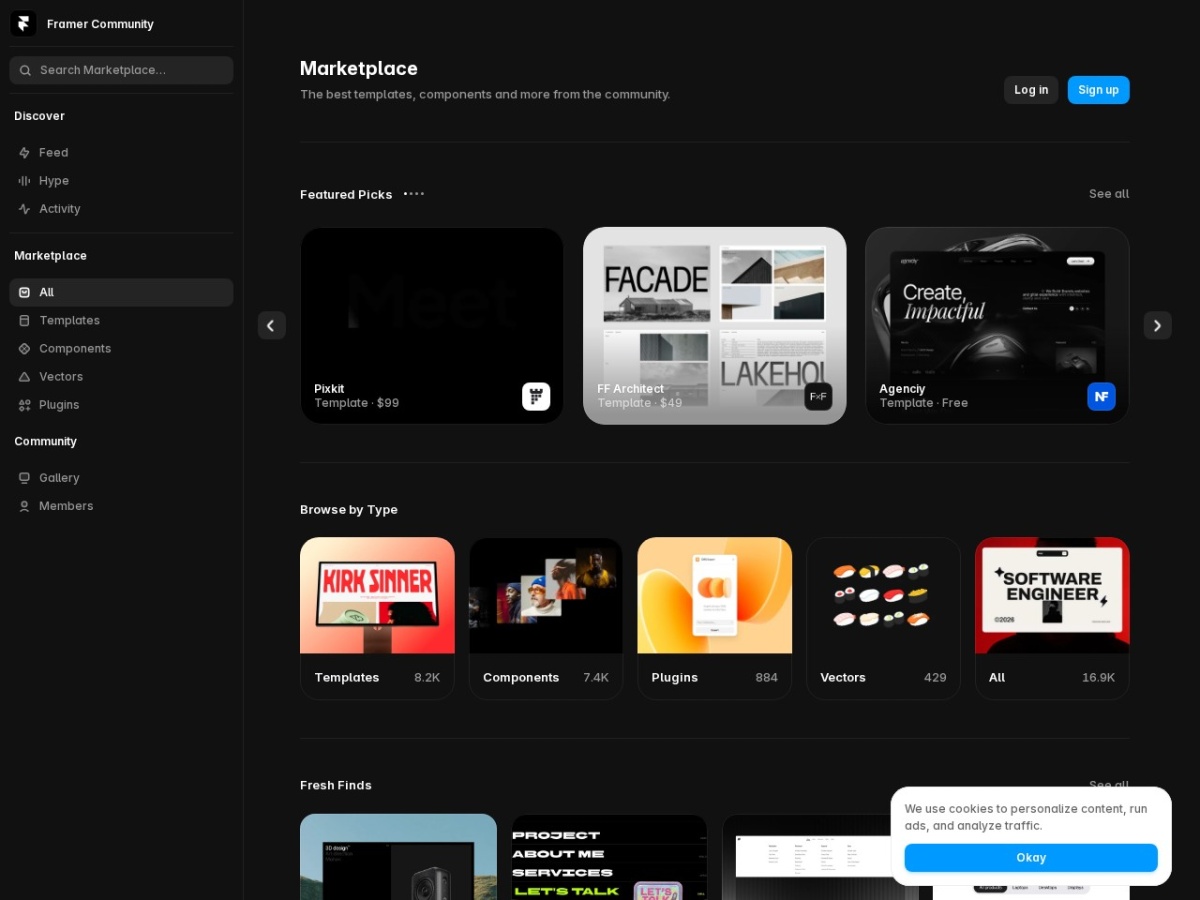
An underrated adoption accelerant is the ecosystem that has grown around the product. The template marketplace runs deep — hundreds of professionally designed starting points from independent creators, typically $0-80, that are real Framer projects rather than static themes: every section remixable, every component editable, which makes them closer to hiring a designer for the skeleton than buying a costume. Component and plugin creators fill the functional gaps — pricing tables, testimonial sliders, cookie banners, advanced forms — and the remix culture means studying how a well-built template achieves an effect is itself a Framer education. For teams starting from zero design confidence, the honest fast path is template-first: buy a strong foundation in your industry, replace content and brand tokens, then progressively remix sections as your skills grow — sites launched this way are visually indistinguishable from custom work at a fraction of the hours.
The learning ecosystem matches: Framer Academy's official courses, an active community forum, and a YouTube scene dense with build-alongs mean the answer to almost any "how do I…" is a search away. Combined with the free tier's full editor, the realistic cost of becoming productionally competent in Framer is two focused weekends and possibly one template purchase — a lower entry toll than any comparable design tool has managed, and the final piece of why this review's recommendation is unhesitating for its intended audience. Score: 8.7 / 10.
Framer's CMS in practice: a small case study
To make the CMS ceiling concrete: a typical agency case-study section — one collection, fields for client, industry, challenge, result metrics and gallery — takes an hour to model, produces a filterable index page and templated detail pages automatically, and hands the marketing team a form-like editor that cannot break the design. That is the platform's sweet spot in miniature: structured content at marketing-site scale, design-safe editing, zero developer involvement after setup. Push the same system to a thousand-item knowledge base with cross-references, multi-level categories and per-locale variants, and you will feel the edges — item limits, no relational depth, workflow features absent. The honest sizing rule from teams that learned it expensively: count your content types and multiply by expected items; under a few hundred total, Framer's CMS is a joy, and beyond that you are buying Webflow's complexity or a headless setup for reasons that are real rather than aesthetic.
FAQ
Framer or Webflow?
Design-led marketing sites: Framer. Structured content machines: Webflow. The fork the whole category agrees on.
Is the AI generation actually usable?
As accelerant, yes — editable drafts that skip the blank canvas; the craft still finishes the job.
Can I run a blog on it?
Yes, within CMS limits — content-heavy publications will feel the ceilings the reviews flag.
Do I need design skills?
To exploit it fully, yes — templates and AI cover the gap for the rest, at the cost of the differentiation you came for.
What about SEO?
Solid fundamentals (fast hosting, clean output, meta control) — the builder is not the ranking constraint; content is.
The launch-week protocol
Day one: AI-draft three site skeletons from your brief, keep the best. Days two-three: the canvas work — type, spacing, motion — where Framer earns its crown. Day four: responsive audit across breakpoints, CMS collections wired if needed. Day five: domain, meta, analytics, publish — the agency-week compressed to one. The startup landing page that looks funded, shipped by Friday: that artifact is Framer's entire market, and it owns it. Score: 8.6 / 10.
{“@context”:”https://schema.org”,”@type”:”Review”,”name”:”Framer review”,”itemReviewed”:{“@type”:”SoftwareApplication”,”name”:”Framer”,”applicationCategory”:”DesignApplication”,”operatingSystem”:”Web”},”reviewRating”:{“@type”:”Rating”,”ratingValue”:”8.6″,”bestRating”:”10″,”worstRating”:”1″},”author”:{“@type”:”Organization”,”name”:”AnalyzeBench”},”publisher”:{“@type”:”Organization”,”name”:”AnalyzeBench”}}



