
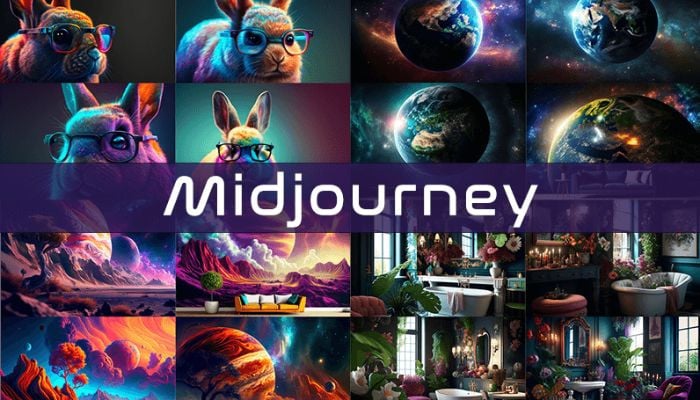
Midjourney is, for many creators, still the gold standard of AI image generation. While rivals chase photorealism and speed, Midjourney has built its reputation on one thing above all: images that simply look better — more artistic, more atmospheric, more ready for real creative work. In 2026, with version 8.1 adding HD output and video, it has grown from a Discord curiosity into a full creative platform with its own web app.
But Midjourney also asks for a paid subscription with no free tier, and its learning curve and community-driven workflow put some people off. We tested its output quality, pricing, features and ease of use to see whether it still deserves the top spot.
Our verdict: Midjourney remains the best AI image generator for artistic quality and cinematic style, now with a proper web app and video generation — the pick for creatives who care most about how the final image looks, if you can accept a paid-only model. Score: 9.0 / 10.
→ Try Midjourney — see current pricing

What is Midjourney and who is it for
Midjourney is a generative AI tool that turns text prompts into images (and now short videos). Originally operated entirely through Discord, it now offers a full web app at midjourney.com where you can prompt, browse, remix and organise your creations. Its models are tuned for aesthetic quality rather than raw literalism, which is why its output tends to look polished straight away.
It is aimed at designers, concept artists, marketers, and content creators who need striking visuals — think album art, marketing hero images, mood boards, storyboards and social content. If your priority is images with a refined, professional look and minimal weak outputs, Midjourney is built for you.
It is a weaker fit if you need precise, literal control (exact text in images, exact layouts), a free tool, or the clearest commercial-safe licensing for every edge case — areas where tools like Adobe Firefly or some rivals compete.

Midjourney pricing and plans
Midjourney is subscription-only, with four tiers: Basic at $10/month, Standard at $30, Pro at $60, and Mega at $120. Paying annually cuts each by 20% (roughly $8, $24, $48 and $96/month). There is currently no permanent free tier, so you commit from day one.
The key difference between plans is fast GPU hours — near-instant generation time — with 3.3 hours on Basic up to 60 on Mega. Standard and above add unlimited generations in Relax mode (slower queue, but no extra cost), which is what most regular users actually rely on. Pro and Mega add Stealth mode for private images and unlimited Relax video.
For most individual creators, the Standard plan at $30 (or $24 annually) is the sweet spot: unlimited Relax generations plus a healthy fast-hours allowance. Heavy commercial users who need privacy and speed step up to Pro.
| Plan | Monthly | Fast GPU hrs | Relax |
|---|---|---|---|
| Basic | $10 | 3.3 | No |
| Standard | $30 | 15 | Unlimited |
| Pro | $60 | 30 | Unlimited + Stealth |
| Mega | $120 | 60 | Unlimited + video |
Image quality and output
Quality is Midjourney reason to exist, and it delivers. Its images consistently look refined, atmospheric and creatively directed, with fewer of the mangled hands, weird artefacts and generic outputs that plague casual generators. Version 8.1 sharpens small-detail retention, adds HD 2K output and improves prompt understanding, keeping Midjourney at the front of the artistic pack.
Where competitors like Leonardo AI offer more granular controls and free access, Midjourney wins on the intangible “look” — the sense that an image is finished and intentional rather than machine-generated. For visuals that need to impress, that edge matters.

Features and workflow
Beyond raw generation, Midjourney offers powerful tools: remix and vary to iterate on an image, pan and zoom to extend canvases, style references to lock a consistent aesthetic, character references for repeatable characters, and now video generation to animate stills. The web app makes browsing and organising far easier than the old Discord-only flow.
The community aspect remains a genuine feature: the public feed and showcase are a constant source of prompt inspiration, and seeing how others achieve a look accelerates your own learning. It is a creative ecosystem, not just a button.
Ease of use and learning curve
Midjourney is more approachable than ever thanks to the web app, but it still rewards learning. Great results come from understanding prompt structure, parameters, style references and aspect ratios — there is craft involved. Beginners get good images quickly; experts get extraordinary ones.
Compared with one-click consumer tools, Midjourney asks a little more of you, but that control is precisely what serious creators want. The documentation and community fill in the gaps, and the payoff for climbing the curve is real.
Midjourney vs the alternatives
Against rivals, Midjourney leads on artistic quality. Leonardo AI offers more free access and fine control; Canva wins on all-in-one design ease; DALL·E and others integrate into broader assistants. But for pure visual impact, Midjourney is still the one to beat.
| Tool | Best for | Free tier | Edge |
|---|---|---|---|
| Midjourney | Artistic image quality | No | The look |
| Leonardo AI | Control + free credits | Yes | Flexibility |
| Canva | All-in-one design | Yes | Ease |
Pros and cons
Pros: Best-in-class artistic and cinematic image quality; V8.1 with HD 2K output and video; powerful style and character references; full web app plus Discord; unlimited Relax generations on Standard and up; strong community and inspiration feed; steady, rapid model improvements.
Cons: No free tier — subscription required from the start; learning curve for best results; less literal/precise than some rivals; text-in-image still imperfect; commercial licensing nuances worth checking for your use case.
Who should use Midjourney — and who should not
Use it if you are a designer, marketer or creator who needs the most polished, professional-looking AI images, you value artistic quality over literal control, and you will use it enough to justify a subscription.
Look elsewhere if you want a free tool, you need pixel-precise or text-heavy layouts, or you require the clearest commercial-safe licensing — where Leonardo AI or Canva may serve you better.
Frequently asked questions
Does Midjourney have a free trial?
Not currently. Midjourney is subscription-only, starting at $10/month (Basic), with occasional limited promotions but no permanent free tier.
Which Midjourney plan is best?
For most creators the Standard plan ($30/month, or $24 annually) is the sweet spot, offering unlimited Relax-mode generations plus a solid fast-hours allowance.
Is Midjourney still the best AI image generator?
For artistic and cinematic quality, yes — it remains the benchmark. Rivals compete on control, price or licensing, but Midjourney still wins on the finished look.
Can Midjourney make videos?
Yes. Recent versions add video generation to animate images, with unlimited Relax-mode video on higher plans.
Do I still need Discord?
No. Midjourney now has a full web app at midjourney.com, though the Discord workflow and community remain available.
The bottom line
Midjourney has evolved from a Discord novelty into a complete creative platform while never losing what made it special: images that look genuinely great. With V8.1 adding HD output and video, and a proper web app smoothing the workflow, it is still the top choice for creators who care most about visual quality. The paid-only model and learning curve are the price of admission — and for the results, most creatives happily pay it. Score: 9.0 / 10.
{“@context”:”https://schema.org”,”@type”:”Review”,”name”:”Midjourney review”,”itemReviewed”:{“@type”:”SoftwareApplication”,”name”:”Midjourney”,”applicationCategory”:”MultimediaApplication”,”operatingSystem”:”Web”},”reviewRating”:{“@type”:”Rating”,”ratingValue”:”9.0″,”bestRating”:”10″,”worstRating”:”1″},”author”:{“@type”:”Organization”,”name”:”AnalyzeBench”},”publisher”:{“@type”:”Organization”,”name”:”AnalyzeBench”}}



