
If you have ever watched a promising WordPress site crawl to a halt during a traffic spike, or spent a weekend babysitting a WooCommerce store instead of selling on it, you already understand the itch that Nexcess is built to scratch. Nexcess is a fully managed application hosting company, part of the Liquid Web family, that focuses on doing a small number of platforms extremely well: WordPress, WooCommerce, Magento (Adobe Commerce), and a handful of other content and commerce apps. Instead of selling you a blank server and wishing you luck, it hands you a tuned, opinionated stack with performance, security, and scaling already handled. In this in-depth review we look at what Nexcess actually delivers, where it genuinely shines, and the honest trade-offs you should weigh before moving your site over. If you want to compare live plans as you read, you can always Check Nexcess deals.
AnalyzeBench Score: 8.4 / 10
Best for: Growing WooCommerce and Magento stores, agencies, and content sites that have outgrown cheap shared hosting and want performance plus real human support without renting a full DevOps team.
What we loved:
- Application-specific tuning for WordPress, WooCommerce, and Magento rather than a generic one-size-fits-all stack.
- Built-in auto-scaling that absorbs traffic spikes without an emergency plan upgrade.
- Genuinely useful included tools: staging, a plugin performance monitor, image compression, Object Cache Pro, and a built-in CDN.
- Free managed migrations and a 30-day money-back guarantee that lowers the risk of switching.
- 24/7 support staffed by people who actually understand the apps they host.
Watch out for:
- Entry storage allotments are modest, so media-heavy sites climb tiers quickly.
- It costs more than budget shared hosts, and renewal pricing is higher than the first-term promo.
- It is not aimed at absolute beginners who want the cheapest possible parking spot for a hobby blog.
What makes Nexcess different
The easiest way to understand Nexcess is to contrast it with two extremes. On one side sits budget shared hosting, where you get a cheap monthly rate but share crowded servers, buy caching and backups as add-ons, and fend for yourself when something breaks. On the other side sits raw cloud infrastructure, where you rent a virtual machine and become your own system administrator. Nexcess sits deliberately in the middle: a managed platform that is tuned for specific applications and takes the operational weight off your shoulders.
That focus matters. Because Nexcess knows you are running WordPress or WooCommerce or Magento, it can pre-configure the web server, PHP, caching layers, and database for those exact workloads. You are not handed a neutral LAMP stack and told to optimize it; the optimization is the product. The company has been in the hosting business for roughly two decades and, since joining Liquid Web, benefits from that group’s data-center footprint and support culture. The result feels less like buying disk space and more like renting a small, competent operations team that happens to come bundled with your server.
Another differentiator is how much is included by default. Daily backups, staging environments, a content delivery network, automatic image compression, and security tooling are part of the plan rather than a checkout upsell. For anyone who has been nickel-and-dimed by add-ons elsewhere, that all-in approach is refreshing, even if the sticker price looks higher at first glance.
The core service
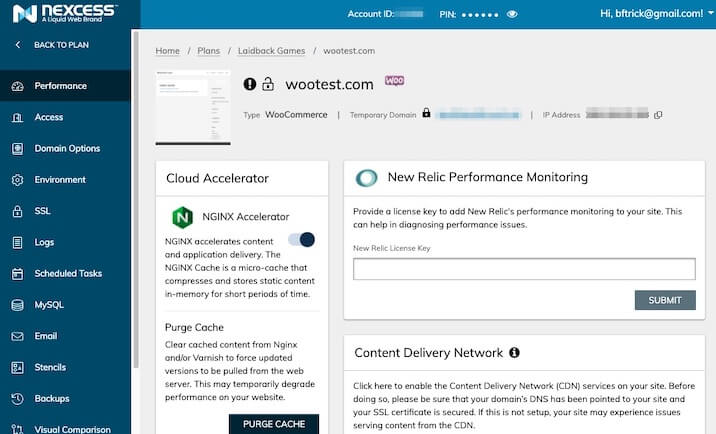
At its heart, Nexcess is managed hosting: the provider handles the infrastructure, server-level updates, caching, and much of the security so you can concentrate on your site and your business. Every plan is built around a performance-first stack. Nexcess bundles server-level and object caching (including Object Cache Pro on WordPress plans), a built-in CDN for faster global delivery, and premium image compression that trims page weight without you installing a single plugin.
The managed part is where the day-to-day value lives. Nexcess offers one-click staging so you can clone your site, test a theme update or a risky plugin, and push changes live only when you are confident. It runs automatic platform and, optionally, plugin updates, with visual comparison checks that flag when an update visibly breaks a page. A standout tool is the plugin performance monitor, which measures how much each plugin is dragging on your load time so you can identify the real culprits instead of guessing. Daily automated backups, malware scanning, and free SSL round out the safety net, and email hosting is included, which is not always a given among managed WordPress hosts.
For stores specifically, Nexcess adds commerce-aware features such as WooCommerce automated testing, cart and checkout optimization, and StoreBuilder, a guided, largely no-code tool that assembles a working WooCommerce storefront from a short questionnaire. If you want to see how these pieces fit together before committing, it is worth a moment to Check Nexcess deals and read the current feature matrix.
Plans & pricing
Nexcess organizes its catalog by application, and each family scales from a modest single-site plan up to high-resource tiers for busy stores. Pricing is premium relative to budget shared hosting but generally undercuts the best-known managed specialists, and there is a 30-day money-back guarantee so you can test the platform with your real site. Because promotional and renewal rates change, treat the ranges below as a map rather than a quote, and confirm the live figure on the Nexcess site.
WordPress
The managed WordPress line is the entry point for most people. Plans are separated by the number of sites, storage, and bandwidth, and every tier inherits the performance stack: Object Cache Pro, image compression, the built-in CDN, staging, and daily backups. Entry plans are aimed at a single site or a small handful, with storage that is comfortable for a lean content site but can feel tight once you accumulate large media libraries. As you climb tiers you gain more sites, more storage, and more headroom for traffic.
WooCommerce
The WooCommerce plans layer store-specific tuning on top of the WordPress foundation, including cart and checkout optimizations, automated testing, and configurations designed to keep dynamic, uncacheable store pages fast. If you run an actual shop rather than a catalog brochure, this is the family to look at, because the extra tuning is precisely what generic hosts miss when a store gets busy.
Magento
Magento (Adobe Commerce) hosting is the most resource-intensive and therefore the most premium tier. Magento is a heavy application, and Nexcess provisions it with the memory, caching, and search infrastructure that a serious Magento store demands. This is enterprise-leaning territory, and pricing reflects that; it is meant for merchants whose revenue justifies a properly resourced platform rather than hobbyists experimenting with the software.
How to get the best value
Nexcess rewards buyers who plan a little. First, take advantage of the longer billing terms; annual plans carry a meaningfully lower effective monthly rate than month-to-month, and since you get a 30-day money-back window you can commit to a year with limited risk once the platform proves itself. Second, size your plan by storage and traffic rather than by price alone. Because entry tiers ship with modest storage, a media-heavy site is often better served by moving up one tier from the start than by constantly bumping into limits.
Third, actually use the included tools you are paying for. The staging environment, plugin performance monitor, and image compression are the features that justify the premium over budget hosting, so leaning on them is how the value materializes. Fourth, lean on the free managed migration. Letting the Nexcess team move your site removes the biggest friction of switching and avoids the downtime that a botched self-migration can cause. Before you commit, it is worth a minute to Check Nexcess deals and match the current promotion to the tier you actually need.
Watch: Nexcess in action
Sometimes it helps to see a platform rather than read about it. The short overview below walks through what comes bundled with Nexcess managed WordPress hosting and how the dashboard is laid out.
Nexcess vs alternatives
Nexcess competes most directly with the premium managed WordPress and WooCommerce specialists. Here is how it lines up against two of the best-known names.
| Factor | Nexcess | Kinsta | WP Engine |
|---|---|---|---|
| Focus | WordPress, WooCommerce, Magento and more, commerce-leaning | Premium managed WordPress on Google Cloud | Premium managed WordPress, agency-friendly |
| Pricing feel | Premium but generally the most affordable of the three | Higher-end, priced by monthly visits | Higher-end, priced by monthly visits |
| Standout strengths | Auto-scaling, StoreBuilder, plugin performance monitor, email hosting included | Polished dashboard, fast Google Cloud network | Developer tooling, strong agency features |
The short version: if raw brand prestige and a famously slick dashboard are your priority, Kinsta and WP Engine are strong. If you want comparable performance and managed convenience for a more forgiving price, plus first-class handling of stores and Magento, Nexcess is the value pick. You can Check Nexcess deals to see where it currently lands against those rivals.
Performance, support & value
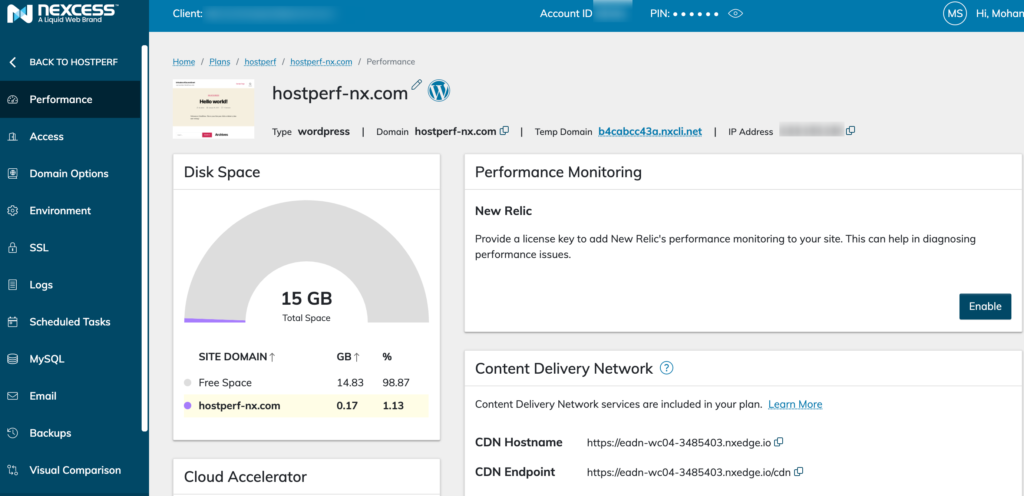
Performance is Nexcess’s headline claim, and the architecture backs it up. The combination of server-level caching, Object Cache Pro, a built-in CDN, and premium image compression means sites tend to load quickly out of the box, before you have optimized anything yourself. The built-in auto-scaling is the feature that separates it from ordinary hosting: when traffic surges, the platform temporarily allocates extra resources so your site stays up during the exact moment a slowdown would cost you the most, and plans include a monthly allowance of auto-scaling before extra usage applies.
Support is the other pillar. Nexcess provides 24/7 assistance by chat, phone, and ticket, and the recurring theme in user feedback is that the agents actually understand WordPress, WooCommerce, and Magento rather than reading from a generic script. For a store owner facing a checkout bug at midnight, that expertise is worth real money. On value, the honest framing is this: Nexcess is not cheap in absolute terms, but when you tally the backups, caching, CDN, staging, security, and email you would otherwise buy separately on a budget host, the all-inclusive plan often looks reasonable rather than expensive.
Who should use it — and who should not
Nexcess is an excellent fit for a specific kind of customer. If you run a growing WooCommerce or Magento store, an agency managing client sites, or a content site whose traffic has outgrown cheap shared hosting, the platform’s tuning, scaling, and support map neatly onto your pain points. Businesses that value uptime during promotions, that do not want to hire a system administrator, and that would rather pay a predictable premium than gamble on a bargain host will feel at home here.
It is a weaker fit for a few groups. If you are launching your very first hobby blog and simply want the lowest possible monthly price, a budget shared host will do the job for less. If you need a niche application that Nexcess does not specialize in, or you specifically want full root-level control to build a bespoke stack, an unmanaged cloud or VPS provider gives you more freedom. And if your site is enormous in raw file storage, you should price out the higher tiers carefully, because storage is where the entry plans feel tightest.
Honest limits
No host is perfect, and Nexcess has real trade-offs worth naming plainly. The most common complaint is storage: entry-level plans ship with allotments that fill up faster than you might expect on an image- or download-heavy site, which can nudge you into a higher tier sooner than you budgeted for. Pricing is the second caveat; Nexcess is a premium product, and like most hosts its renewal rates are higher than the introductory promotion, so the second year costs more than the first. Third, it is a focused platform by design, which is a strength for supported apps but a limitation if your needs fall outside its WordPress, WooCommerce, and Magento sweet spot. Finally, the depth of features and dashboard can feel like a lot for a true beginner; the platform assumes you are at least somewhat comfortable running a real site. None of these are dealbreakers for the target audience, but you should go in with eyes open.
Nexcess discount codes & deals
Nexcess runs promotional pricing on new plans throughout the year, and the biggest savings usually come from choosing a longer billing term rather than hunting for a stray coupon. Because the exact offer changes, the reliable move is to check the current rate directly before you buy, then use the 30-day money-back guarantee to confirm the platform performs for your specific site. Ready to compare tiers and see today’s pricing? Check Nexcess deals and match the live promotion to the plan you actually need.
Frequently asked questions
Is Nexcess good for WooCommerce stores?
Yes. WooCommerce is one of the platform’s core specialties, with store-specific tuning for carts, checkout, and dynamic pages, plus auto-scaling to handle sales-day spikes. It is one of the more natural homes for a serious Woo store.
Does Nexcess include backups and staging?
Both are included on plans. Daily automated backups protect your data, and one-click staging lets you test changes on a copy of your site before pushing them live.
Is Nexcess beginner-friendly?
It is approachable but not aimed at absolute beginners chasing the lowest price. The tooling assumes you want to run a real, growing site. Newcomers can absolutely use it, especially with the free migration and support, but a casual hobby blogger may find it more than they need.
How does Nexcess pricing compare to Kinsta and WP Engine?
Nexcess is generally the more affordable of the three while offering comparable managed performance, and it adds commerce-focused extras like StoreBuilder and Magento hosting that the others do not emphasize.
Does Nexcess offer a money-back guarantee?
Yes, Nexcess offers a 30-day money-back guarantee, which gives you a real window to test the platform with your own site before committing long term.
Can Nexcess handle traffic spikes?
Yes. Built-in auto-scaling temporarily adds resources during surges, and plans include a monthly auto-scaling allowance so a viral moment or a big sale does not immediately take your site down.
Does Nexcess migrate my existing site for free?
Yes. Nexcess provides free managed migrations, moving your files, databases, and email so you avoid the risk and downtime of doing it yourself.
Understanding managed hosting for WooCommerce and online stores
If you are new to the category, it helps to understand why managed hosting matters so much for stores specifically. A content blog can be aggressively cached: most visitors see the same pages, so a caching layer and a CDN can serve them at high speed with little strain on the server. An online store is different. Carts, checkouts, account pages, and inventory are dynamic and personalized, which means large parts of a store cannot be served from a simple cache. That dynamic load is heavier on the database and the application, and it is exactly where cheap shared hosting tends to buckle under pressure, usually at the worst possible moment during a promotion.
Managed WooCommerce hosting exists to solve that problem. Instead of generic caching, it applies commerce-aware optimization: object caching to speed up database queries, tuned PHP and web-server settings for the store workload, and auto-scaling to absorb sudden bursts of shoppers. It also bakes in the operational hygiene that a store cannot afford to skip, such as daily backups, security scanning, staging environments for safely testing changes, and expert support that understands the difference between a plugin conflict and a server issue. The payoff is not just speed for its own sake; faster, more reliable stores convert better and lose fewer sales to abandoned carts and downtime.
That is the frame in which Nexcess makes the most sense. It is not trying to be the cheapest place to park a website. It is trying to be the platform where a growing store or content business can scale without turning hosting into a second job. If that description matches where your site is heading, the premium starts to look less like an expense and more like insurance on your revenue. When you are ready to weigh it against your own needs, take a moment to Check Nexcess deals and see which tier fits.