If you have spent any time researching affordable cloud hosting, you have almost certainly bumped into Vultr. It sits between the sprawling complexity of the hyperscalers like AWS and Google Cloud and the friendlier, developer-first world of providers such as DigitalOcean and Linode. Vultr has quietly grown into one of the largest independently held cloud platforms in the world, with a footprint that spans six continents and a product line reaching well beyond simple virtual private servers.
In this review we take an honest, hands-on look at what Vultr offers in practice: the products, the pricing, the developer experience, and the trade-offs that matter once you are running real workloads. We will be candid about the rough edges too. When you are ready to test it yourself, you can try Vultr and put it through its paces.
AnalyzeBench Score: 8.6 / 10
Best for: developers, startups, agencies, and technically comfortable teams who want raw price-to-performance, global reach, and full control over an unmanaged cloud server without paying hyperscaler prices.
What we loved:
- Excellent price-to-performance across the whole range, with plans starting around a couple of dollars a month.
- 32 global data center regions, so you can deploy close to almost any audience.
- Transparent, predictable hourly and monthly billing with a clear published price.
- A genuinely broad product line: Cloud Compute, High Frequency, Bare Metal, Cloud GPU, managed Kubernetes, managed databases, and object storage.
- Fast NVMe SSD storage and modern AMD EPYC and Intel CPUs on higher tiers.
- A free managed Kubernetes control plane, which is rare and genuinely useful.
Watch out for:
- Servers are unmanaged by default, so you are responsible for the operating system, security, and updates.
- Support is ticket-based and can be slower than a premium managed host, especially on standard accounts.
- Bandwidth overage is billed if you exceed your included allocation, so heavy-traffic sites need to plan ahead.
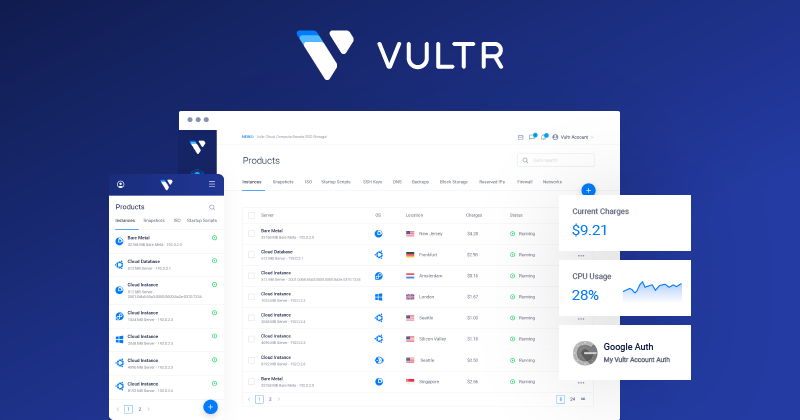
- The control panel, while capable, feels a little more utilitarian than some rivals.
What makes Vultr different
Vultr’s core pitch is simple: enterprise-grade cloud infrastructure at prices that undercut the big clouds, delivered from a network of data centers most competitors cannot match on breadth alone. The company operates its own hardware in 32 cloud data center regions, from Amsterdam and Frankfurt to Tokyo, Sydney, Johannesburg, São Paulo, Bangalore, and more than a dozen locations across North America. That global spread is one of the strongest reasons developers choose Vultr, because latency is a physical problem and deploying a server near your users is worth more than most benchmark charts.
The second differentiator is the pricing philosophy. Vultr publishes a clear price for each plan and bills you by the hour up to a monthly cap. You spin up an instance, you see the rate, and that is what you pay. For anyone who has been burned by a surprise hyperscaler bill, that predictability is refreshing.
The third thing that sets Vultr apart is how much it has expanded beyond plain VPS hosting: Cloud GPU instances on NVIDIA hardware, a managed Kubernetes engine, managed databases, S3-compatible object storage, load balancers, and a marketplace of one-click apps. It has positioned itself as a composable, developer-friendly alternative cloud rather than just a cheap place to rent a Linux box. That said, it still expects you to bring a certain amount of technical competence. Curious to see the console? You can try Vultr and explore the dashboard directly.
The core products
Vultr’s catalog has grown considerably. Grouping it into a few clear buckets helps you see where your workload fits.
Cloud Compute is the flagship. These are virtual machines that come in several flavors: Regular Performance instances on shared Intel CPUs for budget workloads, High Performance instances on newer AMD EPYC or Intel silicon with NVMe storage, and High Frequency instances tuned for higher clock speeds. This is where most people start, and it covers everything from a small personal blog to a busy production API.
Optimized Cloud Compute gives you dedicated vCPU resources rather than shared cores. Vultr offers General Purpose, CPU Optimized, Memory Optimized, and Storage Optimized variants, so you can match the machine to whether your bottleneck is compute, memory, or disk throughput. These are the instances you reach for when noisy-neighbor effects on shared plans become a problem.
Bare Metal hands you a single-tenant physical server with no virtualization layer at all. You get the full performance of the hardware, which matters for latency-sensitive workloads, licensing scenarios that require dedicated cores, or applications that simply do not tolerate a hypervisor between them and the metal.
Cloud GPU is Vultr’s answer to the AI boom. It offers fractional and full NVIDIA GPU instances so you can run model training, inference, rendering, or other accelerated workloads without buying a card outright. The ability to rent a slice of a GPU by the hour is a genuinely useful on-ramp for smaller teams experimenting with machine learning.
Around these core compute products, Vultr layers managed Kubernetes (VKE), managed databases for engines including MySQL, PostgreSQL, Valkey, and Kafka, S3-compatible object storage, load balancers, block storage, snapshots, backups, firewalls, and a one-click app marketplace. That breadth means you can assemble a fairly complete cloud stack without leaving the platform.
Plans & pricing
Vultr’s pricing is one of its biggest selling points, so it is worth breaking down by product type. All prices below are approximate starting points and can vary by region and over time, so always confirm the current rate in the console before you deploy. Billing is hourly up to a monthly cap, which means you only pay for what you actually use.
Cloud Compute
Entry-level Regular Performance instances start at around a couple of dollars a month for a small shared-CPU machine with a modest amount of memory and storage. This is the tier for hobby projects, small sites, development sandboxes, and lightweight services. As you move up the ladder you add more vCPUs, RAM, and NVMe storage, with plans scaling smoothly into the tens of dollars a month for more demanding workloads.
High Frequency
High Frequency plans typically start at a slightly higher monthly rate than the cheapest Regular instances. They pair higher-clock-speed CPUs with fast NVMe storage, which makes them a strong pick for databases, e-commerce, and any application where single-thread performance and snappy response times matter more than sheer core count. For many small-to-medium production sites, this is the sweet spot.
Bare Metal
Bare Metal servers sit at the premium end of the range because you are renting an entire physical machine. Starting prices are considerably higher than virtual instances, generally in the low hundreds of dollars a month for a solid mid-range configuration and climbing from there as you add cores, memory, and storage. If you need guaranteed, uncontended performance or specific hardware, the price reflects the fact that nobody else is sharing your box.
Cloud GPU
Cloud GPU pricing depends heavily on the GPU model and whether you take a full card or a fraction of one. Fractional GPU instances give you an affordable entry point for lighter inference or experimentation, while full-card instances for serious training run substantially higher. Because it is billed hourly, you can spin up a GPU for a training run and shut it down afterward, which is far more economical than leaving accelerated hardware idle. Want to compare the live rates for your exact configuration? You can try Vultr and check current pricing in the deploy screen.
How to get started / free credit
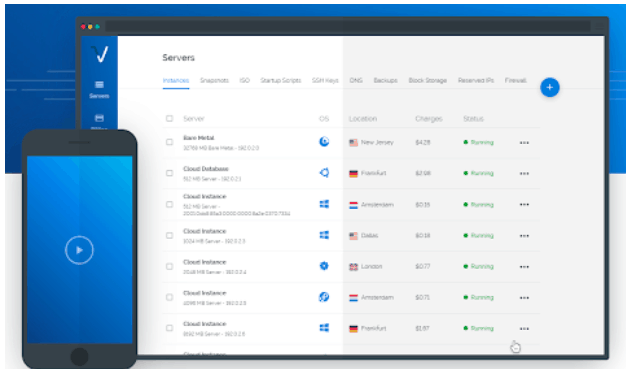
Getting a server running on Vultr is refreshingly quick. You create an account, add a valid payment method, and you are dropped into a console where deploying a new instance is a matter of choosing a location, a server type, an operating system or marketplace app, and a plan size. From clicking deploy to having a bootable server is usually a minute or two.
New accounts are frequently eligible for a promotional signup credit, advertised at various times at up to several hundred dollars and typically valid for a limited window after signup. This is a low-risk way to evaluate the platform: deploy a few instances, benchmark them against whatever you currently use, test the network from different regions, and form your own opinion before committing real money. Terms and amounts change, so check the current offer when you sign up. To see the latest promotion, try Vultr through our link.
Once you are in, the workflow scales nicely. You can automate everything through the Vultr API or the official Terraform provider, attach block storage, set up firewalls and private networking, and schedule automatic backups and snapshots. For teams that live in infrastructure-as-code, this is where Vultr feels genuinely modern.
Watch: Vultr in action
If you prefer to see the deployment flow before you sign up, the walkthrough below shows how to spin up a cloud-hosted server on Vultr from the console, step by step. It is a useful primer on the interface and the choices you make when launching your first instance.
Vultr vs alternatives
Vultr competes most directly with DigitalOcean and Linode (now part of Akamai). All three are developer-focused clouds that undercut the hyperscalers, and the differences are often about emphasis rather than fundamentals.
| Factor | Vultr | DigitalOcean | Linode (Akamai) |
|---|---|---|---|
| Global locations | 32 regions, one of the widest independent footprints | Fewer regions, concentrated in major hubs | Broad after Akamai integration, strong edge network |
| Entry price | Very low, starts around a couple of dollars a month | Low, slightly higher entry point | Low, competitive with DigitalOcean |
| Product breadth | Wide: VPS, bare metal, GPU, Kubernetes, databases, storage | Wide, polished managed services and app platform | Solid, benefits from Akamai edge and security stack |
| Bare metal | Yes, single-tenant physical servers | Limited compared to Vultr | Yes, available |
| Cloud GPU | Yes, NVIDIA instances, fractional options | Available, growing | Available via Akamai |
| Free Kubernetes control plane | Yes | Yes | Yes |
| Developer experience | Capable, functional console and strong API | Widely praised, very polished UI and docs | Clean UI, excellent documentation |
The short version: DigitalOcean often wins on polish and documentation, Linode benefits from Akamai’s edge and security muscle, and Vultr wins on raw global reach and price-to-performance, especially if you want bare metal or GPU alongside your VPS fleet. For a hands-on comparison, the easiest path is to try Vultr and benchmark it against whatever you run today.
Performance, support & value
On performance, Vultr holds up well. High Performance and High Frequency instances built on recent AMD EPYC and Intel CPUs with NVMe storage post strong benchmark numbers, and in independent testing Vultr’s faster tiers land among the more competitive VPS options for the money. Network performance is generally solid, helped by the sheer number of regions. As with any provider, individual data centers vary, and smaller or more remote regions may occasionally show higher latency or more resource contention than the flagship locations.
Support is where expectations need calibrating. Vultr is an unmanaged provider, and its support is primarily ticket-based. For infrastructure and billing questions the team is responsive enough, but you should not expect a managed host’s hand-holding on your application, your operating system configuration, or your code. Response times can stretch during busy periods, and there is no always-on phone line for standard accounts. This is normal for the category and reflected in the low prices, but it is a real consideration if your team lacks systems administration experience.
On value, Vultr is hard to beat for the technically capable. You get modern hardware, a wide product range, global reach, and transparent billing at prices that consistently undercut the hyperscalers and often edge out the nearest independent rivals. The equation tilts in your favor if you are comfortable managing your own servers, and away if you were hoping someone else would run the operating system for you.
Who should use it — and who should not
Vultr is an excellent fit for developers, DevOps engineers, startups, and agencies that want control and performance without hyperscaler complexity or cost. If you are comfortable on a Linux command line, you understand the basics of securing and updating a server, and you want to deploy globally at a low price, Vultr is one of the strongest options available. It is also a great learning platform, particularly the free Kubernetes control plane, which lets you experiment with orchestration while only paying for worker nodes.
It is a weaker fit for non-technical users and teams that need a fully managed experience where the provider patches the operating system, tunes the database, and troubleshoots the application layer for you. If you want to click a button and have someone else own the server entirely, a managed host will serve you better, even if it costs more. Vultr gives you the keys and the road; it does not drive the car for you.
Honest limits
Here are the caveats that matter. First, the unmanaged model means security, updates, and uptime tuning are on you: fine for experienced teams, a real burden for beginners. Second, bandwidth is included up to a per-plan allocation, and traffic beyond that is billed as overage; for most sites the included transfer is generous, but high-traffic or media-heavy projects should model usage carefully, because overage can add up during unexpected spikes. Third, support is ticket-based and leaner than a premium managed host. Fourth, the control panel is capable but a touch more utilitarian than the slickest competitors, though this rarely matters once you work through the API. None of these are dealbreakers for the target audience, but they are worth knowing.
Vultr credits & deals
The most compelling reason to test Vultr right now is that new accounts are frequently eligible for a promotional signup credit, advertised at up to several hundred dollars during various campaigns and typically valid for a limited window. That is enough headroom to deploy real instances, benchmark across multiple regions, and decide whether the platform earns a permanent place in your stack, all before spending a cent of your own money. Offer amounts and terms change over time, so check the current deal at signup. Ready to claim whatever credit is live today? Try Vultr and see the platform for yourself.
Frequently asked questions
Is Vultr good for beginners?
Vultr can work for motivated beginners, especially with its one-click marketplace apps, but it is fundamentally an unmanaged cloud, so you are responsible for securing and maintaining the operating system. If you are willing to learn basic server administration it is a great teacher; if you want zero maintenance, a managed host is a better match.
How much does Vultr cost?
Cloud Compute plans start at a low monthly rate for small shared instances and scale up with more resources. High Frequency, Optimized, Bare Metal, and GPU plans cost more according to the hardware. Billing is hourly up to a monthly cap. Always confirm current pricing in the console before deploying.
Does Vultr charge for bandwidth?
Each plan includes a bandwidth allocation, and usage beyond that allocation is billed as overage. For most projects the included transfer is ample, but high-traffic or media-heavy workloads should monitor usage and plan capacity accordingly.
Is Vultr managed or unmanaged?
Vultr is unmanaged by default. You control the server fully, which also means you handle updates, security, and configuration. Vultr provides the infrastructure, the network, backups, snapshots, and firewalls, but the operating system and application layer are yours to run.
How many data centers does Vultr have?
Vultr operates 32 cloud data center regions across six continents, one of the widest global footprints among independent cloud providers, making it easy to deploy close to your users.
Does Vultr offer GPUs for AI workloads?
Yes. Vultr Cloud GPU provides NVIDIA-based instances, including fractional options, billed hourly. This makes it practical to run model training, inference, and other accelerated workloads without purchasing dedicated hardware.
Can I try Vultr for free?
New accounts are often eligible for a promotional signup credit that lets you test the platform without immediate cost. Amounts and terms vary by campaign, so check the current offer at signup.
Managed vs unmanaged VPS: what you should know
Since Vultr is unmanaged by default, it is worth understanding what that actually means before you commit, because it is the single biggest factor in whether the platform will suit you. A managed VPS means the provider takes responsibility for the underlying system: they patch the operating system, apply security updates, monitor the server, and often help with the software stack running on top. You pay a premium for that peace of mind, and it suits people who want to focus purely on their website or application rather than the machine underneath it.
An unmanaged VPS, which is Vultr’s model, hands you a bare server and full root access, and everything above the hardware and network is your responsibility: the operating system, the firewall, software installation and updates, security hardening, and backups. In exchange, you pay far less and get complete control. This is the model that experienced developers and DevOps teams overwhelmingly prefer, because control and cost efficiency matter more to them than convenience.
The practical takeaway is simple. If you have the skills, or want to build them, an unmanaged provider like Vultr gives you more power for less money, and tools like snapshots, automated backups, and the one-click app marketplace soften the learning curve. If you genuinely do not want to touch a command line, either budget for a managed layer on top or choose a managed host instead. If you are in the unmanaged camp, the best next step is to try Vultr and deploy your first server.