If you have ever spent a weekend fighting a slow WordPress site, chasing a plugin conflict, or restoring a database after a bad update, you already understand the appeal of managed WordPress hosting. WP Engine is one of the biggest and oldest names in that category, built from the ground up to run WordPress and nothing else. It powers well over a million and a half sites across 150-plus countries, from small business blogs to large publishers and enterprise brands, and it has spent more than a decade shaping what “managed WordPress” actually means.
But WP Engine is also a premium product with real limits and a recent public dispute with the wider WordPress community that any honest review has to address. Below we look at what it does well, where it frustrates people, how its plans work, and who should (and should not) sign up.
AnalyzeBench Score: 8.4 / 10
Best for: Agencies, developers, and business owners who want a genuinely hands-off, high-performance WordPress host and are willing to pay for reliability, security, and expert support rather than the cheapest possible sticker price.
What we loved:
- WordPress-specific infrastructure with EverCache and a Cloudflare-powered global CDN that makes most sites noticeably faster out of the box.
- Excellent, WordPress-literate support available 24/7 by chat, and by phone from the Professional plan up.
- One-click staging, daily backups, automatic WordPress and PHP updates, and free SSL that remove most day-to-day maintenance chores.
- Strong developer tooling: SSH, Git, GitHub Actions deployments, the free Local development app, and a mature headless WordPress platform.
- A deep ecosystem including Flywheel, StudioPress/Genesis themes, Smart Search AI, and Global Edge Security.
Watch out for:
- Pricing is high relative to shared hosts, and monthly visit and storage caps can trigger overage charges on busy sites.
- It is WordPress-only, so you cannot park a static site, a Node app, or email hosting here.
- There is a disallowed-plugins list, and some caching, backup, and performance plugins are blocked because the platform handles those jobs itself.
- The 2024-2025 legal dispute with Automattic created uncertainty that is worth understanding before you commit.
What makes WP Engine different
Plenty of hosts will install WordPress for you. WP Engine goes further: the entire platform is engineered around WordPress, and that focus shows up in almost every feature. Instead of a generic cPanel shared server, you get a purpose-built stack with server-level caching (EverCache), a global content delivery network powered by Cloudflare, automatic WordPress core and PHP updates, and a security team that patches vulnerabilities at the platform level so you do not have to.
The company has also assembled an unusually broad ecosystem. It owns Flywheel (a designer- and agency-friendly managed host), StudioPress and the Genesis Framework, Local (localwp.com, a free local development tool), NitroPack for front-end optimization, and Advanced Custom Fields, one of the most widely used developer plugins in WordPress. For agencies and developers, a lot of the tools you already rely on live under one roof.
Two more differentiators stand out. Global Edge Security bundles a managed web application firewall, DDoS mitigation, and Cloudflare’s enterprise network for sites that need serious protection. And WP Engine has invested heavily in headless WordPress through its Atlas platform, letting teams use WordPress as a content back end while building the front end in modern JavaScript frameworks. More recently it has layered in Smart Search AI and a Managed Vector Database aimed at AI-powered site features. This is not a host standing still.
The core service
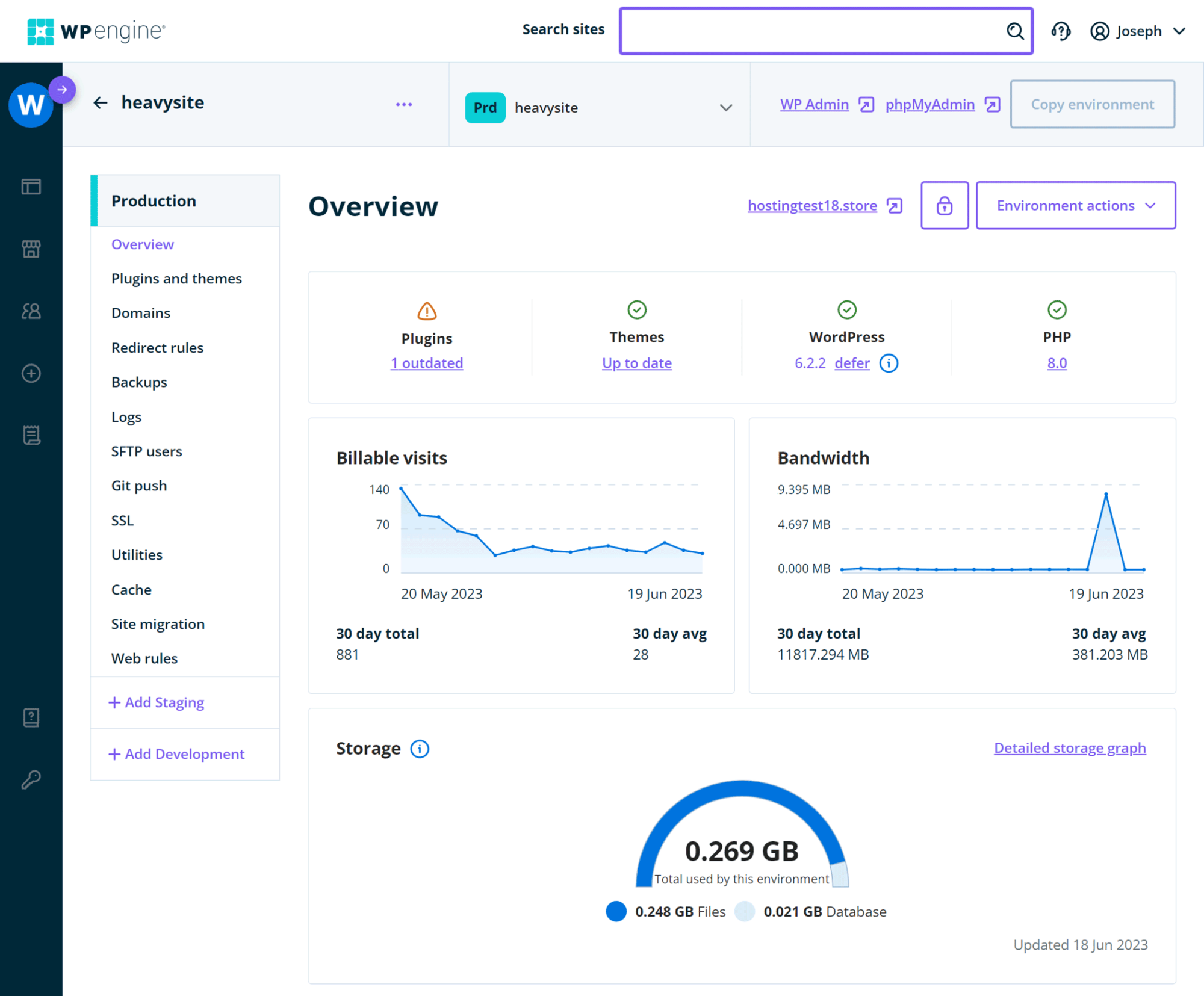
At its heart, WP Engine is fully managed WordPress hosting. When you sign up, WordPress is already installed and tuned, and the platform takes over the maintenance work that eats up hours on a self-managed server. Daily automated backups run in the background (with on-demand backups whenever you want one), and restore points are retained for roughly 30 to 60 days. One-click staging environments let you clone your live site, test changes safely, and push them back to production without touching the command line.
Security is handled at the platform level. You get free auto-renewing SSL certificates, SSH access, Layer 3 and 4 DDoS protection, security patching, and plugin risk scans. WordPress core and PHP updates can be applied automatically, and an optional Smart Plugin Manager add-on will update your plugins with visual regression testing and automatic rollbacks if an update breaks something visible on the page.
Performance comes from EverCache, the Cloudflare-backed global CDN, and modern cloud infrastructure. Developers get SSH, Git, GitHub Actions deployments, WP-CLI, PHP version control, and transferable sites for painless client handoff. Site building is smoother too, with 10 premium themes, the Genesis block system, and multisite available as an add-on on Professional and above.
Plans & pricing
WP Engine organizes its managed hosting into Essential plans for standard shared-resource hosting, plus Core and Enterprise tiers for isolated resources and mission-critical sites. Plans are billed monthly or annually, and annual billing typically saves you the equivalent of about two months per year. Every plan is metered by the number of sites, monthly visits, local storage, and bandwidth, so choosing the right tier is mostly about matching those limits to your traffic. Prices below are current list figures and can change, so always confirm on the pricing page.
Startup
The entry tier lands at roughly $25 to $30 per month depending on billing term and any first-year promotion. It includes 1 site, an estimated 25,000 visits per month, 10 GB of local storage, and 75 GB of bandwidth. Support here is chat only. It is a reasonable home for a single small business site or a personal blog that values reliability over rock-bottom cost.
Professional
At about $55 per month, Professional bumps you to 3 sites, around 75,000 visits, 15 GB of storage, and 150 GB of bandwidth, and it unlocks phone support alongside chat. This is often the sweet spot: if you expect to run two or more sites, it is barely more than paying per-site overages on Startup, and the added phone line matters when something urgent breaks.
Growth
Growth runs around $109 per month for 10 sites, roughly 100,000 visits, 20 GB of storage, and 240 GB of bandwidth. It is aimed at small agencies and busier businesses managing a portfolio of client sites, where the per-site cost drops to a much more comfortable level.
Scale
Scale sits near $276 per month and covers 30 sites, about 400,000 visits, 50 GB of storage, and 550 GB of bandwidth. This is the top of the shared-resource Essential range and suits larger agencies or a single high-traffic property.
Core and Enterprise
Core hosting starts around $400 per month and moves you onto isolated resources with a 99.99% uptime SLA, senior fast-track support, and included licenses for Smart Plugin Manager, site monitoring, and NitroPack. Enterprise is custom-quoted and adds high-availability architecture, a dedicated support team, Git-powered CI/CD, an SSH gateway, and hands-on event and incident management. Two cost notes to keep in mind: additional sites beyond your plan cost about $20 per month each, and traffic over your monthly visit allowance is billed at roughly $2 per 1,000 extra visits. WP Engine also offers a 60-day money-back guarantee, which is generous by hosting standards.
How to get the best value
WP Engine is never going to be the cheapest option, but there are sensible ways to spend less for what you get. First, pay annually if you can commit; the effective discount is meaningful and you avoid month-to-month markup. Second, size your plan to real traffic rather than aspiration. The visit caps are estimates, and overage fees add up, so it is worth checking your current analytics before you pick a tier and leaving a little headroom rather than paying a lot for a bigger plan you will not use.
Third, if you run more than one site, jump straight to Professional rather than stacking per-site add-ons on Startup. The math almost always favors the higher plan once you hit two sites. Fourth, watch for the promotional offers WP Engine periodically runs for new customers, which can knock a few months off the first year; combine that with annual billing and the first-year cost drops considerably. Finally, lean on the 60-day money-back guarantee. Migrate a real site, run it under real conditions, and make sure the performance and support live up to the price before your window closes.
Watch: WP Engine in action
For a hands-on look at the dashboard, features, and real-world experience of running sites on WP Engine, this independent walkthrough is a helpful companion to the written review.
WP Engine vs alternatives
WP Engine’s closest rivals are Kinsta, another premium managed WordPress host, and SiteGround, a more budget-friendly option that also does managed WordPress well. Here is how they compare at a high level.
| Factor | WP Engine | Kinsta | SiteGround |
|---|---|---|---|
| Positioning | Premium managed WordPress, agency and enterprise focus | Premium managed WordPress on Google Cloud, developer focus | Value managed WordPress for SMBs and freelancers |
| Entry price | Around $25-30/mo | Around $30/mo | Lower intro price, higher on renewal |
| Caching & CDN | EverCache plus Cloudflare global CDN | Built-in caching plus premium CDN included | SG caching plus free basic CDN |
| Standout extras | StudioPress/Genesis, Global Edge Security, headless Atlas, Flywheel | Isolated container architecture, polished dashboard, free CDN | Email hosting, low cost, easy for beginners |
| Best fit | Agencies and businesses wanting a deep WordPress ecosystem | Developers wanting speed and clean tooling | Budget-conscious owners who want extras like email |
The short version: Kinsta is the most direct head-to-head competitor and trades blows on speed and dashboard polish; SiteGround wins on price and throws in email hosting that neither premium host offers, but its renewal rates climb and its cheapest plan omits some conveniences like on-demand backups. WP Engine’s edge is the breadth of its ecosystem and its agency-grade tooling.
Performance, support & value
On performance, WP Engine’s reputation is well earned. The combination of WordPress-tuned servers, EverCache, and a Cloudflare-backed CDN means most sites feel fast without much tuning, and the platform holds up well under traffic because caching and infrastructure are handled for you. We are careful not to quote specific benchmark numbers here because results vary by site, region, and configuration, but the consistent theme across independent reviews is that speed and stability are strengths, not weaknesses.
Support is the other pillar. Because every agent is WordPress-literate, you are not explaining what a plugin is before you can get help. Chat is available 24/7 on every plan, and phone support opens up from Professional upward. In practice this is one of the biggest reasons people stay: when a site goes down at an awkward hour, reaching someone who understands WordPress quickly is worth a lot.
On value, WP Engine is expensive if you judge it purely on gigabytes and visits, and excellent value if you judge it on the hours of maintenance, security, and troubleshooting it removes. For a hobby blog, the price is hard to justify. For a business where downtime costs money, it usually pays for itself.
Who should use it — and who should not
WP Engine is a strong fit if you are an agency or freelancer managing multiple client sites, a business that treats its website as a revenue channel, or a developer who wants professional tooling like staging, Git deployments, and a headless option. It is also a good match for anyone who simply does not want to think about server maintenance and is happy to pay for that peace of mind.
It is a poor fit if you are on a tight budget, run a low-traffic personal project, or need to host anything other than WordPress. If you want email hosting bundled in, a general-purpose server for non-WordPress apps, or the absolute lowest monthly price, you will be happier with a value host or a VPS. And if you rely on specific caching or backup plugins that WP Engine disallows, you should confirm compatibility before migrating.
Honest limits
No review is complete without the downsides, and WP Engine has a few real ones. It is WordPress-only, so there is no room for static sites, custom applications, or email accounts on the platform. The metered model means monthly visit and storage caps can bite: a viral post or a seasonal traffic spike can push you into overage charges, and storage limits are modest on the lower tiers, which matters for media-heavy sites.
There is also a disallowed-plugins list. Because the platform provides its own caching, backups, and security, plugins that duplicate or conflict with those systems are blocked. For most users this is invisible, but if your workflow depends on a particular caching or backup plugin, it can be a genuine obstacle. And the price, while fair for what it delivers, remains a barrier for smaller sites.
Finally, the community context. In late 2024, WP Engine became the center of a high-profile public dispute with Automattic, the company behind WordPress.com and led by WordPress co-founder Matt Mullenweg. Mullenweg publicly criticized WP Engine over trademark use and open-source contributions, and access to certain WordPress.org resources was temporarily restricted, which briefly affected updates for some plugins including Advanced Custom Fields. WP Engine filed suit, and in December 2024 a court ordered that its access to WordPress.org be restored; the broader legal case has continued into 2025. We mention this factually rather than to take a side: services stayed online throughout, and the practical impact on customers was limited and short-lived, but it is a piece of context any prospective customer deserves to know before committing.
WP Engine discount codes & deals
WP Engine does not lean on manufactured countdown-timer urgency, but it does run legitimate offers worth using. New customers can typically save the equivalent of a few months by choosing annual billing over monthly, and the company periodically runs promotions that add extra free months onto a first-year annual plan. Stacking those together is where the real savings live. The 60-day money-back guarantee also functions as a risk-free trial, letting you evaluate the platform with a real site before you are locked in.
Because promotional details change over time, check the current pricing and any live offer directly before you buy, then pick the plan that matches your traffic.
Frequently asked questions
Is WP Engine worth the price?
For business sites, agencies, and anyone whose time has real value, generally yes. You are paying for performance, security, automatic maintenance, and expert WordPress support rather than raw storage. For a small hobby blog, a cheaper host will make more sense.
Can I host non-WordPress sites on WP Engine?
No. The platform is built exclusively for WordPress, including WooCommerce stores and headless WordPress projects. If you need to host static sites, custom apps, or email, you will need a different provider for those.
What happens if I exceed my plan’s visit limit?
WP Engine charges an overage fee, commonly around $2 per 1,000 extra visits, rather than shutting your site off. If you regularly exceed your allowance, upgrading to the next tier is usually cheaper than paying ongoing overages.
Does WP Engine include backups and staging?
Yes. Every plan includes automatic daily backups plus on-demand backups, with restore points retained for roughly 30 to 60 days, and one-click staging environments so you can test changes before pushing them live.
Are some plugins really blocked?
Yes. WP Engine maintains a disallowed-plugins list, mostly caching, backup, and certain performance or security plugins whose jobs the platform already handles. Most sites are unaffected, but it is worth checking if you depend on a specific plugin.
Does WP Engine offer a money-back guarantee?
Yes. There is a 60-day money-back guarantee on managed WordPress plans, which is long enough to migrate a real site and evaluate performance and support before committing.
How did the 2024 dispute with Automattic affect customers?
The practical impact was limited and short-lived. Sites stayed online, and a December 2024 court order restored WP Engine’s access to WordPress.org resources. The wider legal case has continued, but day-to-day hosting has not been disrupted for customers.
What managed WordPress hosting actually is
If you are new to the term, managed WordPress hosting simply means a host that specializes in WordPress and takes over the technical maintenance that would otherwise fall on you. On a traditional shared or VPS host, you are responsible for configuring the server, setting up caching, applying updates, arranging backups, and hardening security. A managed WordPress host does all of that for you and tunes its infrastructure specifically for how WordPress behaves.
In practice that translates into a handful of concrete benefits: server-level caching and a CDN so pages load quickly, automatic WordPress core and PHP updates, daily backups with easy restores, one-click staging to test changes safely, free SSL, and platform-level security including firewalls and DDoS protection. You typically also get support staff who know WordPress deeply, so troubleshooting a plugin conflict or a slow query is faster.
The tradeoff is cost and flexibility. Managed WordPress hosting is more expensive than generic shared hosting, and it is deliberately locked to WordPress, so you give up the ability to run arbitrary software. For people who want their site to just work while they focus on content or business, that tradeoff is usually worth it, and WP Engine is one of the most established, feature-complete options in the category. If that description fits you, it is well worth a closer look.