
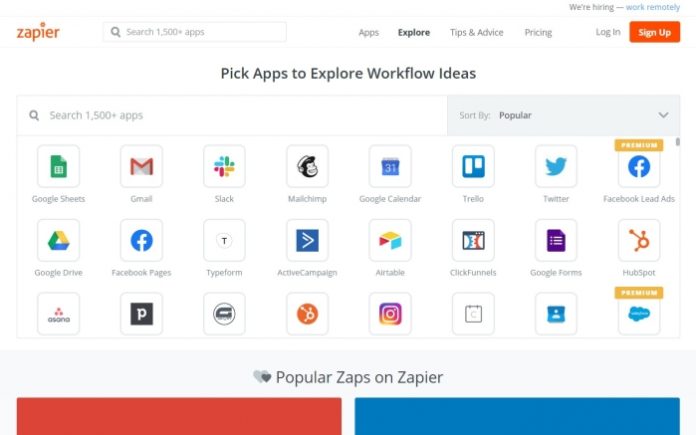
Every no-code automation conversation starts in the same place: “just use Zapier.” Zapier has been the default answer for over a decade because it connects more software than anything else on the market — 7,000+ apps and counting, the largest integration library in the category by a wide margin. But defaults deserve scrutiny. The platform has sprawled far beyond simple trigger-action pairs into tables, interfaces and an AI Copilot that builds workflows from plain English, while its task-based pricing has quietly become the most common complaint we hear from long-term users. We spent weeks building real workflows on it, priced the same automations on rival platforms, and pulled in aggregated user sentiment to figure out when Zapier is still the right answer — and when you are paying a convenience tax you no longer need to pay.
AnalyzeBench Score: 8.6/10
Best for: Non-technical teams and busy operators who want automations working in minutes, connected to whatever software they already use, without reading documentation.
What we loved:
- The 7,000+ app library is a genuine moat — the long-tail CRM or niche form builder your client insists on is almost always there.
- Multi-step Zaps with paths, filters, delays and formatters handle surprisingly sophisticated logic without code.
- The AI Copilot now drafts working multi-step Zaps from a plain-English sentence, and it is genuinely useful rather than a demo trick.
- Tables, Interfaces, Chatbots and Canvas turn Zapier from a pipe between apps into a place where lightweight internal tools can live.
- Reliability tooling is mature: error notifications, automatic replay of failed tasks on paid plans, and a clear task history for debugging.
What could be better:
- Task-based pricing climbs fast — every action in every step burns a task, so a busy multi-step Zap can turn a modest bill into a painful one within months.
- The free tier’s 100 tasks a month is enough to learn the product, not to run anything real on it.
- Complex data work — looping, splitting and recombining records — is clumsier here than in Make’s visual builder.
- Some deeper features (webhooks, advanced admin controls) are gated behind higher tiers where competitors include them lower down.
What makes Zapier different
Zapier’s moat is not technology — it is coverage. Automation is only useful if it connects to the software you actually use, and with 7,000+ integrated apps Zapier connects to roughly three times as many as Make and an order of magnitude more than most workflow tools’ native automation. That coverage compounds: when a new SaaS product launches, its team builds a Zapier integration first because that is where the users are, which keeps the library growing on its own. In practice this means the question “can I automate this?” almost always has the same answer on Zapier, and frequently does not on anything else. For agencies and ops people who cannot control what tools land on their desk, that certainty is worth real money.
The second differentiator is how little Zapier asks of you. The editor is a vertical checklist — when this happens, do this, then this — that a first-time user can follow without training, and the AI Copilot now writes the first draft of the Zap for you from a sentence like “when a Typeform is submitted, enrich the lead and add it to our CRM, then notify sales in Slack.” Around that core, the company has been building an ecosystem: Tables (a lightweight database), Interfaces (forms and simple portals), Chatbots and Canvas (visual process mapping) let you build the whole small workflow — data in, logic, human touchpoint — without renting three more tools. None of these match dedicated products yet, but they signal where Zapier is going: from plumbing to platform.

Key features
7,000+ app integrations
Beyond the obvious names — Gmail, Slack, HubSpot, Shopify, Stripe — the library covers the weird stuff: local payment processors, vertical-market CRMs, legacy webinar tools. Each integration exposes triggers (events that start a Zap) and actions (things Zapier can do), and popular apps expose dozens of each; generic webhooks on paid plans fill any gaps. In our testing the difference between Zapier and rivals was rarely whether a workflow was possible — it was whether it took two minutes or an afternoon of API documentation.
Multi-step Zaps with real logic
A Zap can chain dozens of steps: filters that stop irrelevant records, paths that branch on conditions, delays that wait for business hours, formatter steps that reshape dates, numbers and text, and lookup steps that search connected apps before acting. This covers a large majority of business automations — lead routing, approval nudges, order follow-ups — without touching code. The ceiling is real, though: iterating over line items or merging data from several sources mid-flow is where Zapier gets awkward and Make’s iterators and aggregators shine.
AI Copilot and AI steps
Zapier’s Copilot builds Zaps from natural language, suggests the apps and maps the fields, leaving you to connect accounts and review. It handled our plain-English requests — including a three-branch lead router — with only minor field-mapping fixes. Beyond building, AI steps let you drop ChatGPT, Claude or Zapier’s own AI actions into a workflow to summarize, classify or draft text mid-Zap, turning “new support ticket” into “new support ticket, summarized, sentiment-tagged and routed.”
Tables, Interfaces and Canvas
Tables gives your Zaps a home for data; Interfaces builds the form or mini-portal that feeds them; Canvas maps the whole process visually. Together they let you build a lightweight intake-and-workflow tool entirely inside Zapier. They are young — Airtable is a far deeper database and dedicated form tools are more polished — but for automation-first teams they remove the need to duct-tape yet another subscription into the stack.
Plans & pricing
Zapier prices on tasks: every action a Zap successfully performs consumes one task, and plans are tiered by monthly task volume. The free plan includes 100 tasks a month with basic two-step Zaps and AI power-ups; paid plans start with the Professional tier, which unlocks multi-step Zaps, webhooks and email support, with task allowances that scale the price. Team adds shared workspaces, unlimited users and premier support; Enterprise adds advanced admin, analytics and SAML SSO. The numbers below reflect typical annual-billing pricing at the entry task volume — Zapier adjusts packaging and runs promotions, so treat this as the shape of the pricing and check current pricing before you buy.
| Plan | Typical monthly (annual billing) | What you get |
|---|---|---|
| Free | $0 | 100 tasks/mo, basic Zaps, two-step workflows |
| Professional | ~$19.99 and up by task volume | Multi-step Zaps, webhooks, premium apps, auto-replay |
| Team | ~$69 and up by task volume | Unlimited users, shared connections, SAML add-on |
| Enterprise | Custom | Advanced admin, analytics, dedicated support |
The subtlety is the task math. A five-step Zap that runs 30 times a day consumes roughly 4,500 tasks a month on its own, which pushes you up the volume ladder quickly — and overage handling means busy months can surprise you. Before committing, count the actions (not the Zaps) you expect to run monthly; it is the single number that determines what Zapier really costs you.

How to get started
- Sign up free and connect your three most-used apps first — email, chat and your CRM or spreadsheet — since most useful Zaps touch at least two of them.
- Build your first Zap from a template or describe it to the AI Copilot; start with something low-stakes like “new form submission → Slack notification.”
- Test the Zap with real sample data inside the editor and check every field mapping — this is where 90% of future confusion is prevented.
- Turn it on, then watch the task history for a few days to confirm it fires when expected and skips what it should skip.
- Only then add complexity: filters to cut noise, paths for branching, and a second Zap rather than one monster workflow that nobody can debug.
Expect your first working automation inside fifteen minutes — Zapier’s onboarding is the best in the category at getting a non-technical user to a live workflow. The skill that actually takes time is task discipline: learning to put filters early in the Zap so you stop paying for runs that do nothing useful.
Common setup mistakes to avoid
Three mistakes account for most Zapier regret. First, filtering late: every step after the trigger consumes tasks, so a filter buried at step five means paying for records the Zap ultimately ignores — put it at step two. Second, building one enormous Zap instead of several small ones: a twelve-step do-everything workflow is impossible to debug and fails in expensive, invisible ways; three four-step Zaps with clear names will save your future self hours. Third, ignoring error notifications: Zaps fail silently from expired app connections and changed field names more often than people expect, so turn on email alerts and skim the task history weekly — an automation you believe is running but is not can be worse than no automation at all.
Watch: Zapier in action
Zapier vs alternatives
The comparison that matters most is Make, which charges per operation at a rate that works out dramatically cheaper at volume — often a fifth of the price for a busy workflow — and whose visual scenario builder handles loops, arrays and data transformation far more elegantly. The trade: Make’s ~2,000-app library is a third the size, and its learning curve is genuinely steeper for non-technical users. Self-hosted n8n is effectively free at any volume if you have someone comfortable running a server, making it the endgame for technical teams that outgrow both. Against the automation built into work platforms — monday.com’s automations, Airtable’s, Notion’s — Zapier is the connective tissue between tools rather than a rival: those handle events inside their own walls, while Zapier moves data across them. The honest summary: Zapier wins on coverage, ease and speed-to-working-automation; Make wins on price-per-run and data power; n8n wins on cost at scale for people who can host it.

Performance, support & value
Performance: Zapier’s execution reliability was excellent in our testing — Zaps fired consistently, and the automatic replay on paid plans recovered the handful of failures caused by third-party API hiccups without our involvement. Polling triggers introduce a delay (from about one to fifteen minutes depending on plan), which surprises new users expecting instant reactions; instant webhook-based triggers on supported apps close that gap.
Support: documentation and the template library are the real first line, and they are superb — most questions are answered by a help-doc or an existing template. Human support is email-based with priority on higher tiers; answers in our experience were competent but not fast. The community forum and the sheer volume of third-party tutorials compensate: it is hard to hit a Zapier problem nobody has written about.
Value: this is the genuinely contested question. Per task, Zapier is the most expensive mainstream automation platform. What you buy for the premium is coverage, polish and the near-certainty that any given workflow will take minutes to build. For teams running a handful of moderate-volume automations, that trade is easily worth it; for operations-heavy businesses running tens of thousands of tasks a month, the math starts favoring Make or n8n and the premium becomes hard to defend.
Our testing notes
We rebuilt a set of real workflows on a paid plan: webinar-registration enrichment into a CRM, an invoice-overdue chaser, a content pipeline from project tracker to CMS, and a three-path lead router with AI classification. All four worked, and only the router required real thought — mapping the AI step’s output into clean fields for the paths. Build times ranged from six minutes to about forty. The Copilot drafted three of the four correctly on the first attempt, which would have been science fiction in this product two years ago.
The friction we logged was almost entirely about data shape and cost. Anything involving line items — an order with multiple products, an invoice with multiple rows — forced us into Zapier’s looping and formatter gymnastics, which work but feel like fighting the tool. And watching the task counter during testing was sobering: our four modest workflows consumed just over 3,100 tasks in a month, right at the edge of the entry paid allowance. Zapier works beautifully; it simply meters the beauty.
What real users say
Aggregated review sentiment on Zapier is strongly positive with one loud, consistent exception. Users across G2, Capterra and community threads praise exactly what you would expect: it connects everything, it works, and non-technical staff genuinely build automations themselves rather than filing tickets to IT. The phrase “set it and forget it” recurs constantly, as do stories of small teams automating away an admin hire’s worth of work.
The exception is pricing, and it is not subtle: rising bills as task volume grows are the dominant criticism in nearly every review source, often paired with “we are evaluating Make/n8n” — and migration threads are full of people who did exactly that once usage matured. Quieter gripes: trigger delay on lower plans, and the occasional silently broken Zap after an app updates its API. Notably rare are complaints about reliability or data loss; users grumble about what Zapier costs, almost never about whether it works.

Who should use it — and who should not
Choose Zapier if you are a non-technical team, a solo operator or an agency that needs automations working today across a sprawl of SaaS tools you did not choose. It is the right default for marketers wiring lead flows, ops people connecting forms to spreadsheets to Slack, and small businesses automating forgotten follow-ups. The Copilot has widened that audience further: if you can describe the workflow in a sentence, you can probably ship it.
Skip it — or plan your exit — if you are operations-heavy and volume-sensitive. Businesses running high-frequency workflows, heavy data transformation or anything measured in tens of thousands of runs a month will find Make dramatically cheaper and more capable with structured data, and technical teams with server access will find self-hosted n8n effectively free. Likewise, if every app you use lives inside one platform, that platform’s native automations may cover you without a middleman.
Honest limits
Zapier is a metered convenience, and both words matter. The task model taxes exactly the success it enables — the better your automations work, the more you pay — and the free tier is a demo, not a plan. Data-heavy workflows expose the editor’s weakest side: loops, arrays and multi-source merges are possible but inelegant. Trigger latency on polling apps rules out real-time use cases on lower tiers, and Tables, Interfaces and Chatbots are not yet substitutes for dedicated tools. None of this dents the core proposition; all of it belongs in the decision.

Zapier deals
Zapier discounts predictably rather than dramatically: annual billing cuts roughly 33% versus monthly on most tiers, which dwarfs any coupon you will find, and the free plan plus a 14-day trial of paid features lets you validate workflows before spending anything. Occasional startup and nonprofit programs offer deeper cuts for those who qualify. We track working offers on our deals page as they appear.
Frequently asked questions
What counts as a task in Zapier? Every action a Zap successfully completes — each step after the trigger — consumes one task. Filters and the trigger itself are free; a five-step Zap that runs once uses four tasks.
Is Zapier’s free plan actually usable? For learning and one or two trivial automations, yes. At 100 tasks a month with two-step Zaps only, anything business-critical will outgrow it within weeks.
How is Zapier different from Make? Zapier has roughly three times the app library and a far gentler learning curve; Make is much cheaper per run and stronger at loops, arrays and data transformation. Ease versus economics is the real axis.
Does Zapier work with AI tools like ChatGPT and Claude? Yes — both as integrations you can call mid-Zap and via Zapier’s own AI steps and Copilot, which builds workflows from plain-English descriptions.
How fast do Zaps trigger? Instant-trigger apps fire within seconds via webhooks; polling-based triggers check on an interval from about one to fifteen minutes depending on your plan.
Is Zapier secure enough for business data? Zapier holds SOC 2 Type II certification, encrypts data in transit and at rest, and offers SAML SSO and advanced admin controls on higher tiers. As always, limit connected accounts to what workflows actually need.
Can Zapier replace hiring a developer? For internal glue work — moving data between tools, notifications, follow-ups — very often yes. For customer-facing products with heavy logic, it is a prototyping tool, not a foundation.
How to choose an automation platform: a practical guide
Start by listing the five workflows you would automate tomorrow, then check every candidate platform against the specific apps in them — integration coverage is binary, and one missing connector kills a workflow no matter how elegant the tool. Second, do the volume math honestly: estimate monthly runs times steps per run, and price all the platforms at that number, because the rankings invert as volume grows — the tool that is cheapest at 500 tasks a month is usually the most expensive at 50,000. Third, match the builder to whoever will maintain it: a checklist editor like Zapier’s suits non-technical owners, a flowchart canvas like Make’s suits people who think in data, and self-hosted tools suit engineering teams. Fourth, test failure, not just success: break a workflow on purpose during the trial and see how clearly the platform tells you what went wrong. Finally, weigh lock-in — automations accrete into infrastructure, and migrating fifty of them is a real project. Zapier’s unmatched coverage, gentle learning curve and maturing AI tooling are exactly what this checklist rewards for mainstream teams, which is why it holds an 8.6 — with the standing caveat that volume-heavy shops should run the Make math before they commit.



