Every content team sits on the same untapped asset: a blog archive that could be working as video and is not, because editing is slow and nobody has the hours. Pictory attacks exactly that problem — paste a script or a blog URL and it assembles a finished video from stock footage, auto captions and AI voiceover in minutes, no timeline skills required. It will not win film festivals, and we will be specific about why. But as a machine for turning written words into serviceable marketing video at volume, it is one of the most genuinely useful tools in the category — with quota math and a stock-footage aesthetic to understand before subscribing.
AnalyzeBench Score: 8.1/10
Best for: Bloggers, content marketers and small teams who want to repurpose written content into captioned social video at scale — without learning a video editor or hiring one.
What we loved:
- Blog-to-video genuinely works: paste a URL and get a scene-by-scene draft with matched stock footage and captions in minutes.
- Auto captions with word-level highlighting are accurate and social-ready out of the box — the single feature that most improves silent-scroll performance.
- Scene-level control hits the right depth: swap any clip, edit any caption line, adjust timing — without ever facing a timeline.
- Brand templates (fonts, colors, logo, intro/outro) keep a whole channel’s output consistent, even across multiple team members.
- The output reads as normal content on social platforms — assembled real footage with captions, not synthetic-looking AI video.
What could be better:
- The stock-footage look is real: without deliberate template work and your own footage mixed in, videos can feel generic.
- Rendering-minute and video quotas take arithmetic — iterative re-renders eat allowances faster than beginners expect.
- Built-in AI voices are serviceable rather than excellent; discerning ears will want to import better narration.
- Scene-matching guesses wrong on abstract or technical topics, which means manual clip-swapping on exactly the content that is hardest to visualize.
What makes Pictory different
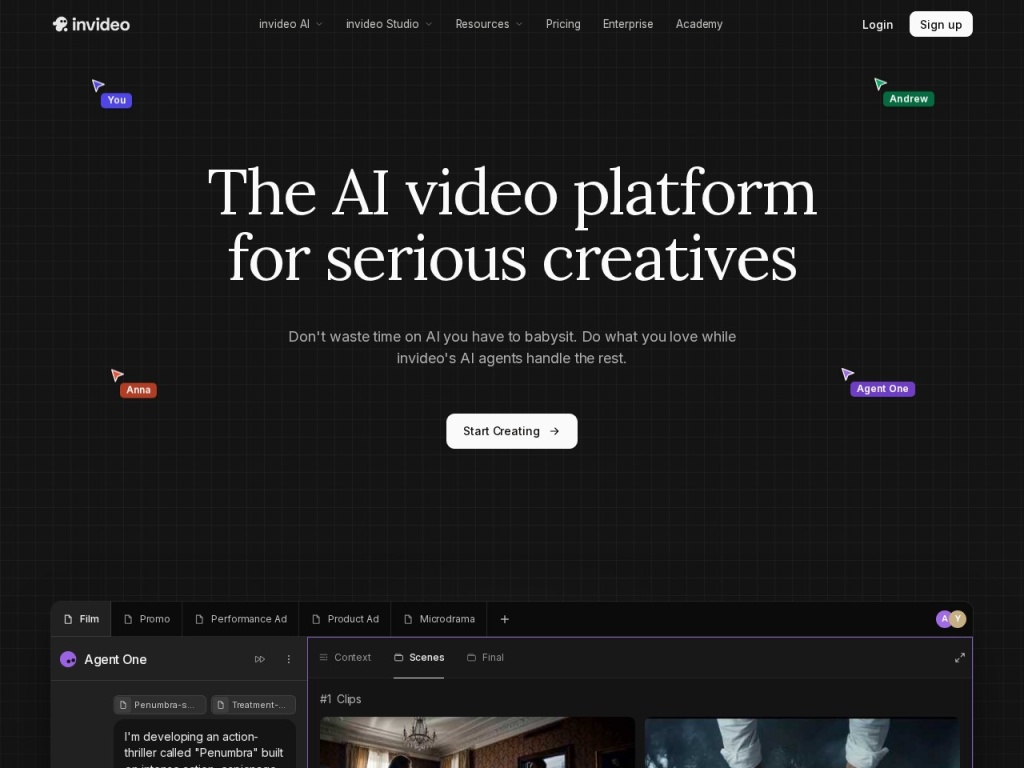
Most AI video tools start from a blank canvas or a synthetic presenter. Pictory starts from your existing words. Feed it a script and it splits the text into scenes, matches each scene with stock footage from licensed libraries, layers on captions and voiceover, and hands you a draft you refine by swapping and trimming rather than assembling. Feed it a blog URL and it goes further — extracting the key sentences, summarizing them into scene text, and building the video skeleton for you. For the core use case of repurposing an article archive into a YouTube or social pipeline, that starting point saves more time than any editing feature could.
The second difference is worth spelling out because almost nobody does: what Pictory outputs is assembled real footage with captions — the visual language of normal social video — rather than fully synthetic imagery or AI avatars. That has practical consequences. Audiences do not react to it as “AI content”; it looks like the stock-plus-captions format that has dominated feeds for years. And as platforms tighten labeling and policy around synthetic media, content built from licensed real footage with generated narration sits in a far more comfortable position than photoreal synthetic humans. Pictory’s output is unglamorous by design — and unusually durable for the same reason.

Key features
Script-to-video and blog-to-video
The headline workflows. Script-to-video splits your text into scenes and visualizes each with matched stock clips; blog-to-video adds an extraction-and-summarization step so a full article becomes a tight highlight video rather than a droning read-through. Both produce editable drafts, not final renders — expect to accept perhaps half the automatic footage choices, swap the rest, and tighten the scene text. On concrete topics (travel, food, fitness, business generalities) the auto-matching is impressively usable; on abstract or technical material it needs more of your hands.
Auto captions with word highlighting
Pictory transcribes and captions automatically with word-level highlighting synced to the narration — the karaoke-style emphasis that dominates short-form feeds because most social video plays silent. Accuracy is high, edits are inline, and styling follows your brand template. Teams also use this feature standalone: upload a recorded talking-head or webinar and let Pictory caption and cut it into clips, which quietly makes it a repurposing tool for recorded video, not just for text.
Scene-level editing and stock swaps
Each scene is a card: its text, its clip, its timing. Swapping footage means searching the built-in licensed stock libraries (millions of video clips and images) and clicking a replacement; you can also upload your own footage and mix it in, which is the single best antidote to the stock look. What you cannot do is frame-level timeline editing — Pictory deliberately trades that depth for speed, and the trade is the product.
Brand templates, voices and team features
Templates lock fonts, colors, logo placement, caption style and intro/outro cards so every video from every team member matches the channel. Built-in AI voices cover the basics across a range of languages and accents — fine for volume social output, flat for anything premium — and you can upload your own narration instead, which is where pairing Pictory with a dedicated voice tool pays off. Higher tiers add team seats and collaboration.
Plans & pricing
Pictory sells monthly tiers separated primarily by quota: how many videos or rendering minutes you can produce per month, plus limits on video length, storage and team seats. That structure rewards buyers who know their real output volume and punishes guesswork — iterative re-renders and abandoned drafts consume allowance just like finished videos. Tiers and quota definitions have been adjusted over time, so treat the figures below as the recent ballpark and check current pricing before subscribing; a free trial has historically been available to test the workflow.
| Plan | Typical monthly (annual billing) | Broad fit |
|---|---|---|
| Starter | ~$19–25 | Solo creators; entry quota of videos/minutes per month |
| Professional | ~$39–49 | Regular publishers; larger quotas, longer videos, more voices |
| Teams / Enterprise | ~$99+ | Multiple seats, collaboration, highest quotas, priority support |
The arithmetic that matters: count the videos you will realistically publish per month, add a buffer of roughly 30–50% for re-renders and experiments, and check that against the tier’s quota and per-video length cap. A creator shipping two or three short videos weekly fits the entry tier; a marketing team feeding multiple channels daily should start at Professional and expect to think about Teams. Confirm what happens to unused quota at month’s end and whether stock library access differs by tier — those two details generate most billing surprises in this category.

How to get started
- Build your brand template before your first real video: fonts, colors, logo, caption style, intro/outro — consistency is cheap now and expensive to retrofit.
- Start with blog-to-video on your best-performing article; strong written structure produces the best automatic scene drafts.
- Review every scene card: tighten the text (shorter beats read better on screen), and swap roughly the weakest half of the auto-chosen clips.
- Replace or augment the built-in voiceover — upload narration from a dedicated voice tool, or record your own — before judging the video’s quality.
- Render once, review at real size on a phone, make one consolidated batch of fixes, and re-render once — disciplined single-batch revisions are how quotas survive the month.
The first video takes an hour or two including template setup; steady-state production settles near 15–30 minutes per short video, which is the number that makes the whole category make sense. If your fifth video still takes as long as your first, the fix is usually tighter source scripts, not more editing.
Common setup mistakes to avoid
The failure pattern with Pictory is almost always the same: publishing the raw draft. The automatic output is a starting point, and the visible difference between “obvious stock slideshow” and “credible branded video” is thirty minutes of scene-text tightening, clip swaps and template discipline. The other recurring mistakes: skipping the brand template and producing a feed that looks like ten different channels; feeding it meandering blog posts and expecting tight videos (the summarizer amplifies structure, good or bad); accepting the default voice on premium-facing content instead of importing better narration; re-rendering after every tiny tweak and wondering where the monthly quota went — batch your fixes; and ignoring your own footage entirely, when even two or three original clips mixed into the stock instantly break the generic look.
Watch: Pictory blog-to-video walkthrough
Pictory vs alternatives
Against InVideo, its closest direct rival: InVideo offers deeper timeline-style editing and a huge template library, while Pictory is faster and more automatic from text to draft — tinkerers lean InVideo, volume repurposers lean Pictory. Against avatar platforms Synthesia and HeyGen: different genres — they generate a synthetic presenter speaking to camera, Pictory assembles real stock footage with captions; presenter-led training suits avatars, faceless social and blog repurposing suits Pictory, and the platform-policy calculus around synthetic humans versus assembled real footage increasingly favors the latter for public feeds. Against Descript: Descript edits recorded video by editing its transcript — a recording-first tool — where Pictory generates video from text that was never recorded. And on narration, Pictory pairs naturally with Murf or ElevenLabs: generate the voice where voices are best, then import it.
Performance, support & value
Output quality lands exactly where the design predicts: consistently serviceable, occasionally better, never cinematic. For captioned social clips, listicle-style videos, and article summaries, the results hold attention and read as professional; for brand films or anything emotionally ambitious, the stock-assembly format is the wrong instrument entirely. The pipeline itself performed reliably in our testing — scene generation in seconds to a couple of minutes, renders of short videos typically inside several minutes, and no failed renders that a retry did not fix, though rendering does queue at busy times on lower tiers.
Support is email and chat with responses typically inside a business day, plus a practical tutorial library — Pictory’s own onboarding videos are, fittingly, decent examples of its output. The help center answers the questions beginners actually have, and product updates ship at a steady cadence. It is not enterprise-grade support; heavy team users should validate response expectations on their tier first.
Value hinges on volume and the alternative you are pricing against. Against a freelance editor at market rates, Pictory pays for itself with the first two or three videos each month; against your own time in a real editor, it converts hours into minutes at the cost of ceiling. The uncomfortable middle case is the perfectionist low-volume creator, who will fight the tool’s limits while barely using its quota — that buyer is happier either learning an editor or hiring one. For everyone repurposing written content at volume, the subscription math is comfortably positive.
Our testing notes
We ran real material through the full pipeline: several published blog posts via blog-to-video, an original script, and a recorded webinar segment for the caption-and-clip workflow. The blog-to-video summarizer was the pleasant surprise — on well-structured posts it picked sentence-level highlights we would have chosen ourselves, and the scene drafts needed text tightening more than re-selection. Footage auto-matching graded out roughly as expected: strong on concrete nouns, lost on abstractions — a post about pricing strategy produced generic office montage until we swapped in our own charts and screen recordings, which took minutes and transformed the result.
Captions were the most consistently excellent component: accuracy was high on clean narration, word-level highlighting synced correctly, and styling followed the template without fights. The built-in voices were the weakest link — usable for high-volume social output, but importing narration generated in a dedicated voice tool lifted perceived quality more than any visual change we made. Quota-wise, our habit of small iterative re-renders proved expensive in the first week; switching to batched revisions roughly halved consumption for the same output, which is the single most useful operational note we can pass along.
What real users say
The dominant note in user sentiment is time saved. Bloggers and content marketers describe cutting video production from a day to under an hour, non-editors report shipping video for the first time in their careers, and the caption quality earns consistent, specific praise — several recurring testimonials are effectively “I bought it for the videos and stayed for the captions”. Course creators and agencies also surface a repeated pattern of using Pictory to clip and caption long recorded content into social snippets, a use case the marketing undersells.
The complaint clusters are equally clear and match our findings. The generic stock look leads — users who publish raw drafts see mediocre engagement and say so — followed by quota frustration: allowances consumed by revisions, and confusion over what counts against limits. The AI voices draw regular criticism from narration-sensitive users, and some report the scene-matcher struggling with niche subject matter. A pragmatic minority notes the flip side of simplicity: hitting the ceiling and wanting more manual control than scene cards allow. Almost nobody disputes the core speed claim.
Who should use it — and who should not
Choose Pictory if you have a content archive to repurpose and channels hungry for volume: bloggers converting posts into YouTube and Shorts, marketers feeding LinkedIn and Instagram from the company blog, course creators clipping webinars into promotion, agencies producing captioned social video for clients at scale. The buyer it fits has more good text than video, publishes on a schedule, and values shipped-this-week over cinematic.
Skip it if your brand demands premium visual craft — assembled stock has a ceiling no template rescues — or if your content needs a human or avatar presenter on camera, which is Synthesia and HeyGen territory. Skip it if you already live comfortably in a real editor and produce few videos; the quota subscription buys you speed you do not need. And if your topics are highly abstract or technical, budget for heavy manual clip-swapping and your own visuals, or the auto-matching will fight you on every scene.
Honest limits
Pictory’s limits are the honest price of its speed. The stock-footage aesthetic is real and only partially escapable — your own clips and disciplined templates mitigate it, but the format never becomes cinema. There is no frame-level editing, no motion-graphics depth, no color pipeline; the scene card is the atom, and some ideas do not fit in it. Built-in voices trail dedicated voice platforms, quota pricing punishes undisciplined revision habits, and stock coverage thins on niche topics precisely where you need it most. None of this argues against the tool — it argues for buying it as what it is: a volume machine for turning words into publishable video, not a replacement for craft where craft is the point.
Pictory deals
Pictory’s reliable discount is annual billing, typically well below the monthly rate, with seasonal promotions and occasional trial extensions on top. Because tiers are defined by quotas that change over time, verify the video and minute allowances an offer actually includes before locking in a year. We track verified current offers on our deals page.
Frequently asked questions
Can Pictory really turn a blog post into a video automatically? Yes — paste the URL and it extracts highlights, drafts scenes with matched stock footage and captions, and hands you an editable draft; expect to refine text and swap some clips before publishing.
Do I need video editing skills? No — editing happens at the scene level (text, clip, timing) with no timeline; that simplicity is the product, and also its ceiling.
Is the stock footage licensed for commercial use? Pictory’s built-in libraries are licensed for use in videos you create on paid plans; confirm the terms on your tier, especially for client work.
How good are the auto captions? One of its strongest features — high accuracy with word-level highlighting and template-driven styling, and many teams use Pictory partly as a captioning tool for recorded video.
Can I use my own voiceover and footage? Yes, both — importing your own narration and mixing original clips into the stock are the two highest-impact upgrades to the default output.
How does Pictory compare with Synthesia or HeyGen? Different categories: those generate synthetic avatar presenters, Pictory assembles real stock footage with captions — better for faceless social content and blog repurposing, and less exposed to synthetic-media labeling policies.
What are the quota limits? Tiers cap monthly videos or rendering minutes and per-video length; revisions consume allowance too, so batch your edits and check current tier definitions before buying.
How to choose a blog-to-video tool: a practical guide
Begin with an inventory, not a demo: how many published articles do you have, how many are structured well enough to summarize, and how many videos per month will you genuinely ship — because every serious tool in this category prices by output volume, and the honest answer to that last question eliminates half the tiers immediately. Then match the format to your audience: assembled stock footage with captions (Pictory, InVideo) reads as normal social content and travels well on every platform, avatar presenters (Synthesia, HeyGen) suit training and personal-brand formats but carry synthetic-media considerations as platform policies evolve, and transcript-based editors (Descript) fit teams whose raw material is recordings rather than text. Test the automatic draft quality on your own worst-case content — an abstract or technical post — rather than the travel-blog demo in everyone’s marketing, because scene-matching on hard topics is where tools actually differ. Audit the caption engine closely (accuracy, word highlighting, styling control), since captions drive silent-feed performance more than footage does. Check that you can import your own voiceover and footage — the escape hatches from generic output — and read the quota fine print for what re-renders cost. Finally, run one real article end to end on a trial, publish the result, and let a week of audience metrics decide; your engagement data outranks every review, including this one.