
At the premium end of managed WordPress hosting, two names come up in almost every serious shortlist: Kinsta and WP Engine. Both charge roughly the same for their entry plans, both promise speed, security and expert support, and both have spent a decade building reputations sturdy enough that choosing either is defensible. Which is exactly why the choice is hard: the differences are real, but they live below the marketing layer — in infrastructure choices, developer tooling, overage math and support culture. We have reviewed each host individually at length, run test sites on both platforms, pushed identical WooCommerce builds through both stacks and read months of aggregated user sentiment on each. This comparison distills the head-to-head: where each one genuinely wins, where the gap is cosmetic, and which kind of site owner should pick which — because at these prices, buying the wrong philosophy is more expensive than buying the wrong benchmark.
TL;DR: Kinsta wins on infrastructure purity and dashboard polish — Google Cloud’s fastest machines plus Cloudflare Enterprise on every plan, managed from the cleanest control panel in hosting. WP Engine wins on developer workflow and ecosystem — Local, ACF, Genesis, multi-environment staging and Git tooling make it the agency default. Performance and support are close enough that neither should decide alone, and entry pricing is nearly identical at roughly $30–35 a month for one site. Solo site owners and design-led teams tend to be happier on Kinsta; development shops, agencies and WooCommerce builds with heavy workflows tend to be happier on WP Engine. Both are reviewed in depth in our Kinsta review and WP Engine review.
Performance & infrastructure
Kinsta’s pitch is infrastructure purity: every site runs on Google Cloud’s compute-optimized C2 and newer C3D machines — the fast ones, not the cheap ones — across dozens of GCP regions, fronted by Cloudflare Enterprise on every plan, with edge caching, HTTP/3 and enterprise-grade DDoS protection included rather than upsold. The architecture is container-based, with isolated resources per site, so a noisy neighbor cannot starve your store during its traffic spike, and the practical result in our testing was consistently low TTFB, strong performance under concurrency, and cache-hit behavior that made even far-flung visitors feel local. Region choice matters here: with dozens of GCP locations, most businesses can place their origin genuinely close to their audience. Kinsta effectively rents the best public-cloud hardware available and passes the bill along in its pricing.
WP Engine’s answer is its own platform engineering: the proprietary EverCache stack layered over Google Cloud (and AWS on some tiers), an in-house CDN, and years of WordPress-specific tuning — including edge caching for WooCommerce that keeps carts dynamic while caching everything around them, a genuinely hard problem most hosts dodge. In our tests WP Engine’s cached performance sat within striking distance of Kinsta’s, with uncached dynamic requests trading blows depending on region and plan. The honest summary: both are top-decile fast, Kinsta by buying the best cloud, WP Engine by engineering its own layer — raw speed alone should not decide this comparison.
Developer experience
This is WP Engine’s home turf. The company owns much of the modern WordPress developer stack: Local, the de facto standard local development app, syncs directly to its hosting; Advanced Custom Fields — the plugin half the custom sites on the internet are built on — is a WP Engine property, as are the Genesis framework and themes. Every site gets three environments (development, staging, production) with one-click copies between them, Git push deployment is native, and the workflow from laptop to live is the smoothest in managed hosting. Add smart plugin updates that visually diff pages before and after an update and roll back automatically on regressions, and you have a platform that clearly thinks in terms of build-test-deploy. For agencies shipping client sites weekly, these are not conveniences; they are the product.
Kinsta’s developer story is thinner but far from thin, and its control panel is decisively better. MyKinsta is the most polished dashboard in hosting — fast, coherent, self-explanatory — where WP Engine’s portal feels a generation older. Kinsta offers one-click staging (with premium multi-environment staging as an add-on), PHP version switching per site from the dashboard, SSH and WP-CLI everywhere, automatic database optimization, and a full REST API for programmatic site management that DevOps-inclined teams genuinely use. The split: WP Engine optimizes for professional build-test-deploy workflows; Kinsta optimizes for the experience of managing running sites. Match that to who on your team touches the hosting most.
Pricing & value
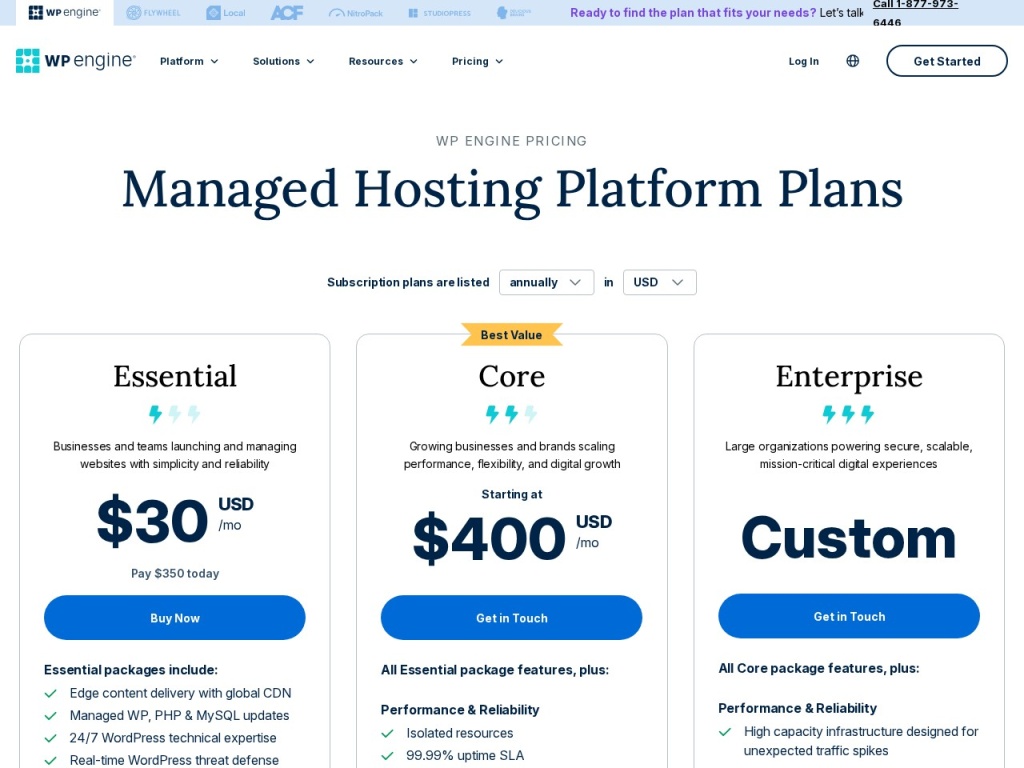
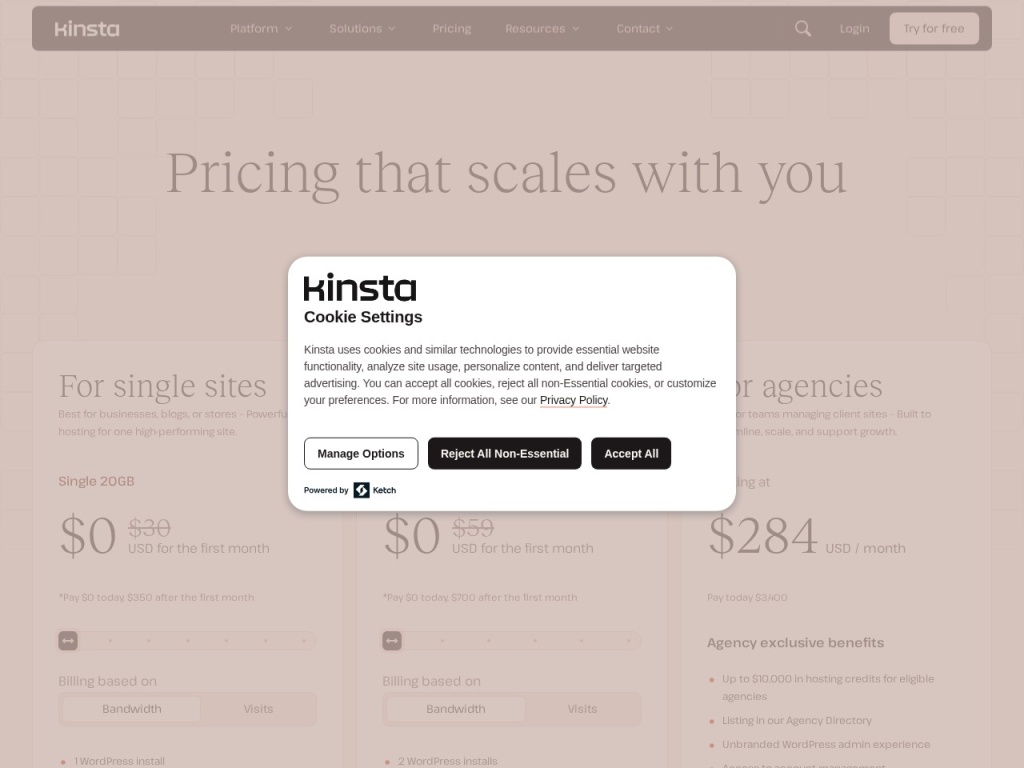
Entry pricing is nearly identical — roughly $30–35 a month for a single site on annual billing at both hosts — and both scale primarily on monthly visits, storage and site count rather than raw features. Both levy visit-based overages when traffic exceeds plan allowances, which is where real-world bills diverge from sticker prices — a viral month can add a surprising line to the invoice at either host, and how visits are counted differs subtly between them, so read both definitions. Numbers move with promotions and plan revisions, so verify current pricing before deciding; the snapshot:
| Factor | Kinsta | WP Engine |
|---|---|---|
| Entry plan | ~$30–35/mo, 1 site, ~25k visits | ~$30–40/mo, 1 site, ~25k visits |
| CDN | Cloudflare Enterprise included | In-house CDN included |
| Environments | Staging included; multi-env via add-on | Dev/staging/production standard |
| Overages | Per-visit fees beyond allowance | Per-visit fees beyond allowance |
| Ecosystem extras | MyKinsta, API, APM tool | Local, ACF, Genesis included |
On value, the tiebreaker is what you would otherwise buy. WP Engine bundles licenses and tooling (ACF-adjacent products, Genesis, Local’s pro workflows) that agencies already pay for elsewhere, while Kinsta bundles Cloudflare Enterprise and an APM tool that would cost real money standalone. Model your actual visit counts — both hosts’ calculators are honest — because a plan tier mismatch costs more than any feature difference. And if the entry price itself is the obstacle, this comparison is premature: WPX or Cloudways deliver most of the speed at half the bill.
Support
Both hosts staff genuine WordPress engineers rather than script readers, both run 24/7 chat, and both will actually dig into a plugin conflict rather than deflecting to a knowledge base — which already puts them above most of the industry. Kinsta’s support runs through MyKinsta chat with no phone tier; responses in our experience were fast, technically fluent and unusually willing to investigate application-level problems — the agent who handled our staged plugin conflict identified the offending hook rather than telling us to disable plugins one by one, which is the difference premium pricing is supposed to buy. The absence of phone support is deliberate and, for most technical users, immaterial.
WP Engine offers chat on all plans and phone support on higher tiers, which matters to agencies whose clients expect a number to call during an incident. Quality in our contacts was strong, with the caveat that responses occasionally leaned on tiering — enterprise customers visibly get the faster lane. Community sentiment gives both hosts high marks with the same complaint pattern: rare slow patches during peak load at WP Engine, and occasional firm plan-limit enforcement at Kinsta. Support should not decide this matchup either way unless phone access is a hard requirement — in which case WP Engine wins by default.
Watch: Kinsta vs WP Engine, compared
Migration & onboarding
Kinsta’s migration service is white-glove: unlimited free expert-handled migrations on most plans, requested from the dashboard with a form, typically completed within a day or two, with the team handling edge cases like multisite and WooCommerce with scheduled cutovers to avoid losing orders. Onboarding after migration is where MyKinsta shines — DNS guidance, Cloudflare setup and SSL are wizard-driven, and a first-time user can plausibly go from signup to live without opening a support ticket.
WP Engine leans on automation: its migration plugin copies a site from any host into a WP Engine environment without human scheduling, which is faster for straightforward sites and self-serve at any hour — agencies migrate client sites in batches this way. Complex builds can still get human help. Onboarding is more workflow-centric: connecting Local, wiring up environments and setting deploy paths takes a developer minutes and a non-developer an afternoon of documentation. Neither host charges for the move, and both let you stage the migrated site on a temporary URL before DNS cutover, which removes most of the risk from switching. The pattern repeats: Kinsta holds your hand; WP Engine hands you excellent tools.
Our testing notes
On matched entry plans with an identical stock WooCommerce build, cached pages were effectively tied — both hosts served full pages fast enough that frontend weight, not hosting, dominated load time, and both held steady under a 50-concurrent-user synthetic load without response-time decay. The separations appeared at the edges: Kinsta’s TTFB was slightly steadier across global test locations (Cloudflare Enterprise’s footprint showing), while WP Engine’s WooCommerce edge caching kept cart-carrying visitors on cached pages longer, which on a busy store is worth real money in server headroom.
Day-to-day operation matched the reputations. MyKinsta was simply pleasant — finding backups, PHP versions or redirect rules never required documentation — while WP Engine’s portal took more clicks but its environment-copy and Git deploy flow saved us an hour the first time we pushed a rebuilt theme through dev and staging to production. Uptime over our observation windows was excellent on both, and both hosts’ backup restores worked first time — a test more hosts fail than you would hope. One practical note: Kinsta’s built-in APM tool earned its keep when we deliberately installed a slow plugin, pinpointing the guilty query in minutes; WP Engine’s equivalent diagnostics lean more on support interaction. Our honest conclusion from the bench: you are choosing between two correct answers, and the tiebreakers are workflow and ecosystem, not benchmarks.
The verdict
Choose Kinsta if you are a site owner, marketer or design-led team that wants premium infrastructure managed through the best dashboard in the business — if the person logging into hosting monthly is not a developer, MyKinsta alone justifies the choice, and Cloudflare Enterprise on every plan is the strongest bundled CDN deal at this price point. Choose WP Engine if you are an agency or development team living in Local, ACF and Git — the environment workflow and ecosystem licenses compound across every project, phone support gives client-facing teams a number to quote during incidents, and the Woo edge caching strengthens the case for serious stores. Score it 50/50 on speed, and let the tooling decide.
If neither profile fits cleanly, price is a fair tiebreaker in the specific: run your real visit numbers through both calculators, including overage scenarios, and check what each is currently discounting. And keep perspective — this is a comparison between the top shelf’s two default options, not the whole shelf: Rocket.net undercuts both on raw edge performance per dollar, and value hosts cover the many sites that do not need premium at all. Whichever you pick here, the honest news is that regret is rare in both directions.
Kinsta & WP Engine deals
Both hosts run predictable promotions: typically two to four months free on annual billing, periodic first-term discounts, and reliably deeper Black Friday offers; WP Engine’s coupons historically discount the first year of annual plans, while Kinsta leans on free-month bundles. Renewal prices at both are the list prices — no teaser-rate trap, which we credit, and both offer a genuine money-back window (30 days at Kinsta, 60 at WP Engine) that makes trying the loser of this comparison a refundable mistake. We verify and track working offers for both hosts on our deals page as they appear, so check there before paying list price on either.
Frequently asked questions
Is Kinsta faster than WP Engine? Not meaningfully in our testing — cached performance was effectively tied, with Kinsta slightly steadier globally and WP Engine stronger on WooCommerce edge caching; frontend weight will affect your speed more than this choice.
Which is better for WooCommerce? Both handle stores well; WP Engine’s Woo-specific edge caching gives it a technical edge for busy carts, while Kinsta’s isolated containers and APM tooling make diagnosing a slow store easier.
Which is better for agencies? Usually WP Engine — Local, ACF, Genesis, multi-environment workflows and phone support map directly onto agency operations, though agencies that prize a client-friendly dashboard sometimes standardize on Kinsta instead.
Do both charge overages? Yes — both bill per visit beyond your plan allowance, so model realistic traffic before choosing a tier; chronic overages usually mean you bought one tier too low.
Can I migrate free to either host? Yes — Kinsta includes expert-handled migrations on most plans, and WP Engine’s automated migration plugin moves sites self-serve, with human help available for complex builds.
Is either worth it over cheaper managed hosts? If your sites earn serious revenue, yes — but WPX and Cloudways deliver most of the performance at roughly half the price for owners who can live without the premium tooling.
Which has the better control panel? Kinsta, clearly — MyKinsta is the most polished dashboard in managed WordPress hosting, while WP Engine’s portal is functional but dated.
How to choose premium managed WordPress hosting: a practical guide
Start with who touches the hosting: if a developer lives in it daily, weight environment workflows, Git deployment and CLI access; if a marketer or owner logs in monthly, weight dashboard clarity and hand-holding support, because the wrong emphasis here causes more frustration than any benchmark gap. Second, model money honestly: take your real monthly visits, add your growth estimate, and price both the plan and the overage scenario at each host — premium hosting punishes tier mismatches more than it rewards feature comparisons. Third, interrogate the bundle: CDN quality, staging depth, backup retention, APM tooling and ecosystem licenses each replace a line item you might otherwise pay for, so price the bundle against your current stack rather than comparing headline numbers in a vacuum. Fourth, test support before you buy — open a technical pre-sales question at an inconvenient hour and judge the answer’s specificity, because you are purchasing that conversation for every future emergency. Finally, confirm the exits: free migration in, clear export out, and renewal pricing that matches the promo, so a wrong guess costs a weekend rather than a year. Kinsta and WP Engine both pass this checklist with distinction — which is why the real decision, as this comparison shows, comes down to whose workflow philosophy matches yours.